
Alternative to a Microsoft 365 subscription: what suits you?
An alternative to Microsoft 365 does not have to replace everything to be the right choice. Are you looking for an alternative to a Microsoft 365 subscription because you would rather not keep paying for features you rarely use? Then Office 2024 may be a good fit, if you consciously choose which features you need and which you can do without.
Office 2024 is a one-time purchase of classic Office apps, without the continuous feature updates of Microsoft 365. Cloud storage via OneDrive, extensive collaboration, and Copilot features are also important differences. If you mainly work with Word, Excel, and PowerPoint, a subscription-free approach can make sense. If you often share files or use cloud features, Microsoft 365 may be the better choice.
In this article, you will read when Office 2024 is a suitable alternative, which features you give up, and what to look for when choosing an Office version and license. You will also discover which conditions to check in advance and how to prepare the activation. This way, you can determine which license suits your use, without unpleasant surprises.
Key Points
- Are you paying for features you barely use? Discover when an alternative to a Microsoft 365 subscription better suits your way of working.
- Compare the one-time purchase of Office 2024 with Microsoft 365. Pay particular attention to cloud storage, collaboration, and ongoing feature updates.
- Map out your usage, devices, and need for online services before choosing an Office version.
- Before switching, check your files, account access, license terms, and activation requirements.
- Discover how Microsoft Office Professional Plus 2024 from LicentiePromo fits as a possible subscription-free option and what independent resale entails.
When are you looking for an alternative to a Microsoft 365 subscription?
Are you paying for features you hardly use? Then check whether you need a subscription, or whether you can also use Office apps through a different purchase method. An alternative to a Microsoft 365 subscription could, for example, be a one-time Office purchase. That may suit you if you would rather not have an ongoing subscription and the included features are sufficient for your daily work.
An alternative does not automatically replace everything. An Office license provides access to the software stated in the product terms. Online services, such as cloud storage and certain collaboration features, may be separate from that. So look beyond just the apps: where do you store files, how do you collaborate, and on which devices do you want to use Office?
A subscription gives access as long as you pay; with a one-time purchase you buy a license according to the terms of that product. That is the core of the difference. Microsoft Office includes various versions and purchase types. The overview page about Microsoft Office offers additional background on the suite and its development. Always check the current terms of the version you are considering.
What does an Office license without a subscription mean?
You purchase a license for Office software instead of an ongoing subscription. What exactly you are allowed to use, on which device and for how long, depends on the terms of that license. Do not assume that every version offers the same apps, updates or duration of use.
Also make the distinction between Office apps and additional online services. A software license does not automatically mean that cloud storage, online collaboration or other subscription features are included. Check those points before you choose.
For whom might a subscription-free alternative be suitable?
Do you mainly work with familiar Office apps for your own documents? Then a one-time purchase is worth considering. That can suit private use, as a self-employed person or within a small business, but the right choice depends on your specific use and the product terms.
Compare carefully if you often collaborate, work on multiple devices, or use files via cloud services. Note down which features you really need and which ones you don't want to miss. That way, you can see more quickly whether an alternative fits your daily work, or whether you will keep using the services of a subscription.
Microsoft 365 or Office 2024: what exactly changes?
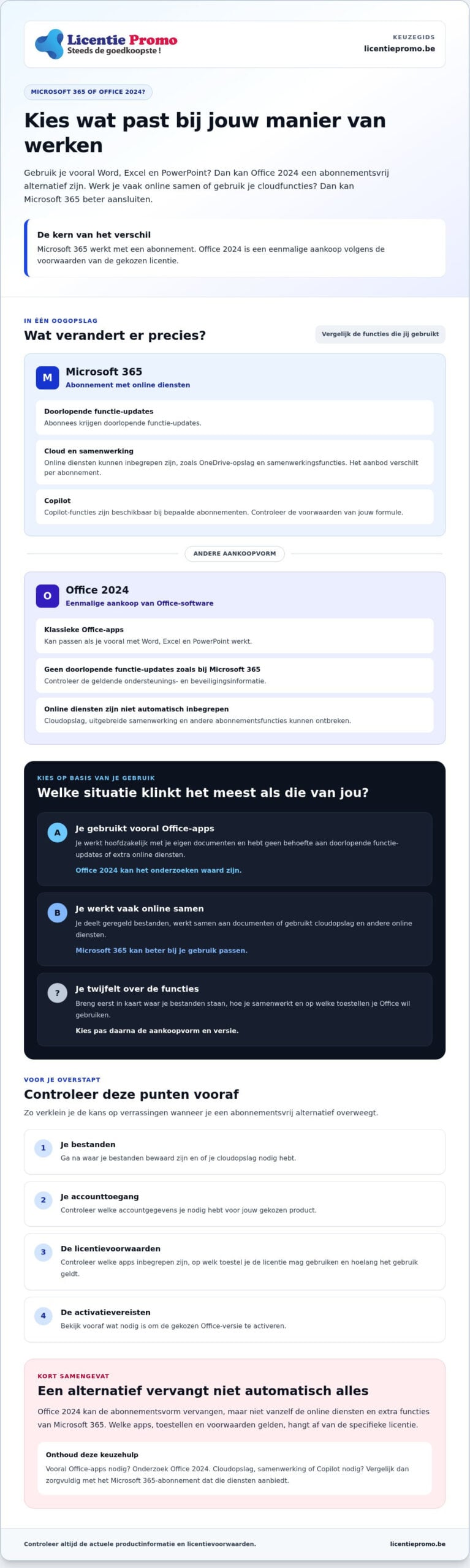
The biggest difference is not only in the apps, but also in what you continue to receive after purchase. Microsoft 365 works with a subscription and can include online services. Office 2024 is a one-time purchase of Office software. Which features and conditions exactly apply depends on the chosen Microsoft 365 subscription or the Office license. Therefore, check the current product information, account requirements, and license terms before purchase.
| Component | Microsoft 365 | Office 2024 |
|---|---|---|
| Purchase type | Subscription | One-time purchase according to the license terms |
| Services | Online services may be included, such as OneDrive storage; offerings vary by subscription | No automatically included Microsoft 365 services package |
| Updates | Continuous feature updates for subscribers | No continuous feature updates as with Microsoft 365; check the applicable support and security information |
| May suit | Those who use online services and collaboration | Those who mainly use Office software and prefer a one-time license |
Office 2024 can replace the subscription model, but not automatically the online services and extra features of Microsoft 365. That difference matters if you store files in the cloud, work on documents together with others, or need Copilot features. According to current product information, Microsoft 365 offers cloud storage and Copilot, but check the availability and terms of the specific subscription.
Which services are part of Microsoft 365?
Cloud storage is useful if you want to open files on different devices or share them with others. Collaboration features can make it easier to work on documents together. Microsoft also mentions Copilot with certain subscriptions. Check which services are included in your chosen plan and whether the storage, collaboration, and AI features match what you need.
What does a one-time Office purchase offer?
Office 2024 is a subscription-free option. The apps, devices and terms of use may differ per license. So don't just look at the product name: check which applications are included and on which device you may activate the license. LicentiePromo sells Microsoft Office Professional Plus 2024 as a possible choice. Review the terms before you decide.
Are you also looking for other office suites besides Office? Then read this comparison between LibreOffice and ONLYOFFICE for more information about those options.
Which alternative suits your way of working?
The best choice depends on your daily usage, not just the product name. First, map out four things: which features you need, how many devices you work on, how often you collaborate, and which online services you use. This will help you assess whether an alternative to a Microsoft 365 subscription suits you.
- Features: do you mainly create documents, spreadsheets, and presentations, or do you also use additional services?
- Devices: on which device do you want to use Office? Check the device requirements of the license.
- Collaboration: do you often work on the same files with others at the same time?
- Online use: do you need cloud storage to save files, share them, or open them on different devices?
For personal use, a one-time license can be interesting if you mainly manage your own files. In a company, shared access, collaboration, and the working methods of colleagues also play a role. Use the situations below as a starting point, not as a fixed recommendation. Always check the current product and subscription terms.
When might Office 2024 possibly suffice?
Do you mainly create documents, spreadsheets and presentations, and do you usually work on your files alone? Then Office 2024 is worth investigating. Before you choose, check which applications are included with the license and for which device it applies. The guide on Office 2024 Professional Plus buying can help you compare the license terms.
When is a Microsoft 365 subscription more relevant?
A subscription may be a better fit if you need online services, cloud storage, or shared use. This can be the case, for example, when you frequently exchange files with colleagues or want to use them on multiple devices. Check which features your chosen subscription currently includes. Terms and included services can vary by plan. As a point of comparison, you can look at the information about Microsoft 365 Personal for one user .
Still in doubt? Note down which features you use today and which ones you don't want to miss. Then compare that list with the license terms of Office 2024 and the services of a subscription. That way you make a targeted choice based on what you actually need.
How do you prepare for the switch to an alternative?
A smooth transition begins before you choose a license. First, check which features you use and what you don't want to lose. Then look at where your files are stored and whether you have access to the accounts you need. This way, you avoid no longer being able to find important documents or access a service after the change.
- Map out your usage. Note which Office applications you need, on which device you work, and whether you use cloud storage or online collaboration.
- Check your files and accounts. Find out where your documents are stored and whether you have access to the account you use to open them. Keep important files in a place you can still reach after the switch.
- Read the product terms. Compare the product description with your operating system, device, and desired applications. Also check the activation period and warranty terms.
- Choose the license that suits your use. Decide only after you have compared the software, device requirements, and any online services.
What information do you check before purchase?
Check whether the product is suitable for your operating system and device. Check which applications are included and whether you get the online features you need. Do not rely on the product name alone. Read the full product description and review the terms for activation and warranty before you order.
At LicentiePromo, purchased licenses must be activated within 30 days. Keep this period in mind if you are still planning to make the switch.
What do you do after receiving the license?
During activation, you make a purchased license operational on a device. The exact steps differ per product. Therefore, follow the product-specific instructions for downloading, installing, and activating. Use the correct account and product code details and do not deviate from the instructions for your license.
LicentiePromo delivers the license by email within five minutes after payment. Consult the available Office downloads and installation files for the relevant information. After receiving it, check that the product details match your order and start the activation in good time. That makes the switch to an alternative to a Microsoft 365 subscription clearer.
Buy Office 2024 without a subscription via LicentiePromo
Have you weighed the differences and does a one-time Office purchase suit your usage? Then Microsoft Office Professional Plus 2024 could be a possible choice. LicentiePromo sells this digital license in Belgium as an independent reseller. According to the product information, you will receive the license by email within five minutes after payment. Before ordering, check whether the product terms suit your device and usage.
What guarantees does LicentiePromo state?
LicentiePromo mentions an activation guarantee and a possibility of refund. Check the current terms and conditions to see exactly what they entail and how you can make use of them. Licenses must be activated within 30 days.
LicentiePromo claims to purchase unused business stocks. Check the product information and terms yourself, and base your choice on what is specifically stated there.
Where can you find the right license and help?
Compare the product description with your device and check which applications and conditions apply. LicentiePromo offers Microsoft Office Professional Plus 2024 as a possible subscription-free choice. That does not automatically make it a complete replacement for all Microsoft 365 services. Read the product information carefully so you know what you are purchasing.
Do you still have questions about the license or the terms? Then contact the LicentiePromo customer service. Only choose once you know how the license works, what the warranty terms exactly cover and within what period you must activate.
Would you like to consider Office 2024 without a subscription? Review the product terms of Microsoft Office Professional Plus 2024 and check whether the license suits your use.
Choose consciously and take your next step
The right choice depends on what you use. If you mainly work with Office apps for your own documents, then Office 2024 can be a subscription-free alternative. If you need cloud storage, online collaboration or other subscription services, carefully compare what you are giving up. A one-time license does not automatically fully replace Microsoft 365.
Are you looking for an alternative to a Microsoft 365 subscription? Check the included applications, device requirements, activation period and warranty terms before you decide. LicentiePromo mentions an activation guarantee and a possibility of refund. The digital license is delivered by email after payment. Read the product terms to understand what applies.
View the Office 2024 Professional Plus license and check the terms. This way you can determine whether this license suits your way of working.
Frequently Asked Questions
Is Office 2024 a full-fledged alternative to Microsoft 365?
No, Office 2024 is not automatically a complete replacement. It can be suitable if you mainly use Office software and do not want a subscription. Microsoft 365 can additionally offer online services, cloud storage and collaboration features. Which services are included depends on the chosen subscription. Therefore, compare the applications and services you use with the current terms of Office 2024 and Microsoft 365 before you switch.
Can I replace Microsoft 365 with Office 2024 without losing my files?
Switching to Office 2024 does not automatically remove your files, but check where they are stored and how you open them. Files on your device are separate from the Office license; files in an online storage service may be subject to separate account or service terms. Make a backup of important documents in advance and check whether you retain access to your account and storage location after the change.
What is the difference between a Microsoft 365 subscription and Office 2024?
Microsoft 365 is a subscription model with software and, depending on the plan, online services and continuous feature updates. Office 2024 you buy as a separate license according to the terms of that version. The available apps, devices and terms of use differ per product. An alternative to a Microsoft 365 subscription can therefore replace the subscription model, but not necessarily all services or features. Check the current product information before you choose.
Can I use Office 2024 on multiple devices?
That depends on the specific license. Do not assume that a one-time purchase automatically allows use on multiple devices. Check the product description to see for which device or devices the license is valid and whether it is compatible with your operating system. The product page for Microsoft Office Professional Plus 2024 states a license for one device. Follow the current terms of the chosen version.
Is a cheap Office license legal?
A low price alone does not prove whether a license is valid or authentic. Check the origin, product terms, and information about activation and warranties. LicentiePromo is an independent reseller, not a Microsoft partner, and claims to purchase unused corporate stock. The company states that it sells legal licenses and offers an activation guarantee. Read the current terms carefully and keep your order confirmation and license details.
How do I activate an Office license without a subscription?
Follow the product-specific instructions that come with your license. First check the product description and make sure you use the correct account and product code details. The exact steps for downloading, installing, and activating may vary by version, so do not use instructions for a different product. LicentiePromo states that purchased licenses must be activated within 30 days. If in doubt, consult the available product information or contact customer service.