
Legal Microsoft licenses with guarantee: this is how you buy with confidence in Belgium

What good is a Microsoft code if activation fails? That doubt is understandable: you want to know where your license comes from and what happens if the code doesn't work. With legal Microsoft licenses with a guarantee, both the product information and the terms and conditions are therefore important. That way you know what you're buying and what certainty you have if something goes wrong.
LicentiePromo is an independent reseller of legal Microsoft licenses. After payment, you will receive your digital order by email within five minutes. LicentiePromo offers an activation guarantee, an authenticity guarantee, and the option of a refund. The license also comes with a 30-day guarantee. Also pay attention to the activation period: you must activate your license within 30 days.
In this article, you will discover how to recognize a reliable license, which guarantees come with your purchase, and what steps to take if activation fails. You will also read how a one-time license differs from Microsoft 365, so you can choose software without subscription renewal if that suits you better.
Key Points
- Discover what an authenticity, activation, and license guarantee cover, so you know what certainty your purchase offers.
- Learn how to recognize legal Microsoft licenses with warranty through clear product information and terms.
- Compare a one-time license with a subscription and choose what suits your usage, without unexpected renewals.
- Before ordering, align the product name, the device, and the operating system, and then follow the activation steps.
- Read which warranties LicentiePromo offers and what you can do if activation fails.
Legal Microsoft licenses with warranty: what does that assurance mean?
When purchasing a Microsoft license, you want to know exactly what you are buying. Is the license genuine? Where does it come from? And what happens if activation fails? A warranty only provides clarity once you know which problem it covers. “Genuineness”, “activation” and “refund” are different promises.
A license is more than a string of characters. You are buying permission to use a specific software product according to the terms that apply to that product. Therefore, check whether the product name and license type match what you need, and whether the license is intended for your device and operating system. A successful activation is useful, but by itself it does not tell you everything about the origin or the usage rights.
What does an activation guarantee say and not say?
An activation guarantee provides certainty that the purchased license can be activated. This is important if a code is not accepted during the activation process. At LicentiePromo, an activation guarantee is included with the licenses. The guarantee terms describe which steps apply if you encounter a problem.
An activation guarantee is not a promise that every future technical problem will be solved. Problems with your device, the installation or your Microsoft account are not automatically covered. If you get an error message, follow the product instructions and keep your order confirmation and license details at hand. This way you can clearly explain your question and use the guarantee correctly.
What does a legal license mean for you as a buyer?
With a legal license, you want certainty about its authenticity and the terms for its use. Check whether the product name, the type of license, and the device for which you are buying it match. A lower price does not in itself prove that a license is illegal. A smooth activation likewise does not prove that all information about the license is correct.
License types can differ in the way organizations manage and activate software. Volume licensing provides a general overview of licenses for use on a larger scale and of activation methods. That background article helps you recognize terms, but is not proof of the origin or validity of a specific code.
Before purchasing, place the product information and warranty terms side by side. Pay attention to concrete information about the license, not just a broad promise. Check for example:
- Is the exact Microsoft product name clearly stated?
- Is it clear for which device or operating system the license is intended?
- Is it explained what happens if activation fails?
- Can you find the warranty terms and information about the license?
This is how you assess legal Microsoft licenses with a guarantee on more than just a successful activation. For additional background on recognizing and buying Microsoft software in Belgium, you can also consult the guide on legal Microsoft software.
Which warranties on Microsoft licenses give you real clarity?
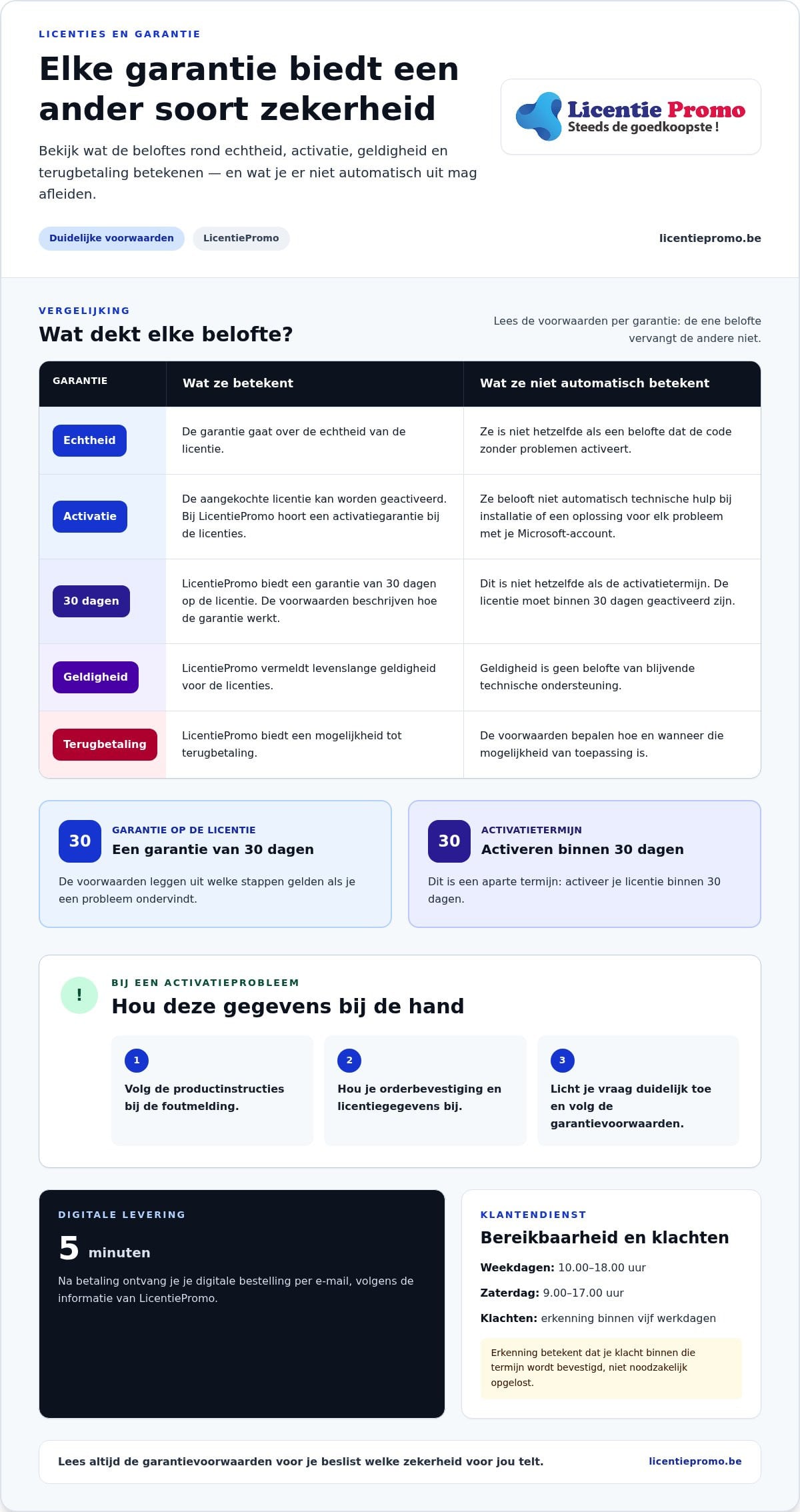
The word “guarantee” sounds reassuring, but without explanation it means little. A guarantee of authenticity, activation guarantee, refund option and promise about validity period each cover a different risk. Therefore, look at them separately. That way you know which assurance is relevant and what you should not infer from a general claim.
Keeping authenticity, activation and validity separate
Authenticity guarantee: this concerns the authenticity of the licence. It is not the same as a promise that the code will activate without problems. Activation guarantee: this relates to the ability to activate the purchased licence. It does not automatically guarantee technical assistance with installation or a solution for every problem with your Microsoft account.
30-day warranty: LicentiePromo offers a 30-day warranty on the license. This is different from the activation period: you must activate the license within 30 days. Lifetime validity: LicentiePromo states lifetime validity for the licenses. This promise concerns the validity period and is not a promise of ongoing technical support.
If you encounter a problem, look in the warranty terms for the relevant coverage and the steps you need to follow. Warranty terms provide more guidance than a general promise, because they explain which problem is covered and what you can then do.
Assessing refunds and customer service
LicentiePromo offers a refund option. The terms and conditions determine how that option applies. Keep your order confirmation and the communication about your license, so that you have the purchase information at hand if you have a question or complaint.
Customer service also plays a role, but reachability and warranty are different matters. Customer service is available on weekdays from 10:00 to 18:00 and on Saturday from 9:00 to 17:00. Complaints are acknowledged within five working days. This means that your complaint is confirmed within that period, not necessarily resolved. You can find the contact details via the LicentiePromo customer service.
For background on copyright and software, you can also consult the Microsoft Copyright Information . If you want to compare legal Microsoft licenses with a guarantee, then place the authenticity, activation, validity period, refund, and support of each offer side by side. That way you can see which promise matches your purchase.
Comparing legal Microsoft licenses with warranty: what should you look out for?
Don't just compare the name of a warranty. Also look at the license type, the term, and what happens after purchase. A one-time license and Microsoft 365, for example, are not the same: with one you buy a license for a specific version, with the other you use software via a subscription. The features and usage rights differ per product. A warranty by itself says nothing about that.
One-time license or Microsoft 365 subscription?
A one-time license is suitable if you want to use a specific software version without ongoing subscription renewal. In that case, you choose the features and usage rights of that specific version. For example, view the information about Microsoft Office Professional Plus 2024 and align the license with your device and usage.
Microsoft 365 works with a subscription model. Depending on the plan, the subscription is renewed automatically. Check the page of the specific subscription for how long it runs, what is included, and how renewal works. Do not assume the same features or rights for every Office product. So anyone comparing a one-time purchase with a subscription is comparing both the term and the renewal model.
Which points do you place side by side?
Use this table as a practical starting point. Compare claims based on the information provided, so you know what they refer to.
| License type | Warranty claim | Scope | Findable conditions |
|---|---|---|---|
| One-time license | Authenticity, activation or license validity, depending on the seller | The purchased license and the product for which it is intended | Look up the coverage, term and steps in case of a problem |
| Microsoft 365 subscription | Check which warranty or support applies to the specific offer | The chosen subscription and its term | Read the subscription duration and information about automatic renewal |
| License from LicentiePromo | The seller provides guarantees regarding authenticity, activation, and license validity | The license you purchase | Consult the warranty terms for the precise coverage |
Also check how the license is delivered. At LicentiePromo, you receive the digital order by email within five minutes after payment. Keep the order confirmation and your license details, so you can quickly find them when you need them.
Finally, compare the product name, the device, and the operating system side by side. A warranty does not make an unsuitable license suitable and does not add any features. By concretely comparing the product information and terms, you choose legal Microsoft licenses with a warranty that fit your situation, without taking out a subscription if you do not want one.
How to check a Microsoft license before and after purchase
A quick check before you order prevents you from choosing a license for the wrong product. Match the product name, the device, and the operating system. After purchase, keep your details and follow the product instructions during activation. This way you know what you have bought and can ask for targeted help if there is a problem.
Check the product and terms before you order
Start with the product itself. Check whether the license is intended for Windows or macOS and whether it matches the device on which you want to use the program. Also check whether you are choosing a one-time license or a subscription. A warranty does not make an incorrect product choice suitable.
- Read the product name: compare the full name with the program you want to activate.
- Check the use: check for which device and operating system the license is intended.
- Read the terms: before payment, check the information about authenticity, activation, validity and any refund.
- Keep the purchase information: keep the product page and order confirmation, so that you know afterwards which terms applied to your order.
If you buy Office Professional Plus 2024 for a Windows device, compare the product information with your situation. View the Office Professional Plus 2024 license for Windows and check before you order whether the product name and the intended device match. That way you choose the license you actually need.
Follow the activation process after digital delivery
After payment, LicentiePromo will send your digital license by email. Check your inbox and compare the received details with your order confirmation. You must activate the license within 30 days. Follow the instructions promptly and do not postpone activation.
- Open the email with your license details and check that they match your order.
- Follow the activation steps provided with the chosen product. The exact screens may vary by product.
- Enter the code in the indicated place and follow the on-screen prompts.
- Check whether the product accepts the activation. Keep the confirmation and your license details.
For a Microsoft product that is linked to an Office account, use the account information according to the product instructions. Do not share your code or account details unnecessarily. This way you keep the activation details at hand and limit confusion about which product is linked to which account.
Activation not working? First check whether you are following the instructions for the correct product version and whether the code belongs to your order. Note the error message and have your order confirmation and license details ready. Then contact customer service and describe which steps you have already tried. Check the Office Professional Plus 2024 license if it suits your device and usage.
What certainty do you get with LicentiePromo?
LicentiePromo sells legal Microsoft licenses as an independent reseller. LicentiePromo provides guarantees regarding authenticity, activation, and license validity. These guarantees cover different matters. The warranty terms indicate what each promise means for the license you purchase.
An activation guarantee concerns the ability to activate the purchased license. An authenticity guarantee concerns the authenticity of the license. In addition, LicentiePromo offers a 30-day guarantee, lifetime validity, and a possibility of refund. These guarantees are not a general promise that every technical problem with your device or Microsoft account will be resolved.
From order to activation at LicentiePromo
After payment, you will receive your digital license by email within five minutes. Compare the details with your order and keep the order confirmation. Activate your license within 30 days and follow the instructions for the chosen product. This way, you can later check which license you bought and what information was part of your order.
Do you want to take customer experiences into account? Evaluate reviews based on their content and relevance to the product you are considering. A review can provide context, but it does not replace product information or warranty terms. Base your choice on concrete information about the license and the warranties that LicentiePromo offers.
LicentiePromo also offers a refund option. Keep your purchase details so that you can quickly find the information if you want to make use of it.
What do you do if activation fails?
First, check whether you are using the correct code and product instructions. Note the error message and have your license details and order confirmation ready. Then contact customer service and describe which steps you have already tried. This way, your question about the correct license can be handled in a targeted manner.
Customer service is available on weekdays from 10:00 to 18:00 and on Saturday from 9:00 to 17:00. The warranty terms describe the coverage and the next steps if activation does not succeed.
If you choose a one-time license, you avoid ongoing subscription renewal. Compare the product information with your device and usage, then make your choice. View LicentiePromo's legal Microsoft licenses and choose the license that suits your situation.
Choose with confidence what suits your usage
A good purchase starts with the way you work. Do you want a one-time license without subscription renewal, or do the ongoing features of Microsoft 365 suit you better? First determine what you need. Then compare the product information and warranty terms. That way you choose not only based on a promise, but also based on what you actually want to use.
After making your choice, take the time to complete your order carefully. Check the product name and the device, keep your order confirmation, and schedule the activation process in good time. These small steps make it easier to start using your license with confidence.
With legal Microsoft licenses with a guarantee, you know what your purchase is based on and which terms apply. Choose the solution that suits your device and usage, without taking out a subscription if you don't want one. Choose your legal Microsoft license at LicentiePromo and receive your digital license within five minutes of payment!
Frequently asked questions about Microsoft licenses
How do you know if a Microsoft license is legal?
You assess a license based on the product information, the origin and the seller's terms. Check whether the product name matches what you want to use and which warranty applies. A successful activation by itself does not provide complete information about the origin. Therefore, also review the purchase documentation and the information about the license. This way you compare offers based on concrete data.
What does an activation guarantee mean for a Microsoft license?
An activation guarantee refers to the ability to activate the purchased license. The warranty terms describe which solution applies if a code is rejected. Follow the indicated steps and keep your order confirmation, license details, and any error message at hand. An activation guarantee does not automatically cover every problem with your device, the installation, or your Microsoft account.
What happens if your Microsoft license does not activate?
A failed activation does not automatically mean that your license expires or that you immediately receive a refund. First check whether you are following the instructions for the correct product version and whether you are entering the code correctly. Note the error message and keep your purchase details at hand. Then contact customer service and follow the warranty terms. This way, your question about the correct license can be handled in a targeted manner.
Within how much time must you activate a LicentiePromo license?
You must activate a LicentiePromo license within 30 days. So start shortly after receiving it, even if you don't actually need the program until later. Before you start, check whether the product name matches your order and follow the accompanying instructions. Also keep the email with your license details. This way you won't delay activation and you can immediately find the correct details if an error message appears.
Do you get your money back if a license doesn't work?
LicentiePromo offers a possibility for a refund, but that does not mean that you automatically get your money back in every situation. The warranty terms determine how that possibility applies. If activation fails, keep your error message, license details, and order confirmation at hand and follow the indicated steps. This way, you have the necessary information ready for your request.
Is a one-time Microsoft license the same as Microsoft 365?
No. A one-time license is intended for the use of the chosen software version, while Microsoft 365 works via a subscription. The subscription duration and any automatic renewal depend on the specific plan. Therefore, compare the product information for exactly the version or subscription you are considering. Also look at the included features and usage rights. These differ per product and do not follow from the warranty offered by the seller.
How quickly do you receive a Microsoft license after your order?
At LicentiePromo, you will receive the digital license by email within five minutes of payment. After placing your order, check your inbox and also check your spam folder if the message does not appear immediately. Compare the received details with your order confirmation and keep both messages. This way, you have your purchase information ready and can follow the instructions for your product.