
Office 2024 vs 365 for students: which version fits your budget?

The free version of Office through your college or university is often the most expensive choice you can make. It sounds appealing, but after you graduate, you suddenly find yourself empty-handed and lose access to all your important files. In the battle between office 2024 vs 365 for students, it's about more than just today's features! You want to avoid monthly costs silently adding up while you actually need a package that lasts your entire academic career.
You probably recognize the frustration. You just want full versions of Word, Excel, and PowerPoint that always work without hassle. Discover in this article whether you should choose a one-time purchase or a subscription to get through your student years without software worries. We immediately clear up the confusion about what exactly is included in each package. No vague promises, but concrete facts for your wallet.
We dive deep into the differences between one-time payments and recurring invoices. You will learn which package offers the best value for your specific situation and budget. This way, you choose certainty and a software package that continues to work perfectly even after your diploma! Make the switch today to a solution that truly fits you.
Key Points
- Understand the fundamental difference between an annual subscription and a one-time purchase without recurring costs.
- Discover in the office 2024 vs 365 comparison for students which package saves you hundreds of euros over your entire study period.
- Determine whether the extra cloud storage and AI features of Microsoft 365 are worth the monthly bills for you personally.
- Guarantee access to all your important documents after graduation with the permanent license of Office 2024.
- Learn how to activate a legal license within 5 minutes and start your next assignment right away.
Office 2024 vs 365 for students: what is the difference?
Do you choose a temporary rental solution or invest in a tool that lasts your entire career? Many students fall for Microsoft's marketing trap and blindly choose a subscription. They think this is the only way to stay up-to-date. However, the reality in 2026 is different. License terms change continuously, and those who make the wrong decision now will pay a high price later. The battle between office 2024 vs 365 for students fundamentally revolves around ownership versus rental.
In both packages, you will find the familiar apps such as Word, Excel, and PowerPoint. These are the building blocks of every successful assignment or thesis. To understand the full context of how these tools have evolved, you can read about What is Microsoft Office? and its history on Wikipedia. Although the apps may seem the same at first glance, the way you manage and pay for them differs fundamentally.
What is Microsoft 365 for students?
Microsoft 365 operates on a cloud-based model. You pay a fixed amount per month or per year to be allowed to use the software. This is often presented as the ‘complete’ solution because you get 1TB of OneDrive storage and extra Teams features. It sounds attractive, but there is a danger hidden in this rental mentality. Your documents are stored in the cloud, but your access to the software is tied to your payment. Do you cancel your subscription or graduate? Then you lose the ability to properly edit your files. You are held hostage by a recurring invoice that never stops.
What is Office 2024 for students?
Office 2024 is the powerful counterpart that focuses on independence. This is a perpetual license. You make a one-time purchase and the software remains yours forever. It is the logical successor to the popular 2021 edition and includes all the modern features you need for demanding academic projects. Think of improved functions in Excel for data analysis and smoother presentation options in PowerPoint. With a package like Microsoft Office Professional Plus 2024 , you are assured of a package that lasts for years. No monthly costs, no surprises, just a reliable tool on your own computer that continues to work perfectly even after your student days.
Microsoft's marketing pushes you toward 365 because they love predictable revenue. For you as a student, that predictability is often a disadvantage. Your budget is limited, and you don't want to be tied to a subscription that suddenly becomes much more expensive after your studies. By investing wisely in a 2024 license now, you protect your wallet and your digital work for the future.
The benefits of a Microsoft 365 subscription
Microsoft 365 is the absolute king of extras. You rent the software, but in return you get an impressive package. Think of the latest versions of Word, Excel, and PowerPoint. You always have the most recent security patches without having to worry about them yourself. For those comparing office 2024 vs 365 for students, the enormous flexibility of 365 is often the biggest plus point. You can install the package on five devices at once. Your laptop for the lecture hall, your tablet for on the go, and your phone are always perfectly synchronized. This way, you literally have your latest notes at hand everywhere.
Cloud storage and mobility
Working on your thesis has never been so safe and easy. With 1TB of OneDrive storage, you never have to fear a broken hard drive or a lost USB stick. All your documents and photos are safely stored in the cloud. Start your report on your MacBook in the library and effortlessly continue working on it in the evening on your Windows PC at your student accommodation. Synchronization between different operating systems runs flawlessly. Thanks to the auto-save feature, you never have to manually press the save button again. Version control also ensures that you can return to a previous version of your file with a single click. This prevents digital drama right before an important deadline. The main differences in terms of mobility in the discussion about office 2024 vs 365 for students make 365 a strong candidate for the active student.
Continuous updates and new features
With a subscription, you are never stuck with outdated software. Updates happen fully automatically in the background. You get direct access to premium templates and hundreds of exclusive fonts that give your presentations a professional look. However, the real gamechanger in 2026 is the AI integration via Copilot. This assistant helps you quickly summarize long source texts or rewrite stiff paragraphs in your papers. This saves you precious hours of research and editing. Additionally, this package includes Outlook for all your business email traffic and advanced security features that protect you against malware and phishing.
All those extra features and cloud services sound fantastic, but they are tied to a recurring invoice. Ask yourself whether you will really use that 1TB of storage or whether you would rather own your software. That's why many budget-conscious students choose the peace of mind of a one-time purchase. Discover whether a full license for Microsoft Office Professional Plus 2024 might be a smarter investment for your budget.
Why Office 2024 is the smart choice for your student years
Stop renting and start owning. While Microsoft 365 chains you to an endless cycle of payments, Office 2024 offers you total freedom. You pay once and you're set for years. No unexpected debits from your account at times when your budget is already tight. In the comparison office 2024 vs 365 for students , this is the most decisive argument for anyone who manages money wisely. You invest in your own tools today, instead of asking permission every month to use a word processor.
Ownership vs. renting
What happens when you have that coveted master's degree in hand? With a subscription through your school or university, your license often expires immediately after your last exam. Suddenly, you can no longer edit that important thesis or carefully built portfolio without taking out a new, expensive subscription. With the Office 2024 Professional Plus license , access to your files remains guaranteed. You retain full control, regardless of your enrollment status. The psychological advantage is enormous: this is your software on your machine. According to Microsoft’s official comparison , with the one-time purchase you don't get ongoing new features, but you do get all the essential security updates you need for a secure PC.
Stability and privacy
Nothing is as frustrating as a lagging Wi-Fi connection in your student room while you have a deadline to meet. Office 2024 works completely offline. You don't need an active connection to open Word or edit a complex Excel spreadsheet. This offers enormous stability during the exam period and exams, when you can't afford distractions or technical failures.
- Privacy: Your documents remain on your own hard drive, not in a cloud you don't control.
- Speed: No slowdown due to heavy background synchronization processes.
- Consistency: The interface does not suddenly change due to an automatic update in the middle of your writing process.
Because your files are not automatically pushed to a personal cloud environment, Microsoft does not perform data mining. Your data remains locally on your own drive. No algorithms analyzing your texts for commercial purposes, just pure focus on your academic work. The choice between office 2024 vs 365 for students therefore also depends on how much you value your digital privacy. Do you want a package that doesn't change its appearance every week? Then choose the peace and stability of the 2024 version. It is a mature, powerful package that does exactly what it should, without making you a subscription slave.
The price comparison: how much do you really save?
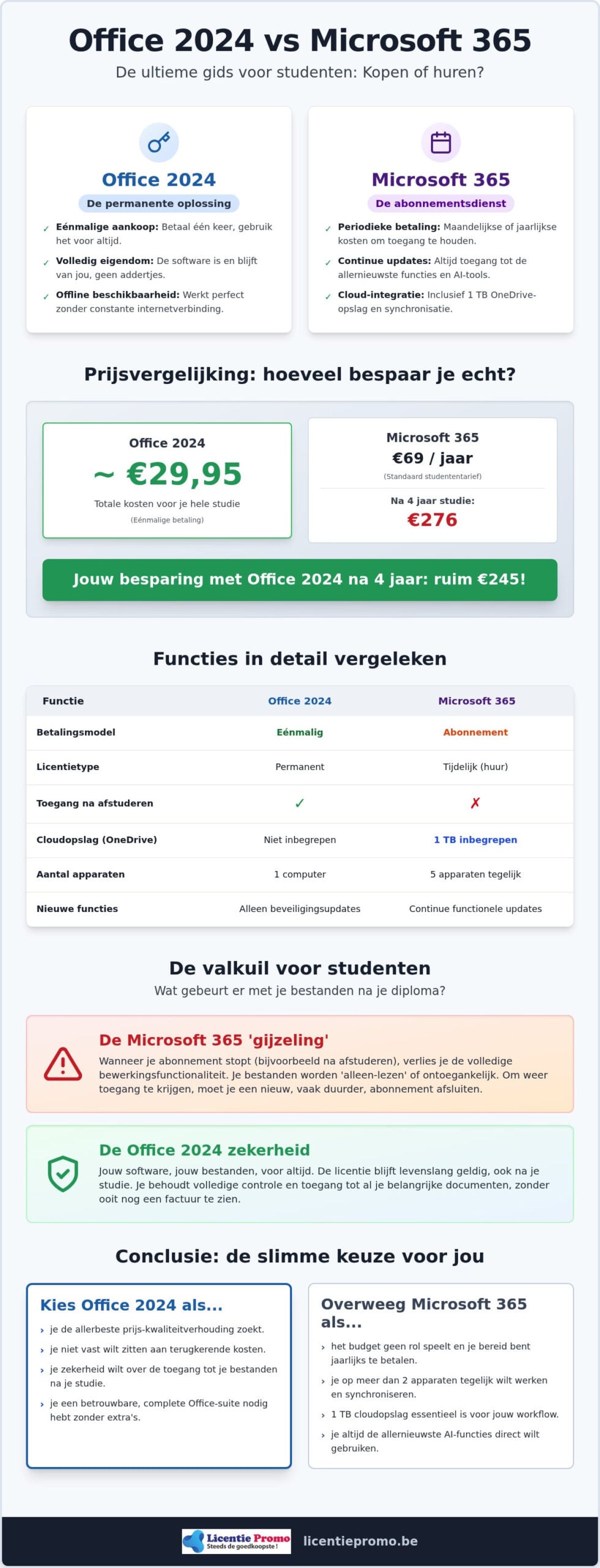
Are you choosing a bottomless pit or a smart investment? Many students only look at the low entry price of a monthly subscription. That is a costly mistake. Anyone who calculates the cost for a full bachelor's or master's program will be shocked by the results. In the discussion about office 2024 vs 365 for students , the numbers are relentless. A Microsoft 365 Personal subscription officially costs you €99 per year. After four years of studying, you will have already spent nearly €400 on software you will never own. That is money you will never see again.
At LicentiePromo, we do things differently. We offer the Professional Plus version for a fraction of that amount. This is the most complete suite, including advanced tools that are often missing from the standard student versions. You pay once and the license remains valid indefinitely. No hidden costs, no price increases, and no monthly headaches. You save hundreds of euros that you can much better spend on expensive textbooks, a new laptop, or a well-deserved vacation after the exams.
The long-term cost picture
The official Microsoft Store pushes you towards the cloud, but look at the hard facts. A one-time purchase of Office 2024 from LicentiePromo pays for itself within the first year. While subscribers have to dig into their wallets every year again, you enjoy software that just keeps working. Moreover, LicentiePromo offers a rock-solid activation guarantee. This fully protects your investment. Does your code not work right away? Then we'll fix it immediately. No hassle, only results. This way you are sure your money is well spent and that your software is legal and safe.
LicentiePromo: legal software for a fraction of the price
How do we keep those prices so low? We purchase unused licenses from companies that are switching to other systems or going bankrupt. This is completely legal under European legislation. You receive an official license code that you activate directly with Microsoft. It is a smart way to save without compromising on quality or safety. For an optimal experience, we recommend combining this with a legal Windows 11 license. This way, your entire system is up-to-date and protected against modern threats.
As a Belgian webshop, we offer the certainty you miss on vague international marketplaces. You get a clear invoice and support in your own language. Know where you buy and prevent your license from being suddenly blocked after three months. Choose the reliability of a local partner who understands the Belgian market. Stop wasting money on temporary solutions and claim your permanent license today.
Do you want to stop those monthly bills right away? Buy your Office 2024 license now and save directly on your study costs!
Conclusion: which package should you buy now?
Making the decision doesn't have to be difficult. After weighing all the factors in the battle between office 2024 vs 365 for students, it comes down to one crucial question: do you want to be an owner or remain a renter? Microsoft 365 is a great choice if you absolutely cannot do without 1TB of cloud storage or if you want to use AI tools like Copilot daily for your source research. For most students, however, this is an unnecessary luxury that will weigh too heavily on your wallet in the long run.
Choose Office 2024 if you want a reliable package without recurring costs. You invest once and are assured of software that will never let you down. No hassle with expiring licenses just when you need to submit your master's thesis. It is the most logical choice for students who value stability, privacy, and financial independence. Your field of study also plays a role here. For disciplines where you work extensively with data in Excel or write complex reports in Word, the Professional Plus version offers all the depth you need.
The checklist for your decision
Still in doubt? Then quickly run through this short questionnaire. Do you really need that 1TB of cloud storage, or would you rather use an external drive or free alternatives? Do you want to be able to open your thesis without any problems in five years without having to keep paying monthly for it? Is your budget limited to a one-time expense? If you answer ‘yes’ to the last two questions, then the permanent license of Office 2024 is the only right way. It gives you the peace of mind you need during a tough exam period.
Get started right away
At LicentiePromo, we understand that you have no time to lose. A deadline doesn't wait. That's why we guarantee lightning-fast delivery within five minutes. You'll receive the activation code directly in your mailbox. No physical packages, no waiting times. You enter the code, install the software, and you can start your next assignment right away. It's that simple. LicentiePromo's activation guarantee ensures that you can start without worries.
Using an Apple device? No problem. For Mac users, we have a specific solution that fits perfectly with macOS. Also check out Office Home & Business 2024 for a seamless experience on your MacBook. Whether you use Windows or Mac, you will always find a legal license that suits your studies and your budget. Choose the certainty of a local partner and put an end to those monthly subscription costs today. Invest in Microsoft Office Professional Plus 2024 and focus entirely on what really matters: earning your degree.
Ready for a carefree student life?
The choice in the battle between office 2024 vs 365 for students is now crystal clear. Why keep paying a tech giant every month when one smart investment can set you up for years? You not only save hundreds of euros in the long run, but you also keep full control over your own documents. No more fear of blocked accounts or lost files after graduation. You choose stability and a powerful package that remains available offline on your computer at all times.
At LicentiePromo, we make it extremely easy for you. You will receive your legal license code in your mailbox within 5 minutes so you can immediately start on that next assignment. Thanks to our 100% activation guarantee, you run no risk. Forget those recurring invoices and choose the certainty of a permanent license. No subscription, no hidden costs; just honest software at a sharp student price.
Buy your Office 2024 license now and save directly on your software!
Grab that advantage today and focus fully on your studies. Your success starts with the right tools, but don't forget to strengthen your CV either; you can discover Studentpool for a career-oriented part-time job in finance or accountancy.
Frequently asked questions about Office 2024 for students
Is Office 2024 for students the same as the Professional Plus version?
Professional Plus 2024 is the most comprehensive version you can get. It includes Word, Excel, PowerPoint, Outlook, and Publisher. While Microsoft often promotes a limited student version, Professional Plus 2024 offers all the tools you need for a successful study. It is a one-time purchase with no restrictions. So you get more features for a lower price than the standard retail version.
Can I install Office 2024 on both my laptop and my desktop?
A standard license for Office 2024 Professional Plus is intended for installation on one device. Do you want to use the software on both your laptop and your desktop? Then you need two separate license codes. Although this is different from Microsoft 365, it often remains cheaper in the long run. After all, you no longer pay annual costs for use on those specific devices.
What happens to my Microsoft 365 files if I switch to Office 2024?
Your files remain fully intact and accessible. Documents you created in Microsoft 365 use the same file types as Office 2024. You can open them effortlessly from your hard drive or via the browser from OneDrive. The only difference is that you will now use local software to edit them. So you will never lose your work when you make the switch to a permanent license.
Do I need an internet connection to use Office 2024?
An internet connection is only needed for the one-time download and activation of your license code. After that, Office 2024 works fully offline on your computer. This is ideal for students who are often on the go or working in student housing with slow Wi-Fi. You can always continue working on your thesis without being dependent on an active connection to the cloud or a constant subscription check.
Is the license from LicentiePromo really valid for life?
Absolutely, the license is permanent and never expires. Once you have activated the code, the software is yours forever. There are no hidden costs or recurring invoices after a certain period. In the comparison office 2024 vs 365 for students , this is the strongest point: you own your tools and are no longer a renter of Microsoft. The package keeps working, even after your diploma.
Does Office 2024 also work on a MacBook?
Yes, Office 2024 is available for Mac users. You will need the Microsoft Office Home & Business 2024 version for this. This license works flawlessly on both Windows and macOS. When ordering, make sure you choose the correct variant for your MacBook. You will then enjoy the same benefits: a one-time payment and full access to Word, Excel, and PowerPoint without a subscription.
Will I still receive updates if I buy Office 2024?
You will receive all important security updates and stability improvements that Microsoft releases for this version. Your software remains safe and up-to-date against modern threats. Although you don't get monthly new features like with a 365 subscription, Office 2024 is a complete and mature package. It contains everything you need to stay productive throughout your entire student years and beyond without technical worries.
Why is LicentiePromo so much cheaper than the Microsoft Store?
We buy unused volume licenses from companies that no longer need them. According to European legislation, the resale of these legal licenses is fully permitted. By buying in bulk and not maintaining physical stores, we can keep the price extremely low. So you buy exactly the same software as in the official store, but for a fraction of the price with our activation guarantee.