
What is the difference between Office 365 Personal and Family? The complete guide for 2026
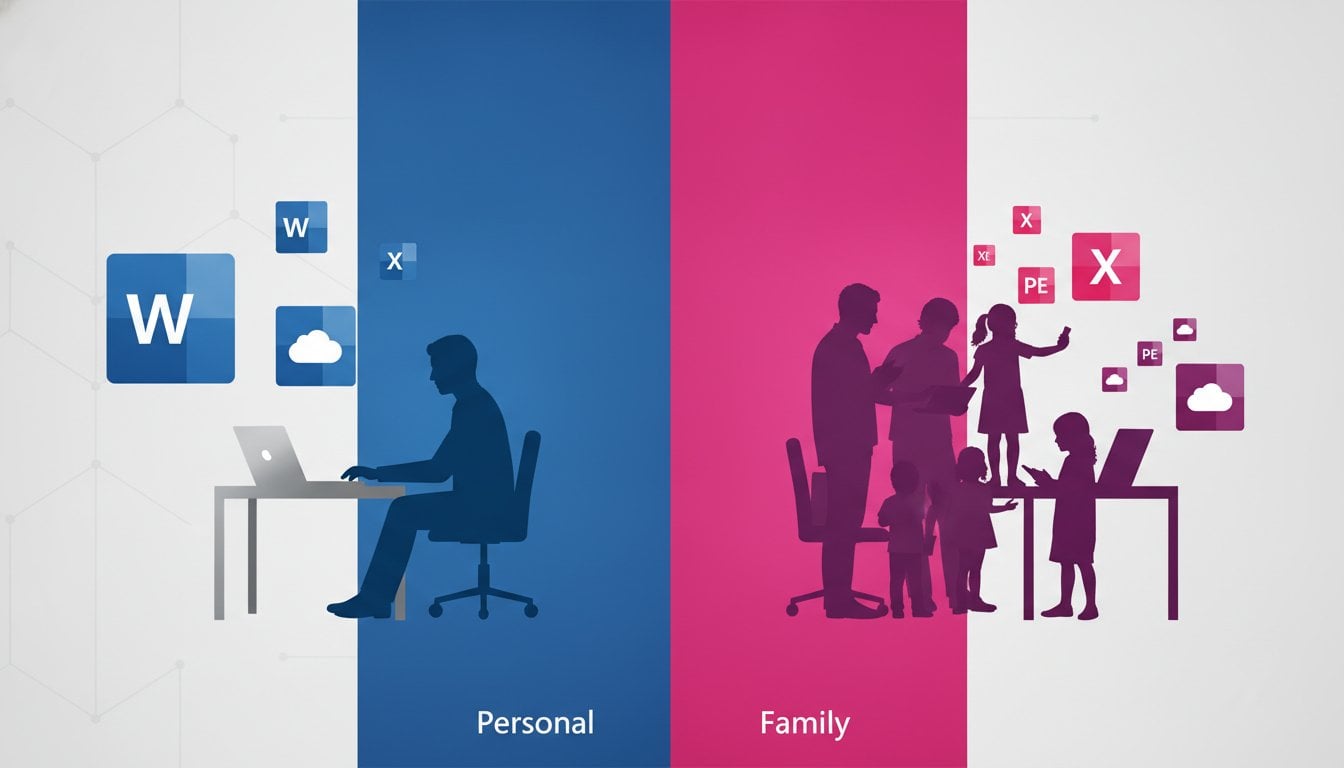
Do you pay too much each month for software that you actually only use on a één laptop? Choosing the right package saves you hundreds of euro’s in the long term. The difference between Office 365 Personal and Family appears at first glance small, but the impact on your bank account and your digital freedom is huge. You just want Word and Excel to work flawlessly without being stuck with unclear limits or unnecessarily high costs!
It is completely logical that you are hesitant due to the confusion about cloud storage and the number of allowed users. You would rather lose recurring subscription fees than be rich. In this guide you will discover exactly which Microsoft subscription best fits your needs and budget, including clever ways to save immediately. We make the choice between personal and family crystal clear for you.
We dive deep into the specifications for 2026 and compare the cloud limits per user. Additionally, we look at whether a one-time purchase of Office 2024 Professional Plus for you turns out to be much more cost-effective than a monthly subscription. This way you can make a decision today that you will enjoy for years to come!
Key Points
- Discover the crucial difference between Office 365 Personal and Family so you never have to pay for extra users you don’t need.
- Learn how to intelligently distribute the 6 TB cloud storage of the family package across your entire family for maximum safety of all your documents.
- Compare the annual costs and discover why a subscription is not always the most cost‑effective solution for your specific situation.
- Find out whether the one‑time purchase of Office 2024 Professional Plus is a smarter alternative to permanently eliminate those recurring costs.
- Save instantly on your software by using legal, unused licenses with a full activation guarantee.
Microsoft 365 personal vs family: understanding the basics
Microsoft has fundamentally changed the way we work. In the past you bought a box with a CD-ROM in the store. Today you choose a flexible subscription. The transition from the name Office 365 to Microsoft 365 was more than a simple marketing trick. It marks the shift to a platform that is always up-to-date. You get immediate access to the latest features and security updates without ever having to install a new version. You essentially rent the software. This provides maximum flexibility on all your devices.
The biggest difference between Office 365 Personal and Family lies in the size of your digital household. Do you have enough with één license for yourself? Or do you want to provide your entire family with legal, secure software? The choice you make now determines your monthly costs and the total amount of cloud storage you have available. It's all about efficiëntie. Why would you pay for six users if you live alone? Conversely, the family package is a goldmine for those who want to share the costs.
The power of one: Microsoft 365 Personal
Microsoft 365 Personal is the ultimate solution for the individual powerhouse. Think of students at KU Leuven or solo entrepreneurs in Antwerp who are looking for a reliable digital partner. You get the full suite at your disposal: Word, Excel, PowerPoint and Outlook. You install these apps on all your personal devices, from your laptop to your smartphone and tablet. The 1 TB cloud storage on OneDrive is a huge asset. It is more than enough for hundreds of thousands of photo’s or heavy work documents. Everything syncs automatically. You start a text on the train on your phone and finish it seamlessly at home on your desktop.
Stronger together: Microsoft 365 Family
Do you want more value for your money? Then the family version is often the smartest choice for Belgian families. You share this subscription with up to five other people. That makes a total of six users, each managing their own account. The great thing is that everyone retains full privacy. Your partner or your children can never see your files unless you explicitly share them. This prevents digital chaos and keeps your administration strictly separate from the children's school projects.
Each user gets their own mailbox and 1 TB of personal storage. That brings the total to an impressive 6 TB for the whole household. In addition, you get access to the handy ‘Family Safety’ dashboard. With it you monitor your children's screen time and easily block unsuitable websites. It is a complete package for digital safety and productivity under one roof. You manage everything centrally and save heavily on the individual license costs for each family member.
The technical differences between personal and family at a glance
Do you choose the solo experience or a shared digital life? The biggest technical difference between Office 365 Personal and Family lies in scalability. With the Personal license you are the only captain of the ship. With the Family version you can invite up to five additional crew members. Everyone gets their own premium apps and personal settings. Important to know: each user can sign in on up to five devices simultaneously. Whether you work on your laptop, tablet, or smartphone, your workflow remains identical and synchronized everywhere. It helps to choose the right Microsoft 365 subscription based on your hardware arsenal and the number of people in your household.
Storage space and OneDrive: the decisive factor
Data loss is the nightmare of every Belgian self‑employed professional. That's why OneDrive storage is so essential. In the family plan you enjoy a total of 6 TB. Note: this is strictly divided as 1 TB per person. So you cannot claim the full 6 TB for yourself. Use the ‘Personal vault’ for your most sensitive documents, such as your ID card or contracts. This extra‑secured folder requires a second verification step. That is crucial in case your laptop is stolen. Your files are safe in the cloud and always accessible. Would you prefer to pay once and never look at monthly invoices again? Then check out our Microsoft Office Professional Plus 2024 license for a fixed, low price.
Digital safety for the whole family
Security does not stop at a simple password. Microsoft Defender is now included by default with your subscription. It protects all your devices against phishing and malware. For parents in Belgium, the Family Safety app is a real game‑changer. You can see in real‑time where your children are via location notifications on their smartphone. Easily set content filters on the Xbox or Windows PC. This way they don’t accidentally end up on harmful websites. You manage screen time with a single swipe on your phone. You keep control without constantly looking over their shoulder. The advanced spell‑check in Editor also helps you write flawless emails and documents. That immediately radiates more professionalism to your customers or teachers.
Compare costs: what are you really paying for a subscription?
Saving money starts with the right numbers. In the officiële Microsoft Store you currently pay about $99.99 per year for Microsoft 365 Personal. If you switch to the Family variant, that price rises to $129.99 per year. That seems a small difference office 365 personal and family, but the real gain lies in the distribution. Share that Family license with five others? Then you pay less than $22 per person per year. That is a fraction of the price of an individual subscription. Choose monthly payments instead of an annual invoice? Then you will always end up more expensive over time. You pay a premium for flexibility, which costs you tens of euro’s extra over three years.
Subscriptions have a treacherous nature. The costs creep in month after month, while market prices rise. In July 2026 we already saw significant price increases in Microsoft's business packages. It is only a matter of time before consumer prices follow. Those who are smart look beyond the standard prices and choose a strategy that freezes costs in the long term. You don't want to be stuck with an expensive contract that gets more costly each year without gaining extra features.
Save on your annual costs
Never pay the full price. It's a public secret that you can obtain legal licenses much cheaper through specialized resellers. LicentiePromo purchases unused corporate stock and offers it with a full activation guarantee. You get exactly the same software, the same updates and the same security, but at a fair price. No vague deals, but a legitimate way to keep your software budget under control. See how you Microsoft Office 365 discount in België scores and stop wasting money.
The alternative: one-time purchase without subscription
Do you have a burning dislike for recurring costs? You are not alone. More and more Belgians are turning their backs on the subscription model. They choose the certainty of a one-time purchase. Do the math yourself: three years of a Personal subscription costs you almost $300. For a much lower amount you can buy a lifetime license that never expires. With Office 2024 Professional Plus you no longer have a monthly domiciliëring on your bank statement. You install the apps and they remain yours, period. No worries about cloud limits or terminated accounts. Discover the benefits of Buy Office 2024 Professional Plus and take back control of your own software.
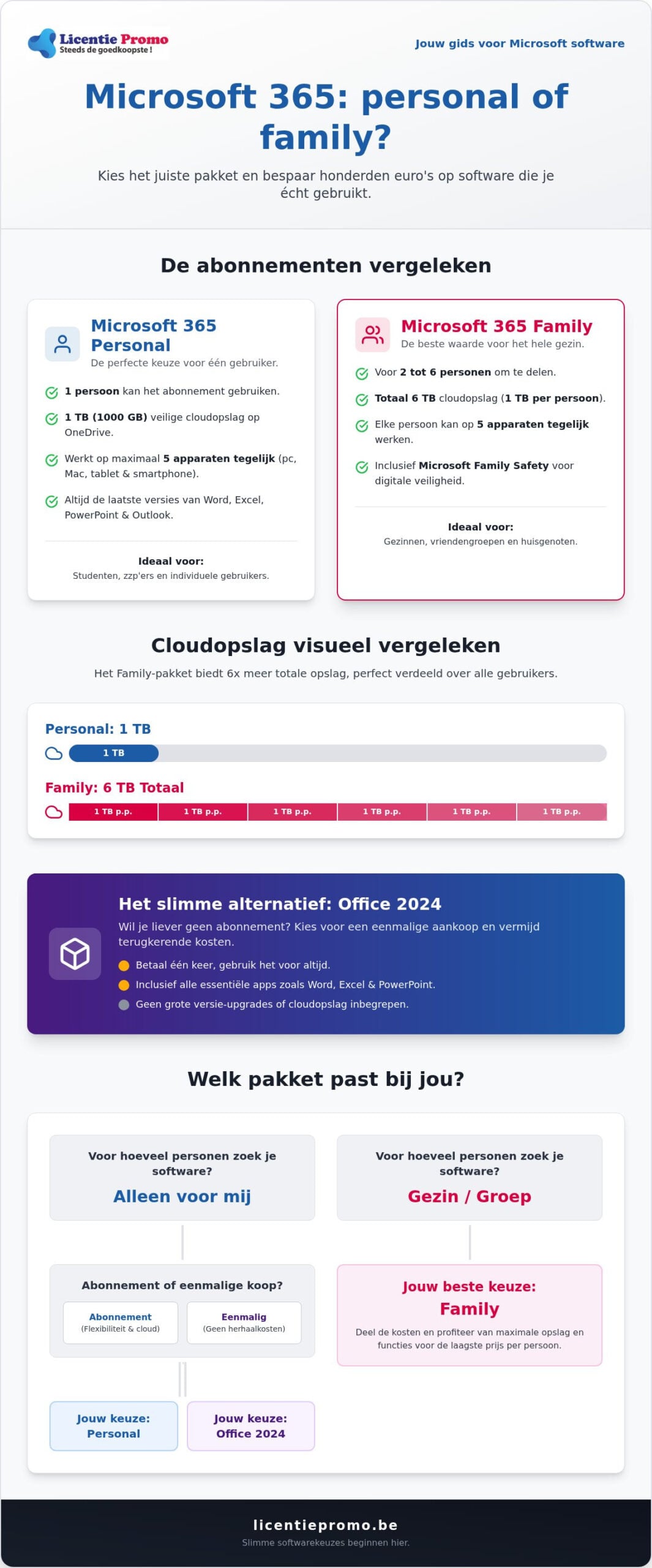
Which package fits your situation? a handy selection menu
Making a decision doesn't have to be difficult. You simply look at your daily habits and your budget. The biggest difference Office 365 Personal and Family in practice is not the software itself, but the way you share it. Are you a student living in a dorm in Ghent or a single professional? Then Personal is usually more than enough. You have all premium apps on your laptop and phone, and that 1 TB of storage you get almost never fills up on your own. It is the most cost-effective way to legal software for één person.
When more people live under your roof, the story changes. Scenario’s with multiple laptops, tablets and roaming smartphones scream for a family-plan. Think of the family where the children type reports for school, while you do the bookkeeping in Excel. For the small self‑employed (ZZP) reliability is crucial. You want professional tools that always work, whether you’re at a client’s site or in your office in Antwerp. In that case you choose the certainty of a package that grows with your needs.
When your office or home becomes too crowded due to the growth of your activities, it can be smart to also consider physical storage; JOIN ME self storage is an excellent example of a provider that offers flexible solutions for both private individuals and entrepreneurs.
When to choose Microsoft 365 Family?
The choice for family is a logical calculation. Do you have more than two people in the house who regularly use Word or Excel? Then you save money immediately by één license sharing instead of multiple separate subscriptions. The centralized management is a huge time saver. You add family members with a simple invitation via e‑mail. Moreover, the massive amount of cloud storage is ideal for safely storing all family photos’s and videos’s on één central, but private place; think of the footage from a cozy summer evening around a kamado from Tools & Grill.
When is a one-time license the best choice?
Not everyone likes the ‘rental culture’ of software. Do you have an absolute aversion to monthly deductions that silently drain your bank account? Then a one‑time license is your salvation. This is also the best option for computers that are not constantly connected to the internet, such as a laptop in a workshop or a stationary PC in a remote location. You buy the software één once and it remains yours indefinitely. No hassle with expiration dates or price increases in the future. Read more about Office 2024 at home and freelancers and discover how you can permanently stop with subscriptions.
Do you want to instantly snag the smartest deal for your specific situation? Don't wait any longer and check out our full range of legal licenses. Save today on your Microsoft software at LicentiePromo and receive your activation code within 5 minutes in your mailbox!
Saving on Microsoft Office: discover the deals from LicentiePromo
Why would you pay the full price at the officiële source? You now know exactly what the difference between Office 365 Personal and Family is for your situation. The next step is to score the smartest deal. LicentiePromo makes premium software accessible to everyone in België. We offer legal license codes at a fraction of the recommended price. No hidden tricks. Just the original software you need, but at a price that feels wél fair. We remove the barriers so you can be productive right away.
At LicentiePromo everything is about speed and certainty. We understand that you want to get started right away. You don't have time to wait days for a package or a slow activation. That's why we deliver your license code to your mailbox within 5 minutes. Our activation guarantee gives you the peace of mind you deserve. If something still doesn't work during installation, our customer service is ready to truly help you. We won't leave you out in the cold, but provide concrete solutions for every problem.
Why our licenses are so cheap
Our competitive prices are no accident. We specialize in buying up unused corporate inventory. Large enterprises often purchase licenses in bulk, but they don't use them all. We buy these legal surpluses and offer them to you. This process is completely transparent and legitimate. According to European legislation, software can be resold. So you receive a 100% official key that you can activate immediately. Learn everything about buying legal Microsoft software in Belgium and discover how we open the market for you.
Through our efficientë working method we make the difference Office 365 Personal and Family even more attractive for your budget. Because our base prices are lower, you save a lot on both variants compared to the standard retail price. You receive the same updates, the same security and the same features. The only thing missing is the unnecessarily high price tag.
Ready to order?
The process is simple and effective. Choose the license that fits your needs, pay securely and check your mailbox. You don't need to be a technical expert to easily upgrade your current Office version. Follow the clear instructions in your confirmation email and you'll be up-to-date in no time. Whether you choose the flexibility of a subscription or the peace of mind of a one-time purchase, we ensure the lowest price. Buy your Office license now at a discount from LicentiePromo and prefer to invest your money in your own growth rather than in overly expensive software contracts!
Make the smartest choice for your software today
You now have all the cards in hand to make the right decision. The difference between Office 365 Personal and Family is now crystal clear: choose Personal for individual use or go for the Family bundle to share the costs with your whole household. Do you hate recurring costs? Then the one‑time purchase of Office 2024 Professional Plus is your best ally. You permanently step out of the subscription cycle and retain full control over your own software budget.
LicentiePromo is ready for you with the sharpest deals of 2026. You will receive your legal license code within 5 minutes in your mailbox. Thanks to our 100% activation guarantee, you take no risk at all. We remove the complexity from the purchase process so you can focus on what really matters: your work, your studies, or your family. You never have to pay the full price for premium software again.
Save today on your Microsoft license at LicentiePromo and set up your digital workspace with the confidence of an expert by your side. You are only a few clicks away from a hassle‑free and affordable software experience!
Frequently Asked Questions about Microsoft Office licenses
Can I switch from Microsoft 365 Personal to Family?
Yes, you can upgrade from Personal to Family seamlessly at any time. When you activate the new license, your remaining time on your current subscription is automatically converted to the Family plan. So you don’t lose any day you have already paid for. It’s a quick and easy way to add extra users to your account directly without putting your files at risk.
What happens to my files if I cancel my subscription?
Your files remain safely stored, but you lose the ability to edit them with the desktop apps. After ending your subscription, the software switches to a ‘read‑only’ mode. You can still view and download your documents to your hard drive. Note: your extra OneDrive storage expires, so you will need to move your files if you exceed the free 5 GB limit.
Do I always have to be online to use Office 365?
No, you can use the well-known apps such as Word, Excel and PowerPoint completely offline on your PC or Mac. You only need an internet connection for the initial installation and to activate your license. Microsoft checks roughly once a month via the internet whether your subscription is still active. You simply keep your documents locally, so you can continue working without Wi‑Fi on the train or in an airplane.
Can I share the Family license with people outside my household?
Yes, you can share your license with up to five other people, regardless of their location. This is in practice the main difference office 365 personal and family. You send an invitation via e‑mail and the recipient links the license to their own Microsoft account. Everyone enjoys their own privé-storage of 1 TB. You can never see each other's files unless you deliberately share them with each other.
Does Microsoft 365 work on both Windows and Mac?
Absolutely, the software is designed to work seamlessly on both operating systems. You get access to exactly the same premium features and apps, whether you’re using a powerful Windows desktop or a MacBook. You can even switch between different systems. Start your report on your Mac and finish it later on your Windows PC at the office. Everything syncs automatically and without hiccups.
What is the difference between Office 2024 and Microsoft 365?
Office 2024 is a one-time purchase without a subscription, while Microsoft 365 works with an annual or monthly fee. With the 2024 version you buy the software outright and have no cloud storage or future feature updates. Microsoft 365 always provides you with the latest versions and 1 TB of cloud space. The choice depends on your preference: do you want to pay éé once and be done, or choose the extra services of a subscription?
How many devices can I link to a single Microsoft 365 account?
You can install the Office apps on an unlimited number of devices and be signed in on five devices simultaneously. This applies to each individual user within a subscription. So you never have to log out on your laptop to use your tablet. The system automatically recognizes your sign‑in. This gives you ultimate freedom to work anywhere, whenever you want.
Do I also get Outlook with a Personal subscription?
Yes, the full premium version of Outlook is included by default in the Personal package. You get an ad‑free experience and advanced security for your mailbox. This is much more extensive than the free web version you get with a standard Hotmail or Outlook address. You manage your e‑mails, complex agenda’s and contacts like a professional on all your connected devices.