
Activating an Office 2024 license: the step-by-step guide for a hassle-free installation
Why would you pay every month for software that you can simply own in one go? It's a fair question now that expensive subscriptions seem to be the standard. You want to get started with Word and Excel right away without those recurring costs on your bank account. But let's be honest: activating an Office 2024 license doesn't always go smoothly. Maybe you're worried about unclear error messages or you're afraid that old software remnants will ruin the installation.
We fully understand that. You are looking for certainty and a legal solution that simply works. In this guide, you will learn how to activate your Office 2024 license safely and permanently within minutes. No more hassle with vague messages and no more fear of illegal software. We show you exactly how to prepare your system and successfully complete the activation. This way, you get immediate access to a fully functional Office suite without ever having to spend another euro on subscription fees.
Key Points
- Discover why a one-time license saves you hundreds of euros in the long run compared to a Microsoft 365 subscription.
- Learn how to successfully activate office 2024 license in just 5 simple steps for a permanent result.
- Gain insight into European legislation that makes it possible to purchase legal software licenses at rock-bottom prices at LicentiePromo.
- Prevent installation errors by learning how to correctly remove old software remnants and trial versions from your system.
- Get practical solutions for the most common activation codes, so you never get stuck during the process again.
Why activating your Office 2024 license is the first step to working efficiently
Stop hoping that your software will keep working on its own. Microsoft Office 2024 has been the new standard since October 1, 2024, for anyone who refuses to be tied to monthly costs. Activating an Office 2024 license means you choose a one-time purchase instead of an endless subscription. You buy the right to use the software unlimited on your PC or Mac. However, without that activation, your powerful suite quickly turns into a limited ‘read-only’ version with which you can barely do anything.
The end of subscription costs
The calculator doesn't lie. A Microsoft 365 subscription costs you money every year again. Over a period of five years, we're talking about hundreds of euros in lost capital. With a license for Microsoft Office Professional Plus 2024 , you pay a sharp price once and you're done. No more unexpected debits from Microsoft on your bank account. You are the owner of the software. This gives peace of mind and full control over your own digital toolbox without being forced to store everything in the cloud.
Which version do you need? For most Belgian entrepreneurs and demanding users, the Professional Plus edition is the absolute top choice. You get the full suite, including Outlook and advanced features in Excel. Do you prefer working on a Mac or is the basic version enough? Then Microsoft Office Home & Business 2024 is an excellent alternative. Both versions offer that coveted permanent access to your favorite programs’.
Full access to all Office features
Software without a valid license is a ticking time bomb for your productivity. Once the trial period expires, Microsoft blocks crucial features. You can no longer edit or save documents. Worse: you miss essential security updates. Your office 2024 license activation ensures that your system directly connects to the official Microsoft servers for the latest patches.
- Direct access to Word, Excel, and PowerPoint without any restrictions.
- No more annoying red warning bars at the top of your screen.
- Optimal protection against leaks and malware through official updates.
- Permanent activation that remains linked to your hardware for years of use.
The process is simple and effective. By activating now, you prevent being unable to access your files at a crucial moment. It is the only way to work professionally and securely in a modern digital environment.
The technical side: how exactly does Office 2024 activation work?
Activation is more than just entering a code; it is a digital handshake between your device and Microsoft. Once you enter the 25-digit product code, your computer immediately contacts the official activation servers. These servers verify the authenticity of your purchase in a fraction of a second. Is the code valid? Then your unique hardware ID is inextricably linked to the license. This process guarantees permanent activation on that specific device. The biggest advantage of Office 2024? After this one-time process, you don't need a constantly active internet connection. Unlike the subscription versions of Microsoft 365, which regularly need to 'phone home' to check your status, Office 2024 works completely autonomously. So you can work without any problems in places without Wi-Fi, such as on the train or during a flight to the sun.
Product key vs. digital license
That 25-digit code is your proof of ownership. It tells the Microsoft servers that you own a legitimate copy for unlimited use. At LicentiePromo, you only receive codes that are directly recognized by the official systems. No hassle with vague activation workarounds or illegal software that stops working after a week. Activating your Office 2024 license via your own Microsoft account is the smartest move. This digitally records the license in your personal profile. If you ever need to reinstall your PC due to a crash, Microsoft will immediately recognize your hardware and account. So you don't have to worry about losing your investment during a major Windows update or a system reinstall.
System requirements for smooth activation
A flawless installation starts with the right foundation. Office 2024 is optimized for the latest technologies and requires a modern operating system. Make sure your system runs on Windows 10 or Windows 11 for the best experience. A legitimate Windows 11 Pro license forms the perfect basis for a stable and secure working environment. For the Apple users among us, support is provided for the three most recent macOS versions. Do you have a stable internet connection for that first, crucial activation moment? Then the job is done within a few minutes. No technical knowledge required, just a few clicks and you're ready for years of worry-free use.
Want to get started right away without technical hassle? Then check out our offer and receive your Office 2024 license in your mailbox within 5 minutes.
Save on your software: buy a legal license at LicentiePromo
Why pay full price at Microsoft when there is another way? The demand for an affordable Office 2024 license activation grows daily. However, many consumers and self-employed people in Belgium wonder how such enormous price differences are possible. The answer is simple and completely legal: European legislation. Since a landmark ruling by the European Court of Justice in 2012, the resale of unused software licenses has been officially permitted. We purchase large batches of licenses that have become redundant for organizations and offer them again. This way, you enjoy exactly the same software, but at a fraction of the new price.
With LicentiePromo you take no risk at all. Every code we send is unique and is covered by our activation guarantee. Does the code not work? Then we will resolve it immediately. Rest assured: you won't get any shady activators that infect your system with malware. You will receive an official product that is directly approved by Microsoft's servers. With more than 14,000 positive customer reviews, we prove every day that reliability and a sharp price go perfectly hand in hand.
Why choose LicentiePromo in Belgium?
Time is money, especially for the Belgian entrepreneur. That's why we guarantee delivery within 5 minutes after your payment. You will receive the code and clear download instructions directly in your mailbox. No waiting days for a physical package, but get started right away. Our team understands the specific needs of the local market like no other. Do you need an official invoice for your accounting? We'll take care of that. Every purchase is delivered with an invoice including VAT specification. This is essential for self-employed individuals and SMEs to correctly claim costs in their Belgian accounting.
The benefits of Office 2024 Professional Plus
For those who want to get the most out of their workday, the Professional Plus edition is the only logical choice. This package is much more extensive than the standard home versions. You get not only Word, Excel, and PowerPoint, but also Outlook, Publisher, and Access. It is the most complete suite for data analysis, professional communication, and desktop publishing. Want the best deal for your PC? Then choose the Microsoft Office Professional Plus 2024 license code and experience software that is fully optimized for the latest hardware. This ensures a system that responds at lightning speed and never stutters during important tasks.
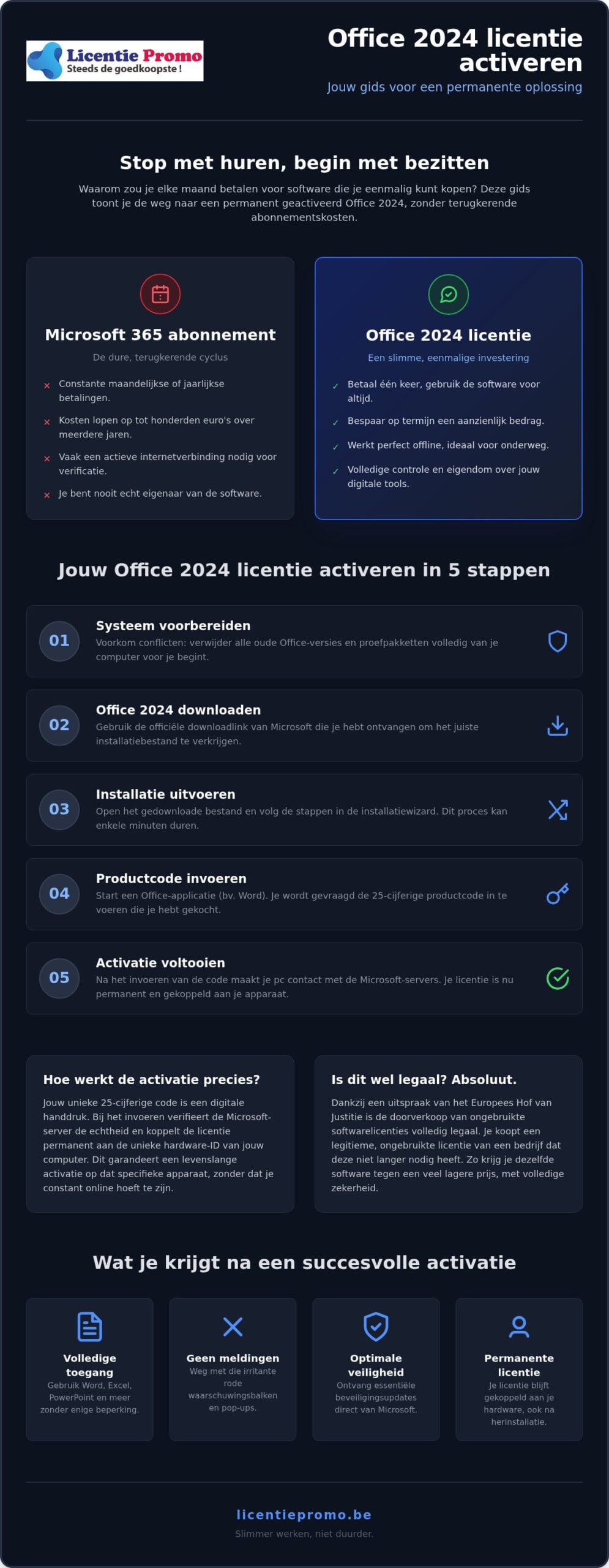
How to activate your Office 2024 license in 5 simple steps
No more guessing. Follow this path and you'll be up and running in minutes. Activating an Office 2024 license isn't rocket science if you follow the right order. We'll guide you through the process without technical jargon and ensure you get results right away. Good preparation is half the work here.
Thoroughly clean up before you begin
Conflicts are the biggest enemy of a smooth installation. Often, remnants of trial versions or old Office 365 packages remain on your system and disrupt things. Windows sometimes tries to give priority to these outdated files, leading to frustrating activation errors. Therefore, first remove all existing Office applications via 'Settings’ and then 'Apps’. Critically review the list and remove any duplicate installations you encounter.
For a truly effective result, we recommend the official Microsoft removal tool. This tool removes deeply rooted registry settings that a regular uninstall often overlooks. A “clean” PC is essential to prevent your new license from conflicting with old license data. Only when all remnants are gone does your new installation have free rein to properly establish itself in your operating system.
After your system is cleaned up, download the official Office 2024 installation file via the link in your confirmation email. Start the installation and let the computer do its work. Once the progress bar is complete, open a program such as Microsoft Word to begin the final phase.
Entering the license code
No automatic activation screen appears when starting up? Don't panic. In Word, go to the backstage view by clicking 'File' at the top left and choose 'Account' at the bottom. Here you will see the current status of your software. Look for the option 'Change product key' or 'Activate'. Now enter your unique 25-digit code that you received from us. Microsoft's servers will immediately check the code for authenticity.
Once the confirmation appears, your software is permanently activated and ready for years of use. This activation is final and will never expire. So you don't have to worry about future costs or sudden blocks. If the activation screen still doesn't appear, restart your computer. This often forces Windows to synchronize the new license status.
- Step 1: Completely remove old Office remnants with the removal tool.
- Step 2: Download the official installation file via our link.
- Step 3: Install the package and open a program such as Word.
- Step 4: Enter your unique license key via the account menu.
- Step 5: Confirm the activation and start working right away.
Ready to make the leap to a subscription-free life? Order your Microsoft Office Professional Plus 2024 license today and experience how easy software installation can be.
What to do about activation problems and error messages?
Sometimes the process doesn't go exactly as planned. That's annoying, but no reason to panic. Activating an Office 2024 license should go smoothly, but small technical obstacles on your own computer can throw a spanner in the works. Seeing a cryptic error code? Then first check the absolute basics. Is your system date and time set correctly? A deviation of just a few minutes can block the secure connection to the Microsoft servers. Windows then thinks the security certificate is invalid and immediately aborts the activation.
Resolving common error messages
Another well-known culprit is an active VPN or an overly strict firewall. These services encrypt your internet traffic or block specific ports that Office needs for verification. Temporarily disable this security and try again. Doesn't that help? Then try starting Word as an administrator. Right-click the program icon and choose 'Run as administrator’. This gives the software the necessary write permissions to permanently update the license status in your system registry.
Sometimes the system suggests completing the activation by phone. This may sound cumbersome, but it is an extremely reliable method that resolves almost any persistent issue. In Belgium, you call a toll-free number and follow the instructions of an automated system. You enter a series of digits using your keypad and receive a confirmation code in return. It takes at most five minutes, and your software is then permanently linked to your hardware.
Need help? We won't leave you in the lurch
With LicentiePromo, you never have to figure things out on your own. Do you get a message that a code is “already used”? With unreliable sellers, that is often the end of the story, but with us, that chance is virtually nonexistent. We only supply unique and unused codes. If something does go wrong due to a rare technical bug, our activation guarantee immediately takes effect. We will not rest until your package is one hundred percent operational.
Our Belgian customer service team is ready every working day for direct support. If necessary, we even look along with you via remote assistance to untangle the knot. With us, you are assured of a working solution. It is no coincidence that more than 14,000 customers trust our expertise and honest approach. Read more about our activation guarantee and discover how we protect you against any possible installation error.
Start today with a worry-free Office package
You are now fully informed. Activating an Office 2024 license is the smartest way to definitively put an end to those monthly subscription costs. In this guide, you have seen that good preparation is half the work. By thoroughly removing old software remnants and choosing a legal, unique code, you prevent frustrating error messages. The process is simple, lightning fast, and above all, permanent. You invest once and enjoy all the professional features Microsoft has to offer for years, without money disappearing from your account every month.
Why wait any longer for a solution that is within reach? At LicentiePromo, you'll receive your official code directly in your mailbox within 5 minutes. You choose a secure, one-time payment with no fine print. With an impressive score of 4.8 stars based on more than 14,000 reviews, you're assured of top quality and genuine Belgian support. Buy your Office 2024 license with activation guarantee at LicentiePromo now and immediately experience the full power of Word, Excel, and Outlook on your own PC.
Your system is fully ready. Are you? Install your new package with peace of mind and focus again on what really matters: your work and your ambitions. Good luck with your new software!
Frequently asked questions about Office 2024 activation
How long is an Office 2024 license code valid?
An Office 2024 license code is valid indefinitely. Unlike a subscription, your right to use it never expires. You pay a sharp price once and permanently own the software for the PC on which you install it. This makes it the ideal solution for Belgian self-employed professionals and home users who want peace of mind and refuse to pay again every year for exactly the same features. Your software simply keeps working, year after year.
Can I transfer my Office 2024 license to a new computer?
Most licenses for Office 2024 are technically linked to one specific device. When reinstalling on the same computer, Microsoft automatically recognizes your hardware ID and your activation is retained. Do you want to use the software on a completely new computer? In most cases, you will need a new code. This setup guarantees stable operation on your current system and explains why we can offer these licenses at such a favorable price.
Do I need an internet connection to activate Office 2024?
Yes, you need a stable internet connection for the one-time activation. Your computer must contact Microsoft's servers to verify the code. Once the office 2024 license activation is complete, you can use all programs fully offline. This is a major advantage over cloud software that requires a constant connection to check your license status. So you can work anywhere without Wi-Fi stress.
What is the difference between activating Office 2024 and a Microsoft 365 subscription?
The difference lies in ownership and cost structure. With Office 2024 , you buy the software once and own it permanently without extra costs. Microsoft 365 is a subscription model where you pay monthly or annually. If you stop paying, you immediately lose access to your programs. With a one-time license, you always retain control over your documents without money being deducted from your account each time.
My Office 2024 code doesn't work, what should I do now?
First, check that you haven't made any typos and that all old Office versions have been completely removed. Often, remnants of Office 365 block the new activation in the background. Still not working? Then contact our customer service directly. Thanks to our activation guarantee, we'll solve the problem for you in no time, if necessary via remote assistance. With LicentiePromo, you're never on your own.
Can I activate Office 2024 on a Mac with a Windows code?
No, a Professional Plus code is specifically intended for Windows systems. For Apple users, we have the Office Home & Business 2024 edition that works perfectly on macOS. So make sure you choose the correct version for your operating system before ordering. This way you avoid technical issues and can start installing on your favorite device immediately after receiving your email.
Is it legal to buy a cheap Office 2024 license in Belgium?
Absolutely, this is completely legal under European law. The European Court of Justice has ruled that the resale of unused software licenses is permitted. We purchase unused volumes and offer them at a fraction of the price. Activating your Office 2024 license through LicentiePromo is therefore a safe and legitimate choice that also provides you with an official invoice for your Belgian accounting. So there is no risk at all.
Do I need to back up my old documents before activating Office 2024?
Your documents will simply be preserved, but a backup is always a smart move. Activation only affects the software license and does not touch your personal files. Still, we recommend safely storing important Excel sheets or Word documents on an external drive or in the cloud before making software changes. This way, you can work with peace of mind on an up-to-date system without fear of data loss.