
Activate Windows 11 Pro license: the complete guide for a rapid start
An unactivated system is a hindrance to every Belgian entrepreneur. That annoying gray text at the bottom right of your screen is more than just a visual distraction. It blocks crucial features such as BitLocker and Remote Desktop that you really need for your work. You want to activate your Windows 11 Pro license without spending hours struggling with technical helpdesks or vague guides.
We fully understand the frustration. Nothing is more annoying than a cryptic error code like 0xc004c008 that throws a wrench into things, just when you want to pick up speed. You just want a system that works, without the fear of invalid keys or confusion between Home and Pro versions. This guide provides the direct solution you’re looking for.
In this article you will learn how to Windows 11 Pro license within minutes. We put an end to unclear messages and ensure that your system is immediately fully legal and unrestricted operational. We walk through the entire process step by step and show you how to easily resolve the most common activation errors yourself.
Key Points
- Discover why activation is crucial for your digital security and how it instantly unlocks all advanced personalization options of Windows 11 Pro.
- Learn how you can swiftly activate your Windows 11 Pro license with our clear step-by-step guide for a flawless start.
- Upgrade effortlessly from Windows 11 Home to Pro without a time‑consuming reinstall or loss of your important files and settings.
- Resolve stubborn error codes such as 0xc004c008 on your own with practical tips and the official Windows Troubleshooter for activations.
- Get your legal license with activation guarantee delivered within 5 minutes and save up to 80% compared to prices in the Microsoft Store.
Why activating your Windows 11 Pro license is essential for your security
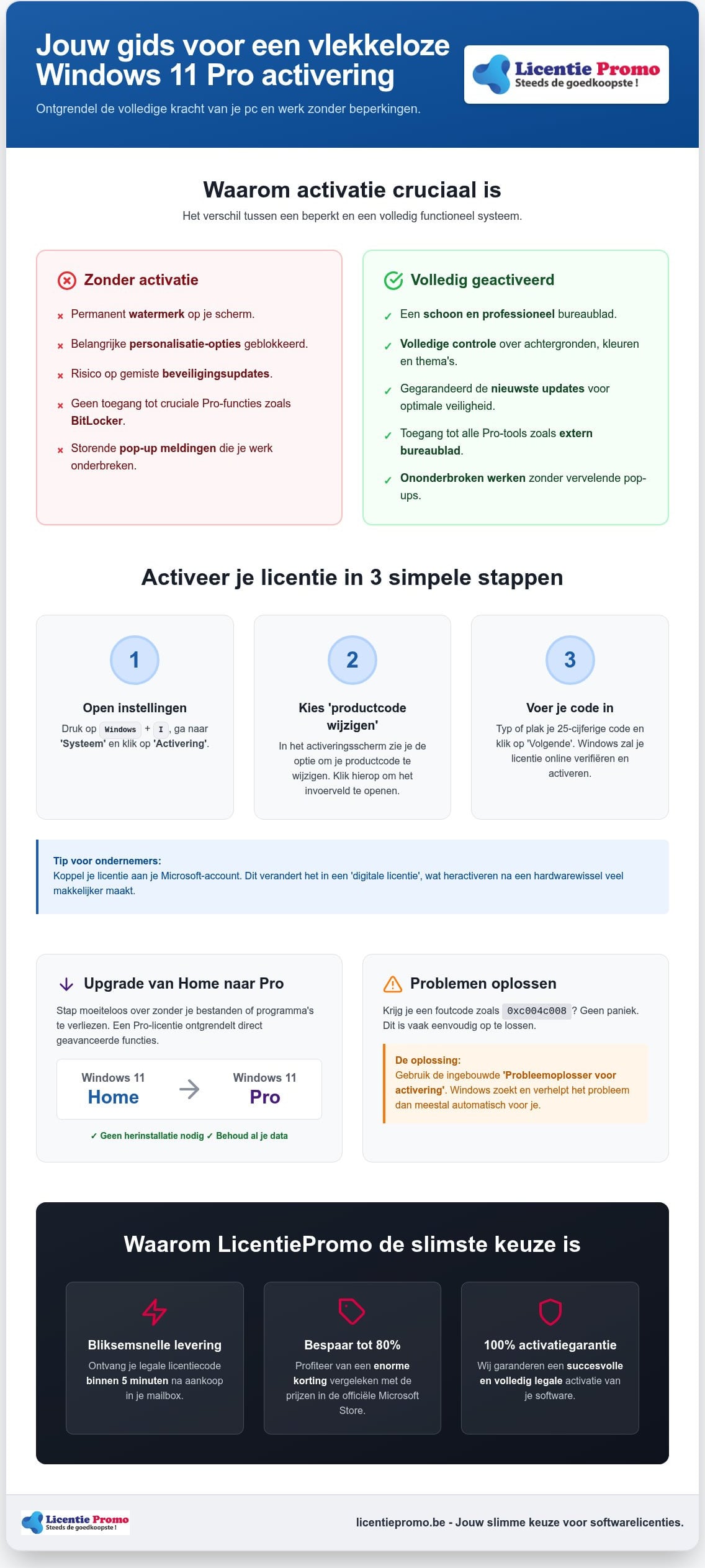
Activating your Windows 11 Pro license is the only way to gain full control over your PC. It is not an optional or technical extra. During this process your software is verified via the Microsoft Product Activation technology. This system links your unique hardware ID to a legal license. This lets Microsoft know you are using a legitimate product and not an illegal copy that could be full of backdoors for hackers. You usually have the choice between a digital license tied to your Microsoft account, or a classic 25‑digit product code that you receive directly after purchasing your Windows 11 Pro license in your mailbox.
The disadvantages of an unactivated Windows version
An unactivated system works like a machine with a limiter. The most noticeable drawback is a stubborn, semi‑transparent watermark in the lower right corner of your screen. It irritably sits over all your windows and presentations. In addition, Microsoft blocks all important personalization options. You cannot change backgrounds, modify color schemes, or arrange your taskbar the way you find efficient. Even worse are the unpredictable pop‑ups that disrupt your work rhythm. They appear in the middle of your tasks and demand that you take action, causing unnecessary stress and time loss during your busy workday.
Security and updates: your shield against malware
In 2026 digital security is more important than ever before for every Belgian self‑employed. Cyber threats are becoming more complex and your operating system must respond accordingly. Without activation you risk missing critical security patches that protect your privacy. A fully activated version guarantees a constant stream of updates that seal leaks before they are exploited. Moreover, only with an active Pro version do you get access to BitLocker device encryption. This is essential to protect your sensitive customer data in case your laptop is lost or stolen. It provides the peace of mind you need to run your business worry‑free. Activation is the only way to a 100 % stable system that always stays up‑to‑date.
Step-by-step guide: how to activate your product key
Ready to start? First, make sure you have a stable internet connection. Without an active connection, your PC cannot verify the code with Microsoft's servers. Look for the 25‑digit code in your mailbox. With LicentiePromo you usually receive it within 5 minutes after purchase. The code consists of five blocks of five characters each. Do you have the code handy? Then we can activate your Windows 11 Pro license and fully unlock your system.
Sometimes Windows asks to link a Microsoft account during this process. For Belgian entrepreneurs this is a smart move. Your license is then converted into a digital license that is attached to your account. This makes it much easier to reuse your license later if, for example, you switch laptops. Don't have a valid code yet? Order your original Windows 11 Pro license for a lightning‑fast start. Windows 11 Pro licentie voor een bliksemsnelle start.
Activating on an existing system
Use the shortcut Windows key + I to open Settings directly. Click in the left menu on ‘System’ and look in the list for ‘Activation’. Here you see the current status of your device. Click the ‘Change’ button next to ‘Change product key’. Enter the code carefully now. Typos are common, so preferably copy the code directly from your email. For more in‑depth technical details about this process you can also consult the official Microsoft activation guide .
Activate during a clean installation
Are you reinstalling Windows completely from a USB stick? The installation wizard will then ask early for your product key. Enter it here immediately. Your PC will then instantly recognize that you want to install the Pro version. Don't have the code handy at that moment? Choose the option ‘I don’t have a product key’. The installation will continue as usual, but your Windows will remain limited. You can complete activation later at any time via the settings menu. As soon as your PC goes online for the first time, the license will be validated and all restrictions will disappear automatically.
Upgrading from Windows 11 Home to Pro without reinstalling
The majority of laptops you buy in the store are shipped standard with Windows 11 Home. Manufacturers choose this to keep the price attractive for the average consumer. For a professional environment, however, this version falls short. Activating your Windows 11 Pro license on an existing Home system is dé way to professionalize your workflow without losing any of your files. The big advantage? You don’t have to perform a full reinstall. All your documents, photo’s and installed program’s remain exactly where they are.
The difference between Home and Pro in practice
Why would you make the switch? For Belgian freelancers and entrepreneurs, it’s about security and flexibility. BitLocker device encryption is essential if you often travel with your laptop. It ensures your data is unreadable to unauthorized persons in case of theft. Additionally, Pro offers Windows Information Protection (WIP), which prevents business data from accidentally leaking to private‑apps. Remote Desktop is also a huge advantage, allowing you to securely log in to your office PC from any location. Microsoft provides a detailed overview of this process in their guide on Upgrading from Windows 11 Home to Pro.
The upgrade process with a LicensePromo key
With a Windows 11 Pro upgrade key from LicentiePromo the job is done. You simply enter the new code in the activation settings of your current system. Sometimes the installation hangs or you get an error message. A proven method is the ‘airplane mode’-trick. Enter the code, disconnect your internet connection and click ‘Start’. Windows now thinks the code has already been verified and begins unpacking the Pro features. After an automatic restart your system is fully transformed. You can easily check this by going to ‘Info’ in the settings. There you will now proudly see ‘Windows 11 Pro’, ready for the real work.
Troubleshooting activation issues for Windows 11 Pro
Do you get an error message during the process? No panic. Error codes are simply signposts that tell you exactly what is going wrong. Usually it is a minor hiccup that you can resolve yourself within a few minutes. The built‑in Windows Troubleshooter is your first lifeline. You can find it under Settings, System and then Activation. This tool scans your hardware and license status to remove common blocks directly. Have you recently replaced your motherboard or processor? Then Microsoft sees your PC as a new device and blocks the old activation. In that case you need to reactivate your Windows 11 Pro license to restore your rights. At LicentiePromo you always receive an activation guarantee with your purchase. Does the code not work as it should? Then we will resolve it for you immediately.
Common error codes and their quick solutions
- Error code 0xc004c008: This means the code has already been used on another device. This often occurs with OEM licenses after a major hardware change in your system.
- Error code 0x803f7001: Windows cannot find a valid digital license for your hardware. Check that your internet connection is stable and re-enter the code manually via the menu.
- Error code 0xC004F050: This is the most common error. You are trying to activate a Pro code on a Windows Home installation without first going through the proper upgrade process.
What to do if online activation fails
Refusing the standard activation over the internet? Then use the powerful SLUI 4 method. This is the official way for telephone activation that often provides a solution for stubborn problems. Press the Windows key + R, type ‘SLUI 4’ in the box and press Enter. Choose Belgium from the list of countries. You will now see a long series of numbers on your screen: the installation ID. Call the free Microsoft support line and enter these numbers using your phone keypad. You will then receive a confirmation ID that you fill into the empty fields on your computer screen. Your Windows is now directly activated and ready for use. Our customer service is happy to help further if you cannot figure it out yourself.
Avoid technical headaches and choose 100% certainty. Order your Windows 11 Pro license from a reliable partner with more than 14,000 positive reviews.
Why a Windows 11 Pro license from LicentiePromo is the smartest choice
Why would you pay full price in the Microsoft Store? At LicentiePromo you save up to 80% on your software. You receive your code within 5 minutes in your mailbox. This also applies on Sunday evenings or in the middle of the night. You want to activate your Windows 11 Pro license without waiting for a physical package or a slow international helpdesk. We make that possible through a fully digital and automated process. Moreover you receive an official Belgian invoice immediately. This is essential for your VAT return and correct accounting of your business. So you buy with the certainty of a local partner who knows the rules.
The assurance of a legal license
Many people doubt the low prices, but that skepticism is unnecessary. Our licenses are 100% legal and rightfully obtained. We make smart use of European legislation on the resale of software licenses. LicentiePromo purchases unused corporate licenses in large volumes from firms’s that no longer need them. These keys are then verified and made available for reuse by individuals and freelancers. This is a sustainable and perfectly legal way to significantly reduce your IT costs. Moreover, your license is valid for life on your device. You will never be tied to an expensive monthly subscription or unexpected hidden fees. Want to know exactly how we do this? Then read all the details about the cheapest Windows 11 Pro license purchase on our information page.
Our activation guarantee: no hassle, always results
We don’t just sell a digital code, we sell a fully functional system without restrictions. Every purchase comes standard with our unique activation guarantee. If a technical problem does arise while activating the Windows 11 Pro license, we won’t leave you out in the cold. Our team provides immediate assistance until your system is fully operational. On our downloads page you will also always find the official links to the correct software versions. This helps you avoid vague installation files from unreliable sources. Our transparent approach bears fruit. This is proven by the thousands of reviews from Belgian customers who rate us with an average score of 4.8 stars. We are the practical partner that removes barriers and ensures maximum hassle‑free service. Choose speed, choose security and start today with a professionally set‑up PC.
Start today with a safe and professional system
You now know that an activated system is the foundation for every serious workstation in België. You have discovered how to effortlessly upgrade from Windows 11 Home to Pro without losing your files and how to remove technical hurdles on your own. You activate your Windows 11 Pro license is the final step to a PC that works fully for you, including all critical security patches and business features such as BitLocker.
Don't wait any longer for slow mail or unnecessarily expensive licenses through official channels. At LicentiePromo you receive your legal code within 5 minutes by email, even on weekends. You enjoy a 100% activation guarantee and our Belgian customer service is always ready for immediate support. This way you start your next project without technical worries.
Buy your Windows 11 Pro license now and activate immediately!
Take the step today toward a faster, more stable, and more secure digital office.
Frequently asked questions about Windows 11 Pro activation
Is it legal to buy a cheap Windows 11 Pro license in Belgium?
Yes, that is 100% legal and legitimate. According to European legislation, software that is no longer used may be resold to third parties. We purchase unused corporate licenses in large volumes and make them available to Belgian consumers and entrepreneurs. This provides a huge cost saving without compromising legitimacy. You also receive an official invoice that you can include in your Belgian accounting for VAT deduction.
Can I activate Windows 11 Pro without an internet connection?
For the standard activation a stable internet connection is required to contact Microsoft's servers. Temporarily no internet on your device? Then you can use the telephone activation method via the command ‘SLUI 4’. You will then receive a series of numbers that you enter via the phone to receive a confirmation ID. This way you can still activate your Windows 11 Pro license without your PC needing to be online at that moment.
What is the difference between an OEM and a Retail license when activating?
An OEM license is directly tied to your computer's motherboard upon first activation. This license is not transferable to another PC in the future. A Retail license is more flexible and you can take it to a new device, provided you remove it from the old computer. For most users, an OEM license is the most cost-effective choice, because the hardware often lasts longer than the software cycle itself. Both versions offer exactly the same features.
How often can I use my Windows 11 Pro product key?
Each product code is technically intended for activation on één specific device. You cannot use the code on multiple computers at the same time. If you try to enter the same key on a second laptop, Microsoft will block the activation with an error message. Want to equip multiple pc’s in your office with Windows 11 Pro? Then you need a unique license for each device. Fortunately, you receive each code from us directly digitally in your mailbox.
My product key doesn't work, what should I do now?
First, check that you haven't made any typos when entering the information manually. Preferably copy the code directly from the email you received from us. Also verify that you have installed the correct version: a Pro code will not work on a standard Home installation without the proper upgrade steps. Does the problem persist? Then contact our Belgian customer service directly. Thanks to our 100% activation guarantee, we always ensure that your system is quickly fully activated.
Do I need to reinstall Windows 11 when upgrading from Home to Pro?
No, a time‑consuming reinstallation is absolutely not necessary in this process. You can activate your Windows 11 Pro license by simply entering the new product key in the activation settings of your current Home version. Windows will then automatically download the missing professional features and unlock them after a short restart. All your personal files, photo’s and installed program’s remain intact. It is the fastest way to get direct access to advanced tools.
Can I transfer my Windows 11 license to a new computer?
That completely depends on the type of license you originally purchased. You can deactivate a Retail license on your old PC and then reuse it on your new device. However, if you bought an OEM license, it is permanently tied to the hardware of your current computer and you cannot legally transfer it to another system. Given the sharp prices at LicentiePromo, many customers simply choose to buy a new license when getting a new PC.
Why am I getting the notification that my license is about to expire?
This message usually appears when a temporary volume license or an unofficial evaluation version is installed on your PC. A genuine, legal license from LicentiePromo is valid for life and never expires. Are you still seeing this message? Then your current activation was probably not performed correctly or there is a conflict with an old key. By entering a new, original Windows 11 Pro product code, this warning disappears permanently and your system is permanently secured.