
Buy an Office package with Access: how to get the full database experience without a subscription

Stop sponsoring monthly subscriptions that drain your wallet. An official Office suite with Access absolutely does not have to be a recurring cost. Many entrepreneurs and database administrators in Belgium rightly feel trapped by the recent price increases of Microsoft 365. You simply want powerful software that works, without being tied to a subscription that gets more expensive every year.
That feeling of frustration about unclear versions and the justified fear of illegal software is recognizable. You are looking for certainty and a fair price. In this article, you will discover which Office package with Access suits you best and how to legally purchase this software with a one-time payment. We guide you through the benefits of Office 2024 Professional Plus, so you have a complete database experience on your PC immediately and without hidden costs.
Key Points
- Learn why Microsoft Access is only available in specific editions and why Professional Plus 2024 is the smartest choice for your PC.
- Discover how to build powerful database applications and seamlessly link data with Excel for more efficient management of your data.
- Save hundreds of euros by choosing a one-time office package with Access instead of an expensive monthly subscription.
- Get a clear step-by-step guide for a flawless installation without conflicts with old software versions on your system.
- Receive your legal license within 5 minutes in your mailbox with full activation guarantee for maximum peace of mind.
Which office package with access do you exactly need?
Are you looking for an office suite with Access? Then you'll quickly notice that the choice isn't as simple as it seems. Many people accidentally buy the wrong version. They only discover after installation that the database software is missing. Microsoft makes a sharp distinction between basic packages and professional bundles. For database management, you need heavier artillery than the standard versions you find in the store.
Why Access is missing from the standard packages
Microsoft sees Access as a tool for advanced users and professionals. The standard packages, such as ‘Home and Student’, focus solely on the basic needs of the average user. There you only get Word, Excel, and PowerPoint. For more complex data management, that is simply not enough. The software is too powerful to be included in a starter package.
What is Microsoft Access actually for your work environment? It goes much further than a simple list in Excel. It allows you to create complex relationships between data and even build your own applications. Because these are specialized features, Microsoft keeps this software exclusive to the Professional Plus editions and Microsoft 365 subscriptions. If you want to work seriously with data, Professional Plus is the only right way.
Office 2024 Professional Plus as the definitive solution
Do you want all the features without being tied to an expensive subscription? Then Microsoft Office Professional Plus 2024 is the most logical choice. This package is the most complete version currently available for Windows users. You get immediate access to the full suite:
- Word, Excel and PowerPoint: The essential foundation for every document and presentation.
- Outlook: For professional email management and calendar planning.
- Publisher: Easily create your own marketing materials and publications.
- Access: The complete database experience for your PC.
This 2024 version is fully optimized for speed. It works seamlessly on both Windows 10 and Windows 11. Since the significant price increases of Microsoft 365 in July 2026, more and more Belgian entrepreneurs are choosing this one-time purchase. Subscription costs rose by as much as 12% for certain business packages. With a one-time license, you completely bypass these price increases. You pay once. The software is yours forever. No more hidden costs and no more monthly deductions. It is the most stable and cost-effective way to get an Office package with Access on your computer.
Why Microsoft Access is essential for your database management
You have data, and lots of it. Excel is fantastic for a quick calculation, but it inevitably crashes with thousands of rows of complex interrelated data. That's why an Office package with Access is essential for database management within any modern Belgian business. With it, you can build your own powerful applications without writing a single line of code. It's the perfect bridge between a simple spreadsheet and a very expensive enterprise system.
The power lies in the structure. Access allows you to store vast amounts of information in an organized way. No more duplicate entries. No errors from manual adjustments in different tables. Everything is interconnected. For the advanced user, the software offers full SQL support. This lets you get the most out of your data and effortlessly link your database to external sources.
From simple lists to complex databases
Lists in Excel quickly become an unmanageable mess. One typo and your entire administration no longer adds up. Access definitively puts an end to this. By working with relational databases, your data is stored in one central place. Do you change a customer address? Then this is immediately updated everywhere in your system. This guarantees an error-free administration for your business.
Getting started is easier than you think. Use the professional templates to set up inventory management or a customer database within minutes. Already have a lot of data in Excel? No problem at all. The seamless integration ensures that you import or export your data within seconds. You won't waste a second manually retyping long lists.
Automation of your work processes
Save hours of valuable time every week with smart automation. Stop manually compiling weekly overviews. With Access, you can generate complex reports with just one click. You create professional forms for data entry. This way, colleagues can add data without accidentally deleting formulas or the table structure. This makes sharing your database within a small network safe and highly efficient.
Do you want to regain full control over your business data? An Office package with Access offers you the tools you need for real growth. You can get started right away with a full license that you will receive within minutes. No hassle with subscriptions, just software that works for you.
One-time purchase vs subscription: the most cost-effective choice for Access
Why would you keep paying every month for something you already own? For an Office package with Access, the calculation is very simple. A subscription may seem attractive at first glance due to the low entry price, but appearances can be deceiving. Since the significant price increases of July 2026, the costs for Microsoft 365 subscriptions have risen considerably. For a business package, you now quickly pay 12% more than before. If you calculate this over a period of five years, you will easily spend more than €800 for a single user. That is money thrown away.
The biggest advantage of a one-time purchase is full ownership. You buy the software and it never expires. You don't have to worry about future price increases or monthly deductions that make your administration unnecessarily complex. Moreover, a local installation offers significant privacy benefits. You are not obliged to store your sensitive databases in the cloud. Your data stays on your PC, exactly where it belongs. In the debate about one-time purchase vs subscription , the conclusion for many Belgian SMEs is therefore clear: a permanent license offers more freedom and a much better return.
The hidden costs of microsoft 365
Subscriptions are a bottomless pit for your budget. The invoices keep coming in, even if you don't use the software intensively for a month. You pay for features you may never touch. Additionally, you are completely dependent on a stable internet connection. Microsoft regularly performs license checks via the web. If your connection drops or there is a problem with your automatic debit, you immediately lose access to your critical tools and databases. As a business owner, you simply cannot take that risk.
The power of a legal license code
At LicentiePromo, we do things differently. We purchase unused licenses from large organizations that are switching to other systems. This process is 100% legal under European law. This allows us to offer the exact same software for a fraction of the normal retail price. With us, you get an official code with a rock-solid activation guarantee. No vague setups, but a working system on your PC right away. You can purchase your own copy of Microsoft Office Professional Plus 2024 right here and get started within five minutes. It's the smartest way to keep your IT costs under control without compromising on quality.
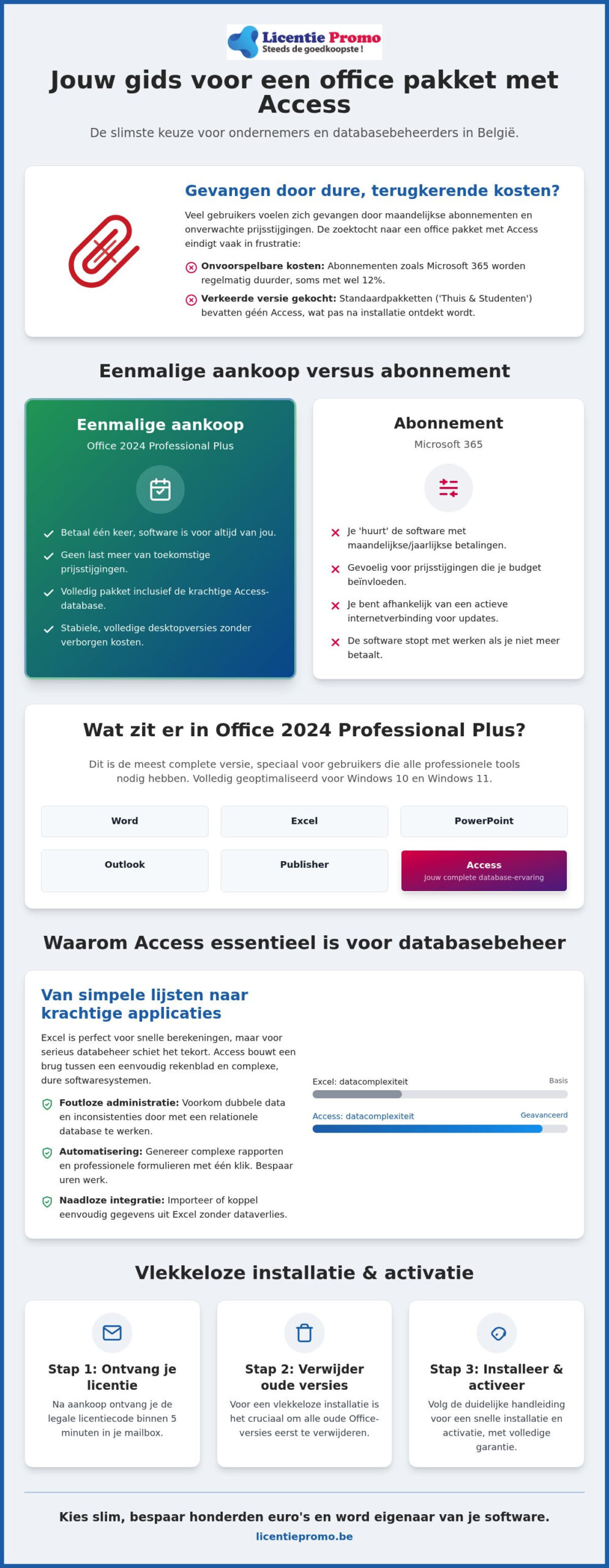
How do you install Office Professional Plus 2024 on your PC?
You have chosen a powerful Office suite with Access. Now you naturally want to get started with your databases as quickly as possible. Fortunately, the installation process is a breeze these days. You don't need any technical knowledge to get the software working. Simply follow these four steps for a flawless start:
- Step 1: Purchase a license. Order your license from LicentiePromo. You will receive the official activation code and download instructions within 5 minutes in your mailbox.
- Step 2: Remove old versions. This is the most important step. Remove all old Office remnants from your PC via the Control Panel. This prevents annoying error messages during activation.
- Step 3: Download and install. Use the link in your email to download the software directly from the official Microsoft servers. This way you are always assured of a safe and virus-free installation.
- Step 4: Activate. Open any app, such as Access or Word. Enter your unique license code when prompted. Your software is now permanently activated.
System requirements for a smooth experience
To get the most out of your databases, your PC must meet a few basic requirements. Office 2024 Professional Plus is designed for Windows 10 and Windows 11. Older operating systems are not supported. Ensure you have at least 4 GB of free disk space and sufficient memory. Although 4 GB of RAM is the minimum, we recommend 8 GB for a smooth experience when running complex queries.
Do you work with very large databases? Then always choose the 64-bit installation. This version can access more computer memory than the outdated 32-bit variant. This prevents Access from becoming slow or crashing when you process thousands of records at the same time. You will find both options in the installation menu we send you.
What to do about activation problems?
Sometimes the process does not go as planned due to a conflict in Windows. Do you see an error code? Don't panic. Most issues are resolved within a few minutes by restarting your PC once or using Microsoft's installation repair tool. Our Belgian helpdesk is ready to support you if you can't figure it out yourself.
At LicentiePromo, you enjoy a rock-solid activation guarantee. We won't let go until your software works perfectly. No vague promises, but concrete help from experts who know the software inside and out. You can confidently purchase your office suite with Access directly and build your first database today. We'll take care of the rest.
Buy your office suite with Access safely at LicentiePromo
Thousands of Belgians have already gone before you. Why? Because LicentiePromo stands for absolute certainty and speed in a market that often feels opaque. Buying an office suite with Access from us means you are choosing a Belgian partner who understands local needs. No vague foreign helpdesks or anonymous intermediaries. You get direct, expert support from a team that knows the software inside and out.
Speed is our greatest asset. Order today? Then your unique license code will be in your mailbox within 5 minutes. So you can immediately start setting up your new database or importing your Excel files. We work resolutely without fine print or hidden conditions. You pay once and get a lifetime license. No recurring costs, no surprises on your bank statement, and no hassle with licenses that suddenly expire at a critical moment.
Safety and reliability guaranteed
Our licenses are 100% legal and comply with all European regulations. We source them exclusively from surplus business inventories of large European organizations. This guarantees that your software always activates smoothly and remains safe for professional use. Are you a self-employed person with a side job or do you run a growing SME? We will provide you with an official invoice in your name for your accounting right away. This way, you can easily deduct the costs and meet all tax requirements in Belgium.
Transparency is essential to us. We want you to know exactly what you are buying and why our prices are so competitive. Want more depth on the legal background of our approach? Then read our comprehensive guide on buying legal Microsoft software in Belgium. It removes all doubt and shows why a one-time purchase is the most sensible business decision you will make this year.
Save on your software today
The price difference with the official Microsoft Store is simply too large to ignore. Why would you pay the full retail price when you get exactly the same functionality for a fraction of the price? You save hundreds of euros on your office package with access. That is capital you can better invest in the growth of your own business or in better hardware. Do you want to set up a completely new system from scratch? Then combine your purchase with an official Windows 11 Pro license for the most stable and secure database environment on your PC.
Don't wait any longer for the next price increase of your monthly subscription. Take full control of your own software budget and choose the certainty of ownership. Order your Office 2024 package now and experience the full power of Access without the burden of recurring invoices. We deliver immediately, so you can achieve results with your data today.
Start today with your powerful database without a subscription
Stop paying monthly rent for software you could simply own. In this article, you've discovered that a one-time investment in an office suite with Access is the only logical choice for price-conscious Belgians. You get full control over your data, enjoy maximum privacy, and bypass all future Microsoft 365 price increases. It's time to take back control of your own software budget.
At LicentiePromo, we make that transition effortless. You will receive your official license code in your mailbox within 5 minutes. Our 100% activation guarantee ensures you can install without stress and start building your first database right away. You don't need a subscription to achieve professional results. Choose the certainty of a local company that supports you at every step.
Don't wait any longer for the next subscription invoice. Buy your legal Office 2024 Professional Plus license with Access now. You are only a few clicks away from a powerful work environment that will be yours forever!
Frequently asked questions about office packages with access
Is access included in every Microsoft Office package?
No, Access is definitely not included in every package. You will only find this database software in the extensive Professional Plus editions and the business Microsoft 365 subscriptions. This program is completely absent from the standard versions for home use or students. If you are looking for an office package with Access, you must specifically choose the Professional Plus 2024 variant. This prevents you from being surprised after installation and allows you to build your own applications immediately.
Is a one-time license for Office 2024 Professional Plus legal?
Yes, these licenses are completely legal. According to European legislation, unused licenses from companies may simply be resold to third parties. LicentiePromo purchases these surplus stocks and offers them at a fraction of the new price. You will receive an official activation code that works directly on your system. We also offer a rock-solid activation guarantee, so you can install and use your software on your PC with peace of mind for your daily administration.
Can I also use Access on a Mac with this package?
No, Microsoft Access is unfortunately only available for Windows computers. There is no native version of Access for macOS, not even within a Microsoft 365 subscription for Mac users. If you still want to use Access on an Apple device, you will need to use virtualization software such as Parallels or a Windows partition via Boot Camp. For a flawless experience, however, it is best to install this office package with Access on a PC with a modern Windows 10 or 11 installation.
What is the difference between Access in Office 2024 and Microsoft 365?
The biggest difference lies in the payment model, not in the deeper functionality of the software itself. With Office 2024 Professional Plus, you pay once and own the software forever. With Microsoft 365, you are tied to monthly or annual costs that keep recurring. Although the 365 version sometimes receives small AI updates faster, the 2024 license offers all the powerful tools you need for professional database management without the financial uncertainty of an ongoing subscription for your business.
Do I have to pay again every year for my access license?
Absolutely not. When you choose a standalone license for Office 2024 Professional Plus, it is a one-time purchase. You pay once and the software remains valid indefinitely on your device. You never have to worry about price increases or blocked access because you forgot a monthly invoice. This makes it the most transparent and cost-effective choice for Belgian SMEs and self-employed professionals who like to keep their costs under control.
Do I get updates for Access if I buy a standalone license?
Yes, you will receive all essential security updates and stability improvements for your specific version. Microsoft continues to roll out these updates throughout the entire product lifecycle via the standard Windows Update channels. This ensures your database environment remains secure and compatible with your system. However, you will not receive an automatic upgrade to a completely new version, such as 'Office 2027’. For most users, this is not a problem, as the 2024 features will provide more than enough power for years to come.
How quickly will I receive my product code after payment?
With LicentiePromo, you never have to wait long for your order. As soon as your payment via one of our secure methods is completed, the unique license code is automatically generated and sent. In 99% of cases, you will find the email with download instructions in your mailbox within 5 minutes. You can therefore start installing and setting up your first spreadsheets right away. Just to be sure, also check your spam folder if you don't see the code appear immediately.
Can I open my database from an older version of Access in 2024?
Yes, Access 2024 is fully backward compatible with databases created in older versions of the software. You can effortlessly open, edit, and further expand files with the familiar .accdb extension. Even older .mdb files are often still supported, although it is sometimes wise to convert them to the newer format for optimal speed and security. Switching to the latest version therefore proceeds without data loss, so you can immediately benefit from the improved performance.