
Buy Windows 11 activation code: choose the right license in 2026
Do you want to buy a Windows 11 activation code? Then first choose the edition that suits your device and your use. Windows 11 Home is intended for daily home use, while Pro offers extra features for professional use and management. By checking in advance which edition you need, you avoid a mismatch during activation.
Doubting between Home and Pro or want to know what to look for in a license code? In this guide you will read how the code, license and installation differ from each other, which conditions are important and how you enter the code in Windows. A Windows 11 Pro license from LicentiePromo is a one-time purchase, without a recurring subscription.
LicentiePromo sells Windows 11 Pro licenses as 100% legal and offers an activation guarantee and a refund option. After payment, you will receive the digital license details within five minutes by email. You must activate the license within 30 days. Below you can read how to choose the right edition and what to do after receiving it.
Key Points
- Discover what a Windows 11 activation code does and why you should first choose the right edition.
- Compare Home and Pro based on your usage and device.
- Read what to look for in the terms and activation guarantee when you consider buying a Windows 11 activation code.
- Follow the steps to check your edition and activate your code.
- Discover how LicentiePromo's digital delivery works and why you activate the license within 30 days.
Buying a Windows 11 activation code: what exactly are you buying?
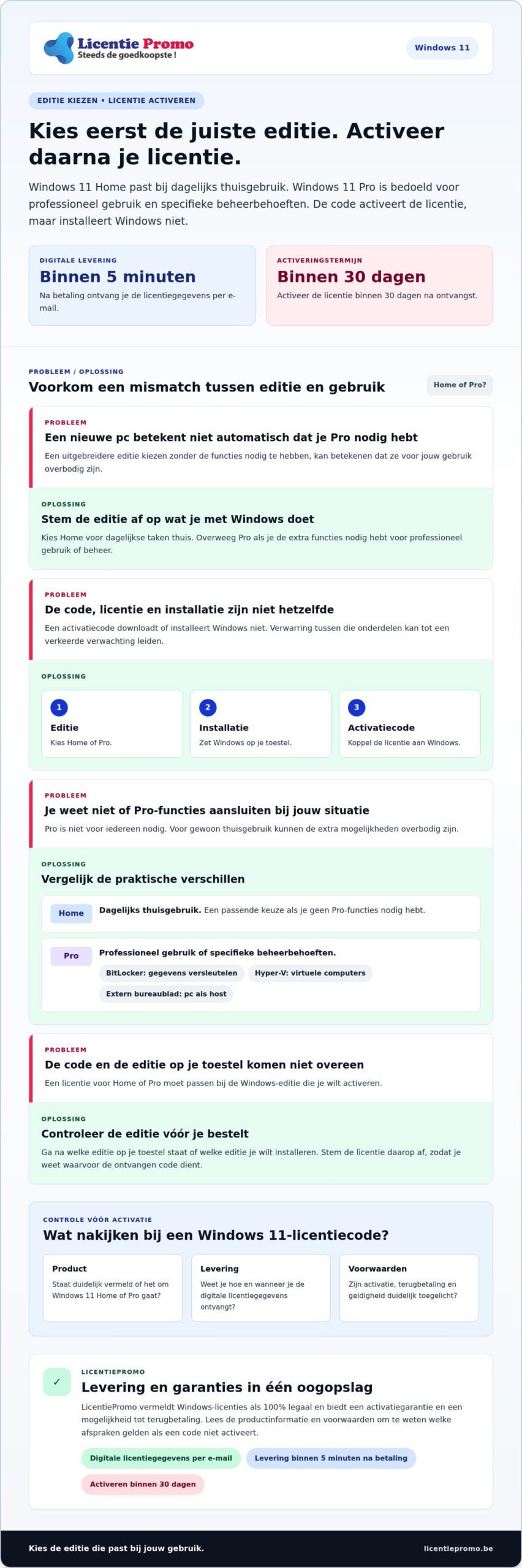
You use a Windows 11 activation code during the activation process to link a license to a Windows installation on your device. The code does not download or install Windows. That distinction is useful to know in advance: the license grants the right of use, the installation puts Windows on your device, and the code is used to activate the license.
A license code is the code you use to activate a Windows license on a device. The license determines the right of use, while the installation file and the installation put Windows on the device. More background about the operating system can be found in this explanation about Windows 11.
What is the difference between an activation code and a license?
The license is the right of use for the Windows edition. The code is the key you enter during activation to link that license to Windows. The code is not the same as the Windows installation file and does not perform the installation.
So you go through three separate steps: choose the edition, make sure that edition is on your device, and activate it with the corresponding license code. Before you order, check which edition you want to use. This way you align the license with the Windows that is already on your device or that you want to install.
Which Windows 11 edition suits your use?
Windows 11 Home is intended for everyday home use. If you mainly use your PC for ordinary tasks, then Home is the edition to consider. Windows 11 Pro is intended for those who need the features of Pro, for example for professional use or specific management needs. Choose based on your usage and the edition you want to activate, not just based on the name of the code.
LicentiePromo sells a Windows 11 Pro license. If you want to activate Pro, take a look at the Windows 11 Pro license code. If you want to buy a Windows 11 activation code, it is wise to first compare Home and Pro and then choose the appropriate license. That way you know what the code you receive is for.
Windows 11 Home or Pro: choose the activation code that suits you
Not everyone needs Windows 11 Pro . Home can suffice for daily use at home. Pro is relevant if you need certain extra features, for example for virtual machines or to control your PC remotely. The right edition depends on what you do with Windows. So a new PC does not automatically mean that Pro is the right choice.
| Edition | Suited for | Practical difference |
|---|---|---|
| Windows 11 Home | Daily home use | A suitable choice if you do not need Pro features. |
| Windows 11 Pro | Professional use or specific management needs | Offers, among other things, BitLocker, Hyper-V and the ability to use your PC as a host for Remote Desktop. |
Microsoft explains the differences in the official comparison by Microsoft. Above all, look at which features suit your use. That way you choose based on what you need, not because a more extensive edition automatically seems better.
When is Windows 11 Home sufficient?
Do you use your PC at home for daily tasks and don't need specific Pro features? Then Home is a logical edition to consider. First check which edition is on your device and which edition you want to activate. The page about the Windows 11 Home license code provides more information about that edition.
When is Windows 11 Pro a better match?
Pro is a better fit for your usage if you actually need the extra features. BitLocker helps you encrypt data on your device. Hyper-V lets you use virtual computers. With Remote Desktop as host, you can connect to your PC from another device. For regular home use, those capabilities may be unnecessary.
LicentiePromo sells a Windows 11 Pro license. Choose Pro if that edition matches your usage and the Windows version you want to activate. View the Windows 11 Pro license code and base your choice on the features you need. If you want to buy a Windows 11 activation code, first determine whether Home or Pro suits your situation.
Is a cheap Windows 11 activation code reliable?
The price alone does not tell you where a code comes from or what terms apply. Therefore, look at the product information: is the Windows edition clearly stated, how do you receive the license details, and what agreements apply for activation and refunds? That way you know in advance what you are buying and how to use the license.
LicentiePromo sells Windows licenses as 100% legal and offers an activation guarantee and a refund option. Read the product information and terms before you order. Anyone considering buying a Windows 11 activation code can compare the edition, delivery, and guarantees side by side. For more information about legal Microsoft software, you can also consult the guide.
Which signals provide more confidence in a license code?
Look for concrete information about the edition, digital delivery and terms. The product name must clearly indicate whether it concerns Windows 11 Home or Pro. Also read what the activation guarantee and refund option entail. That way you know which agreements apply if the code does not activate.
- Product: does it clearly state Windows 11 Home or Pro?
- Delivery: do you know how you receive the digital license details?
- Terms: can you find information about activation, refund and validity?
Also check whether the edition matches the Windows version you want to activate. The official comparison of Windows 11 versions helps you choose between Home and Pro. This way you avoid confusion between a code for one edition and an installation of the other.
What do warranty, refund, and validity mean?
These terms refer to different things. An activation guarantee concerns the activation of the license. The refund option describes what can happen according to the terms and conditions if there is a problem. Lifetime validity refers to the stated validity period of the license. Read the terms and conditions to know exactly what the guarantees entail.
LicentiePromo offers an activation guarantee and a refund option. Activate your license within 30 days. After payment, you will receive the digital license details by email within five minutes. Check the product information and the Windows 11 Pro license before you order. This way you know which edition you are choosing and which terms apply.
How to prepare for the purchase and the activation process
Check in advance which Windows edition is on your device. This prevents you from choosing a license that does not match your installation. After payment, LicentiePromo emails the digital license details within five minutes. Activate the license within 30 days.
First check your Windows edition and System requirements
Open the Windows settings and check the system information to see which edition is on your device, for example Home or Pro. The code must match the edition you want to activate. A Pro code therefore does not fit a Home installation if you want to keep that edition.
Also check whether your device meets the System requirements for Windows 11 Pro. These include, among other things, a suitable device with TPM 2.0 and UEFI firmware that supports Secure Boot. Secure Boot checks at startup whether the software is trusted. An activation code does not replace the required hardware and does not solve a problem with the System requirements.
Follow the steps after receiving your activation code
- Check your order confirmation and email. Look for the digital license details that you receive after payment.
- Open the activation settings. In Windows, go to Settings, choose System, and open Activation.
- Follow the on-screen instructions. Enter the received code when Windows prompts you to and check whether the activation was successful.
- Activate in time. Use the license within 30 days of purchase.
The exact steps may vary depending on the edition and the status of your device. An activation code does not replace a Windows installation. If the correct edition is not yet on your device, install it first. Consult the separate steps article for a complete installation guide.
Do you want to activate Windows 11 Pro ? View the Windows 11 Pro license code and check in advance whether Pro is the edition you need. After receiving it, you can start the activation process right away.
Buying a Windows 11 activation code at LicentiePromo: how to complete your order
Start with the edition. Home suits much everyday home use, while Pro is intended for those who need its extra features. Check which Windows version is on your device and which edition you want to activate. Then choose the matching license. This way you avoid a mismatch and know what you are using the code for.
What can you expect after ordering?
If you don't find the message right away, also check the spam folder. Save the code and the order confirmation so that you have both at hand during the activation process.
Activate your license within 30 days. LicentiePromo offers an activation guarantee and a refund option. Read the product terms before you order so that you know what these agreements entail. Would you like to view experiences from Belgian customers? Then consult the customer reviews of LicentiePromo.
Complete your purchase with confidence
Before you order, check these points:
- The edition: does Home or Pro match the Windows version you want to activate?
- The conditions: do you know what the activation guarantee and refund policy entail?
- The timing: can you activate the license within 30 days?
This way you make a targeted choice and know what to expect after purchase. A Windows license is a one-time purchase, without a recurring Windows subscription. Anyone who wants to buy a Windows 11 activation code should therefore look at the edition, the terms and the moment of activation.
Is Windows 11 Pro the right edition for your device? View the Windows 11 Pro license code and read the product terms. Choose the appropriate license, receive the details digitally by email and then start activating!
Choose your edition and activate with confidence
Start your choice with your usage. Windows 11 Home suits much everyday home use; choose Pro if you need the extra features of that edition. Check whether the license matches the Windows edition on your device. That way you know what you are buying when you consider buying a Windows 11 activation code.
LicentiePromo delivers the digital license details within five minutes by email and offers an activation guarantee and a refund option. Read the product terms before you order and activate your license within 30 days. With a one-time purchase you choose Windows without a recurring subscription.
Is Windows 11 Pro the edition you need? View the Windows 11 Pro license and order your activation code. Choose deliberately, read the terms and start activating!
Frequently asked questions about Windows 11 activation codes
Is a cheap Windows 11 activation code reliable?
The price alone does not prove whether an activation code is reliable or where it comes from. Check which Windows edition the license concerns, how you receive the code, and what conditions apply. Review the product terms before you order, so you know what to expect when you consider buying a Windows 11 activation code.
Can I use a Windows 11 Pro code for Windows 11 Home?
Choose a license that matches the Windows edition you want to activate. Home and Pro are different editions. So before you buy, check which edition is on your device. The page about the Windows 11 Home license code provides information about Home. For Pro you can find the Windows 11 Pro license code. Do not assume that a code will automatically change your edition.
How do I receive my Windows 11 activation code after purchase?
LicentiePromo emails the digital license details within five minutes of payment. The order confirmation confirms your order; the license details contain the code you use for the activation process. They are messages with a different purpose. If you do not find the code immediately, also check your spam folder. If you have questions about your order, contact LicentiePromo customer service.
What happens if my Windows 11 activation code does not work?
First, check whether you entered the code correctly and whether it matches the Windows edition on your device. Also follow the on-screen instructions. Read the applicable terms and conditions and contact customer service if you have any questions.
Within what period must I activate my Windows 11 license?
Activate your Windows 11 license within 30 days of purchase. Keep the code, your order confirmation and the product terms so that you can consult them during the activation process. If you have questions about the warranty terms, check the product information or contact LicentiePromo's customer service.
Is a Windows 11 activation code the same as installing Windows?
No, an activation code is not the same as installing Windows. The code belongs to the license and is used during the activation process. Downloading, installing, and activating Windows are separate steps. If the correct edition is not yet on your device, install it first. Consult the separate activation article for a more detailed explanation of the steps.
Does my Windows 11 license remain valid after activation?
LicentiePromo offers lifetime validity as a guarantee for the license. Read the product terms to learn how that guarantee applies to your purchase. Validity itself says nothing about technical support, updates, future Windows versions, or transferring to another device. Check the product information or contact customer service if you have questions.