
Cost of Microsoft 365 vs Office 2024: how to save hundreds of euros in 2026

Why would you pay rent every month for software that you can simply own in one go? Many users are currently paying unnecessarily high monthly subscriptions that quietly keep renewing. The cost microsoft 365 vs office 2024 will diverge faster in 2026 than you think. Stop paying once? Then you immediately lose access to your own documents. That is frustrating and completely unnecessary for your wallet.
You just want to do your work without the fear of hidden costs or software that suddenly stops working. We fully understand that frustration with the endless subscription pressure. That's why in this article you'll discover the exact price difference between a Microsoft 365 subscription and the one-time purchase of Office 2024. We promise you a clear overview so you can save hundreds of euros and never overpay for your essential software again.
In this guide, we dive deep into the numbers and compare the features of both versions. You'll get an overview of the long-term costs, the benefits of a perpetual license, and tips for a lightning-fast installation. After reading, you'll make the smartest choice for your computer and enjoy full access to the latest apps without monthly invoices.
Key Points
- Learn why owning software always beats renting software and how to get rid of that annoying monthly subscription pressure for good.
- Discover the huge difference in microsoft 365 vs office 2024 costs over a five-year period and see where your money really goes.
- Calculate your own advantage with our break-even overview and see how quickly a one-time investment in Office 2024 Professional Plus pays off.
- Rely on a 100% legal solution via LicentiePromo with direct delivery to your mailbox and full support during activation.
- Unmask the financial illusion of low monthly prices and choose the certainty of a software license without hidden extra costs.
Microsoft 365 vs Office 2024: what is the real difference in cost?
You are faced with a choice that will affect your wallet for years. The fundamental difference between these two options is simple: renting versus buying. Microsoft would rather see you transfer a small amount every month than pay a larger sum once for a product you then use for free for years. This ensures a constant flow of money to their headquarters, but for you it means that the cost of Microsoft 365 vs Office 2024 can add up significantly in the long run.
Both packages include the trusted Microsoft Office suite with essential apps such as Word, Excel, PowerPoint, and Outlook. The difference is therefore not in the names of the programs, but in ownership. Many Flemish consumers nowadays experience 'subscription fatigue'. We are tired of the endless stream of small charges for streaming, storage, and software. It feels like you never truly own the tools you use daily for work or study.
What do you get with Microsoft 365 for your money?
With Microsoft 365, you choose a service instead of a product. You pay a monthly or annual fee to use the software. As soon as you stop paying, you lose access to the full functionality of your apps. In return, you do get extras such as 1 TB of OneDrive storage and access to mobile apps on your smartphone. You also automatically receive every new update and feature that Microsoft rolls out. This sounds appealing, but the cumulative cost of Microsoft 365 vs Office 2024 shows that you actually pay a very high price for that cloud storage over the years.
What exactly is Office 2024?
Office 2024 is a classic product with a permanent license. You make a one-time investment and the software is yours forever. There are no hidden costs and you don't need an internet connection to edit your documents or update your spreadsheets. This is the ideal solution for anyone who simply wants stable software without hassle. You do receive important security updates, but no major new features in between. For most users, that's not a problem at all, since the basic functions of Word and Excel have been more than sufficient for years. Want to save right away? Then choose a Microsoft Office Professional Plus 2024 license and buy your software instead of renting it.
The hidden price of subscriptions: microsoft 365 under the magnifying glass
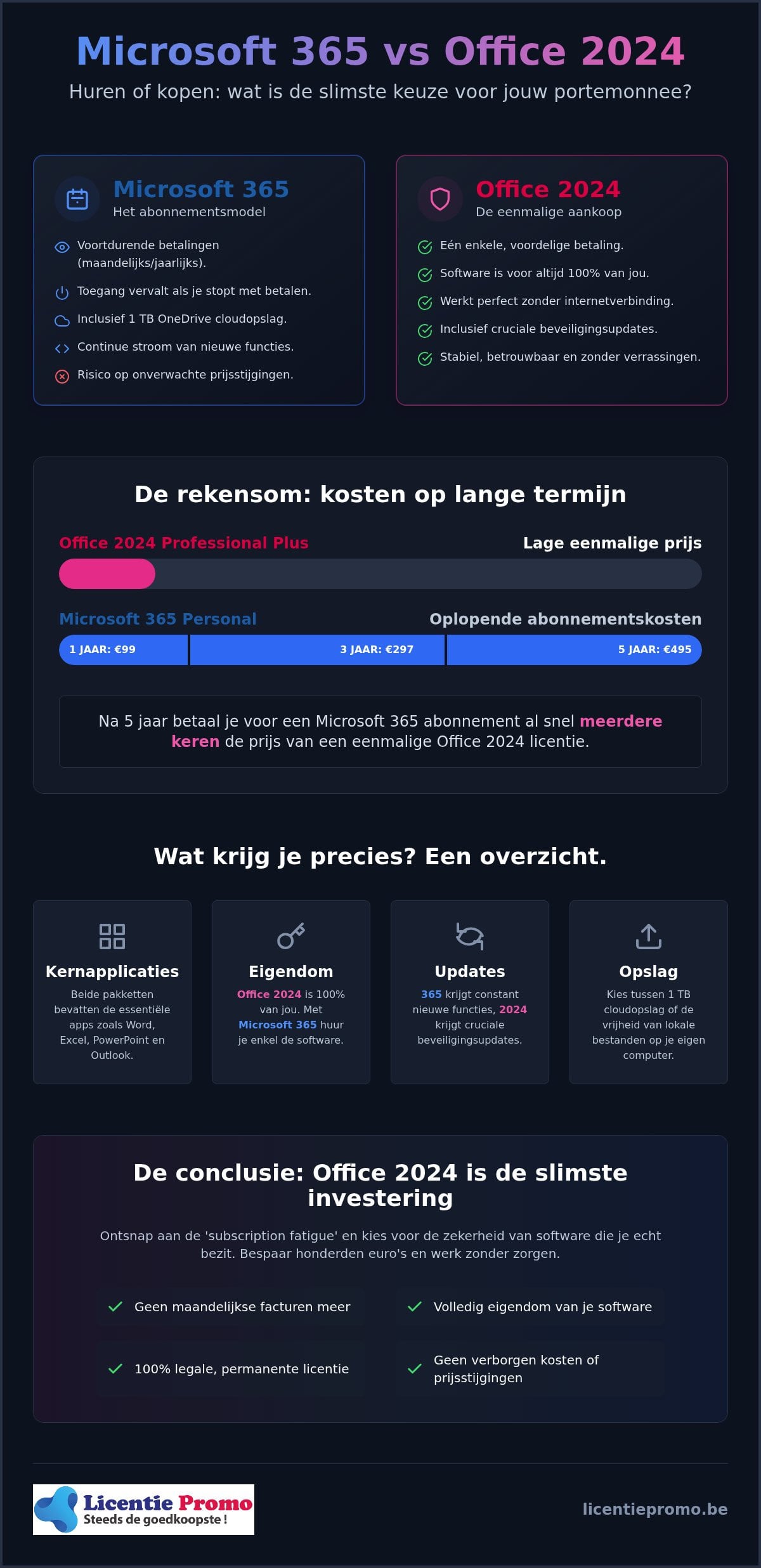
A subscription seems like a bargain at first glance. You pay a small amount each month and you're off. But appearances can be deceiving. Microsoft counts on your complacency to let that automatic debit run for years. When we look at the real difference in cost, you only see the true impact on your bank account. For a Microsoft 365 Personal subscription, you'll already pay €297 after three years. After five years, this rises to €495, and after ten years, you'll have spent nearly €1,000 on software you never truly own.
The low monthly price is a financial illusion. Moreover, you run the risk of price increases. Microsoft has raised rates several times in the past without you being able to do much about it. You are trapped in their system. Do you stop paying? Then your apps will lock immediately. You can still view your own documents, but editing or creating new files is no longer possible. So you are essentially held hostage by your own tools.
Cost of Microsoft 365 Personal and Family
Whether you choose the Personal version at €99 per year or the Family variant at €129 per year, the clock keeps ticking relentlessly. Most users barely utilize ten percent of all the bells and whistles in the package. So you're paying for features you never open. After five years, you'll have paid more than three times as much for a Microsoft 365 subscription as you would for a one-time purchase of a license. That's simply throwing money away while the apps do the same thing in practice.
The OneDrive trap: are you paying for storage you don't use?
The 1 TB OneDrive storage is often touted as the biggest advantage. But do you really need that space? Many Flemish users prefer to manage their sensitive data locally on their own hard drive or use free alternatives for the few files they do want to put in the cloud. If you already use iCloud or Google Drive, you're paying double for exactly the same service. Local storage is safer, faster, and above all, a one-time cost. So it's better to invest in a permanent Office 2024 license and decide for yourself where you keep your files without monthly rental fees.
Office 2024 Professional Plus: the financial benefits of a one-time purchase
Owning your software gives a reassuring feeling. Instead of nervously checking your bank statements every month, you choose the certainty of ownership. Office 2024 Professional Plus is the smartest choice for many. Why? Because after the purchase, you never have to spend another euro on that specific version. When we objectively compare the cost of Microsoft 365 vs Office 2024 , you see that the break-even point is reached very quickly. Usually, you have fully recouped your investment in less than two years. From that moment on, you technically work for free, while subscribers dutifully keep paying for exactly the same features.
No more fussing about expiration dates or failed automatic debits that suddenly block your work. Your license never expires. This is crucial for those who don't want to depend on the whims or price increases of a big tech company. You get a legal, permanent activation without fine print that just keeps working, year after year. Now that's a smart way to handle your hard-earned money. You install the software once and you're set for the years to come.
Why choose the professional plus edition?
The Professional Plus edition is simply the most complete package on the market. While the cheaper versions often stop at Word, Excel, and PowerPoint, here you also get unlimited access to professional tools such as Access and Publisher. This makes the license ideal for both students who need to build complex databases and Belgian self-employed professionals who design their own brochures or marketing materials. So you're not just buying a simple word processor, but a complete digital arsenal for your PC. Want to take that step right away and save hundreds of euros? You can get your own microsoft office professional plus 2024 license code here at an unbeatable price.
No subscription means more control
One of the biggest annoyances with cloud models is the total dependence on an internet connection and the cloud. With Office 2024 , you install the full apps locally on your hard drive. So you can continue working peacefully on the go, at a remote holiday destination, or during an annoying internet outage at home. Your files are where you want them. Moreover, you won't be constantly disturbed by forced updates that mess up your interface just when you have an important deadline. You retain full control over your own workflow and your tools. Although the official Microsoft price comparison often emphasizes “extra value” through cloud storage, the reality is different for most users. Stability and ownership weigh much more heavily than an online storage folder that you often already have for free elsewhere. A one-time purchase is simply the only way to truly keep your software budget under control.
The calculation: how much do you really save over five years?
Numbers don't lie. We've already looked at the cost of Microsoft 365 vs Office 2024 earlier, but the real win lies in the comparison between the official retail prices and LicentiePromo's offering. While Microsoft often charges a premium for a one-time license in their own store, we drastically lower that entry cost by offering unused corporate stock. The amount saved is no small change; it's capital you can invest in a faster laptop, extra RAM, or other professional peripherals that truly improve your workflow.
A Belgian student starting a five-year course feels this difference most keenly in their wallet. Instead of transferring money year after year for a rental model that suddenly blocks access after graduation, a one-time purchase lets you build your own digital arsenal. The money you don't lose to monthly subscriptions easily covers the cost of a sturdy laptop bag or a few months of internet in your student room. For a small self-employed person with three computers in the office, this advantage multiplies immediately. Equipping three devices with a permanent license means you permanently cut hundreds of euros from your annual fixed costs. This freed-up budget can then be invested in industry-specific solutions such as Best Bid, which is essential for electrical contractors who want to optimize their estimating process.
For the average Fleming who occasionally uses Word at home for a letter or Excel for the family budget, the calculation is simple. Why would you pay rent for 60 months for apps that barely change at their core? The total difference in euros often amounts to more than €400 over a period of five years when you choose a license through our platform. This is the smartest choice for your new PC. You install the software once and your price is fixed for the coming years, regardless of future price increases by the manufacturer. Also for professionals in the sports sector, who for example use AppyBee for their administration, minimizing unnecessary subscription costs is a smart move for their margin.
As an entrepreneur, you know that every recurring cost puts pressure on your margins. That's why a one-time investment is much more interesting than a subscription that quietly burdens your cash flow. At LicentiePromo, you also receive an official invoice that is fully tax-deductible for your accounting. You minimize your fixed costs and maintain full control over your operational expenses without any surprises later. Working on a Mac? Then be sure to check out the options for microsoft office home and business 2024 for a professional and highly cost-efficient solution.
Do you want to stop wasting money on software rental today? Visit our license shop and claim your financial advantage directly with a legal license.
Your legal license via LicentiePromo: the smartest choice for Flemish people
LicentiePromo puts an end to unnecessarily high software prices. While the official Microsoft Store often charges €149 or more for a basic version, we offer a legal solution for a fraction of that price. The cost of Microsoft 365 vs Office 2024 therefore works out even more in favor of the one-time purchase. We buy unused licenses from companies that have surplus stock. These licenses have never been activated and work exactly the same as an expensive version from the store. So you get the same quality for a much lower price.
Thousands of Belgians have already found their way to our webshop. Why? Because we completely remove the threshold. No complicated procedures or vague promises. With us, you get the certainty of a working code and a team that is ready for you. We understand that you want to get back to work or study quickly. That is why we optimize every part of your purchase, from payment to the final activation on your computer.
Buy safe and legal software
There are many misconceptions about cheap licenses. However, the European Court of Justice is very clear: reselling unused software licenses is completely legal. So you are buying a legitimate product from us. We even go a step further with our activation guarantee. What if your code doesn't work right away? Then we'll resolve it for you immediately. No hassle, no extra costs. You can always count on our expert customer service for support at every step of the process. Safety and legitimacy are central to us.
Start today without waiting time
You don't want to wait days for a package. With LicentiePromo, you'll receive your license code in your mailbox within 5 minutes of payment. You pay easily and securely with Bancontact, the favorite payment method of every Fleming. After payment, you can download the software directly from the official Microsoft servers. So you always install the original and most secure version of the software. Not convinced yet? Then read the reviews from our satisfied customers. They've already discovered how easy it is to save hundreds of euros without compromising on quality or service. Choose certainty today and stop that monthly rental for your software.
Take control of your software budget today
The choice is simple: stop renting and it's the smartest way to a healthy bank account. You've discovered how the cost of Microsoft 365 vs Office 2024 turns out painfully for subscribers in the long run. By investing once in a permanent license, you eliminate a recurring cost for years to come. You get full control over your tools and files, without the fear of blocked apps or sudden price increases.
LicentiePromo makes the switch lightning fast and safe. You receive your legal code within 5 minutes in your mailbox, enjoy a 100% activation guarantee and never pay an extra euro again. No subscription, no fine print, just software that is truly yours. Join the thousands of price-conscious Flemings who already chose certainty and ownership.
Buy Office 2024 Professional Plus now without a subscription and claim your advantage directly.
You are only a few clicks away from a worry-free and cost-efficient digital work environment. Good luck with your smart purchase!
Frequently Asked Questions about Office 2024
What is the difference between a one-time purchase and a subscription?
A one-time purchase means you fully own the software without any further costs. With a subscription like Microsoft 365, you rent the apps and access stops as soon as you miss a payment. The cost of Microsoft 365 vs Office 2024 therefore differs greatly in the long run. With Office 2024 you pay a fixed amount once for your license. This gives you the certainty that your programs will always keep working.
Is a LicentiePromo license truly permanently valid?
Yes, every license you purchase from LicentiePromo is permanently valid for the relevant device. There is no expiration date and we never charge extra costs after your purchase. Once you have activated the code, the software will continue to function indefinitely. This is the ideal solution for those who value stability and have no desire for unexpected invoices. So you are forever the owner of your own work tools without any fine print.
Can I install Office 2024 on multiple computers?
A standard license for Office 2024 Professional Plus is intended for installation on one device. Do you want to use the software on multiple computers? Then you need a separate license code for each device. Although Microsoft 365 allows installation on five devices, you pay for that again every year. With us, you make a one-time investment per computer, which for most users still works out to be hundreds of euros cheaper over the entire lifespan.
Will I still receive security updates with Office 2024?
Absolutely, you will receive all necessary security updates directly through Microsoft's official channels. Your software therefore remains protected against viruses and other online threats. The only difference compared to the subscription version is that you will not receive major new features or AI additions during the term. For most users, this is not a problem at all, as the current features of Word and Excel are already more than sufficient for professional and personal use on your PC.
Why is LicentiePromo so much cheaper than the Microsoft Store?
We purchase unused license volumes from companies that no longer need them. Thanks to this smart purchasing method and the fact that we have no physical stores or expensive marketing campaigns, we keep prices low. This is fully legal within the European Union thanks to the right of resale. So you get exactly the same software as in the official store, but at a fair price that fits your budget much better.
Do I need internet to use Office 2024?
You only need an internet connection for the initial download and the activation of your license code. After that, you can use all Office apps completely offline on your laptop or desktop. This is a major advantage over cloud-based services where you often need to stay connected for certain features. Whether you are on the train or working in a remote location, you always have access to your documents without cloud dependency.
Can I open my Office 365 files in Office 2024?
Yes, the file formats are fully compatible. Documents you previously created in Microsoft 365 open without any issues in Office 2024. So you don't need to worry about losing your work or layout problems. The transition is seamless and easy. You can simply pick up where you left off, but without the pressure of a monthly subscription. All your existing Excel spreadsheets and Word documents remain perfectly usable.
Is the software from LicentiePromo fully available in Dutch?
Certainly, the software is fully available in Dutch. During installation via the official Microsoft servers, you can select the desired language yourself. In addition to Dutch, you can also choose French, English, or other languages if that better suits your work. You will get the familiar interface and spell check you are used to. LicentiePromo ensures that you can get started in your own language within 5 minutes after payment.