
Difference between Office 2024 and 365: which version suits your way of working?

Why would you pay again every month for software you actually already own? It often feels like a subscription trap you can never escape. It's high time to put the difference between Office 2024 and 365 side by side in sharp focus. You're certainly not the only one frustrated by those constant debits from your bank account. The uncertainty about which features you really need and the fear of illegal licenses from vague providers doesn't make the choice any easier either.
We fully understand that frustration. You just want to get started with Word, Excel, and Outlook without Microsoft digging into your wallet every month. In this article, you'll find out whether you're better off with a one-time purchase or a subscription, and how you can save hundreds of euros on your software. We promise an honest comparison that helps you make that decision today.
We dive deep into the total long-term costs and look at exactly which apps you get with the latest Office 2024. Additionally, you'll learn how to buy a 100% legal license so you're permanently rid of those monthly invoices. After reading this guide, you'll know exactly which version seamlessly fits your way of working and how to manage your software budget smartly.
Key Points
- Understand the fundamental difference between Office 2024 and 365 to determine whether a one-time purchase or a subscription fits your budget better.
- Discover exactly which apps are included in the packages and why you don't depend on a monthly contract for essential security.
- See how with Office Professional Plus 2024 you can recoup your investment within eight months compared to a recurring subscription.
- Learn to ask critical questions about your need for cloud storage so you never pay again for features you don't use.
- Experience the certainty of a 100% legal license with activation guarantee, delivered to your mailbox within five minutes.
What is the fundamental difference between Office 2024 and Microsoft 365?
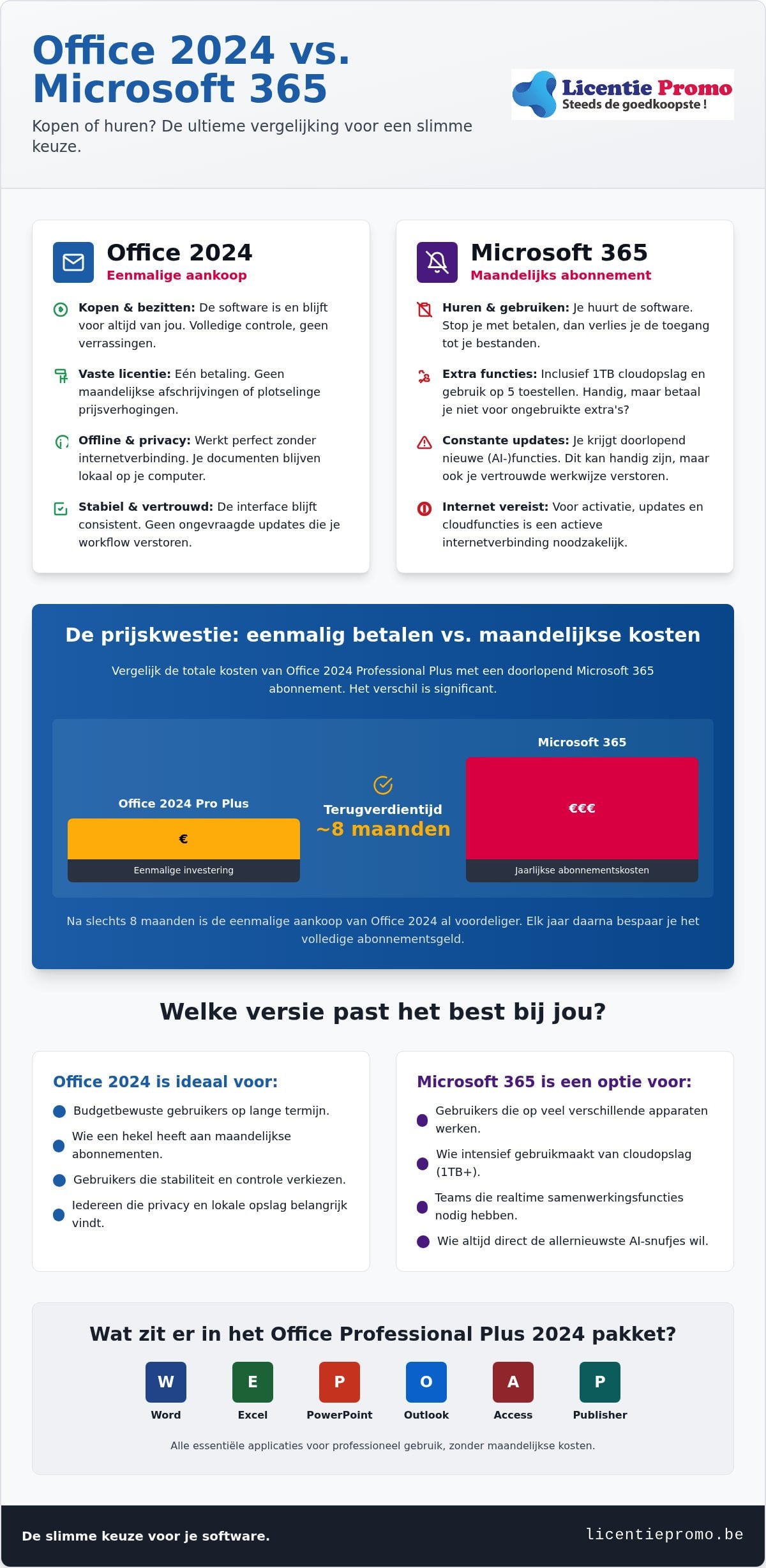
The core of the matter is simple. It's about ownership versus a subscription. Microsoft often pushes you towards a monthly fee, but there is a full-fledged alternative. The most important difference Office 2024 and 365 is not in the power of the programs, but in the way you pay for them. You choose between a fixed investment or an endless series of invoices.
Office 2024: buy and own
You purchase a license for Microsoft Office Professional Plus 2024 and the software remains yours forever. You install the package on one PC or Mac. After that, you never have to pay a euro to Microsoft again. No sudden price increases. No annoying emails about failed automatic debits. This is the perfect solution for those who simply want stable software without being tied to a stranglehold contract. You retain full control over your own computer and your budget.
Microsoft 365: rent and use
This is software as a service. You rent the programs instead of owning them. As long as you pay monthly or annually for Microsoft Office 365 Personal, you have access. If you stop paying, you immediately lose the ability to edit your documents. You get extras like 1TB OneDrive storage and the option to work on five devices at the same time. That sounds attractive to some, but think carefully about whether you really use those extras or whether you are mainly paying for storage space that you can find cheaper elsewhere.
When we look at the history of Microsoft Office, we see that the shift to subscriptions was mainly a commercial move by the software giant. For the average user, little changed at the core. Whether you type a letter in Word 2024 or in the 365 version, the experience is virtually identical. The buttons are in the same place and the features are equally powerful for your daily tasks.
Don't be misled by marketing talk about “limited” versions. Office 2024 includes all the essential applications you need on a daily basis. Excel, PowerPoint, and Outlook work exactly as you're used to. The big difference Office 2024 and 365 is mainly about your freedom. Do you want to pay every month for updates you often don't even notice, or do you choose the peace of mind of a one-time purchase? Choosing a permanent license saves you hundreds of euros in the long run and gives you the certainty that your software always works, even without an active internet connection or ongoing subscription.
Features and updates: what's really in the package?
If you choose Office 2024, you get the trusted powerhouses directly on your hard drive. Word, Excel, PowerPoint, and Outlook are included as standard in the package. So there is no difference Office 2024 and 365 when it comes to the basic tools you use every day. The big advantage? You are not dependent on a stable internet connection. After the one-time activation, everything works fully offline. This is a huge asset for your privacy. Your documents stay locally on your computer and are not forced into the cloud.
In technical analyses about the main differences between 365 and 2024 you often read that the subscription version has more AI features. That's true, but ask yourself if you really need them. Microsoft 365 is a constant construction site where features come and go. Office 2024 is, on the other hand, a rock in the storm. You get exactly what you buy. No surprises, no buttons that suddenly change place, and no unsolicited interface updates that disrupt your workflow. You buy stability for your daily tasks.
The power of Office 2024 Professional Plus
For those who want more than just the basics, the Professional Plus edition is the only logical choice. This package also includes Access and Publisher. These tools are essential for database management and professional layouts. The software is fully optimized for Windows 11. This ensures a lightning-fast startup time and a modern look that perfectly suits your new PC. Do you want to get started right away without monthly costs? You can buy Office 2024 Professional Plus here and receive the activation code within five minutes.
Updates and support in 2026
Don't be scared by stories about security. Microsoft guarantees security updates for Office 2024 for the next five years. Your computer remains optimally protected against new digital threats. The lack of new functional updates is actually a blessing for many professionals. Your software remains predictable. You don't have to relearn how a program works after an automatic update. This saves time and frustration in the workplace. Curious about the rest of our offerings? You can always check our license shop for the sharpest prices in Belgium.
The price question: one-time payment versus monthly costs
Money is often the decisive factor. The difference Office 2024 and 365 only becomes painfully clear when you take out the calculator. Many users are blinded by the low entry price of a subscription. However, they forget the long-term total. A subscription is an endless financial obligation. A perpetual license is a one-time investment that pays for itself very quickly.
Just look at the hard numbers. In the table below you can see the cumulative costs of a standard Microsoft 365 Personal subscription (based on the current market price of approximately €99.99 per year) compared to the one-time purchase of Office 2024 via LicentiePromo.
| Period | Microsoft 365 (Subscription) | Office 2024 (One-time) |
|---|---|---|
| After 1 year | ~€100 | One-time purchase |
| After 3 years | ~€300 | €0 extra costs |
| After 5 years | ~€500 | €0 extra costs |
The conclusion is simple. Office 2024 usually pays for itself completely within 6 to 8 months. How do we keep these prices so low? LicentiePromo buys unused licenses from large corporate inventories. This is fully legal according to European legislation and the European Court of Justice. So you get exactly the same software as in the store, but for a fraction of the price. No hidden catches. Just a smart deal.
Calculation example for a Belgian self-employed person
As a self-employed person, every euro counts in your accounting. A monthly subscription is a recurring expense that reduces your profit. At LicentiePromo, you will receive an official invoice directly in your mailbox after your purchase. This allows you to neatly deduct the VAT and claim the costs as a business expense. Over a period of five years, you can save hundreds of euros this way. That is money you can better invest in your own business or marketing. Check our license shop for the most current offers and start saving today.
Hidden costs of subscriptions
Subscriptions seem flexible, but they come with risks. Microsoft regularly implements price increases. In July 2026, for example, the price of Microsoft 365 Business Basic rose by 16% and some other plans even by 33%. You have no control over this. Moreover, if you don't pay for one month, Microsoft immediately blocks access. You can no longer edit your own documents. With Office 2024 , you don't have those worries. You own the software. You have the psychological peace of a computer without debts or monthly obligations. That's truly worry-free work.
For whom is which version the best choice?
For larger enterprises that not only want to control their costs but also strengthen their market position with Microsoft technology, NaviWorld (Thailand) Co., Ltd. shares essential strategies for leveraging customer insights with an eye toward 2026.
Your way of working determines the ultimate winner in this comparison. The difference Office 2024 and 365 is very different for a student than for an SME. First ask yourself a few honest questions before you pull out your bank card. Do you really need that 1TB of cloud storage? Or do you prefer to keep your documents safely on your own external drive for maximum privacy? Most people use their software on one fixed laptop. Why would you then pay for a subscription that supports five or more devices? It's all about efficiency and cutting unnecessary costs.
Choose Office 2024 if you…
You dislike recurring costs and unexpected price increases. We completely understand that. With a one-time purchase, you're set for years. This is the smartest move for self-employed individuals and small businesses seeking stability in their budget. Moreover, you prefer to work locally. Your files are on your own hard drive, not in a distant data center where you lose control. That brings peace of mind. The interface also doesn't suddenly change due to an unsolicited update. You work with the same buttons today as you will in three years. No wasted time, no frustrations. Want that freedom right away? You can buy your Microsoft Office Professional Plus 2024 license here and install it within five minutes.
Choose Microsoft 365 if you…
Collaboration is your absolute priority. You constantly share documents in real time with colleagues and work intensively in the cloud every day. Then the subscription form of Microsoft Office 365 Personal certainly offers advantages. You always get first access to Microsoft's latest AI features. Realize, however, that this is a luxury you pay for every month again. The difference Office 2024 and 365 here lies mainly in the additional services around the familiar programs. For a large family, a shared subscription can be handy, but for individual use, the bill quickly adds up.
Take a critical look at your actual usage. Most Flemish people have enough with the core functions of Word, Excel, and Outlook. These are nearly identical in both versions. If you don't need constant cloud synchronization or experimental features, you're essentially throwing money away with a subscription. A one-time license gives you the certainty that your software always works. Even if you miss an invoice or have no internet. Do the math for the next five years and choose the security of ownership. Check out all options in our license shop and save on your fixed costs today.
Why office 2024 via licentiepromo is the smartest move
You now understand the fundamental difference between Office 2024 and 365 and the huge financial gain you make with a one-time purchase. Now it's time for action without hassle. At LicentiePromo, we believe in speed and results. Stop waiting for physical packages or complicated contracts. Our process is very simple: you choose your package, pay securely, and within five minutes the official activation code is in your mailbox. You can get started with your new software right away while others are still waiting for their next monthly invoice.
Direct delivery and easy installation
Waiting is a thing of the past in today's digital world. Everything is handled via email, so you pay no shipping costs and lose no time. Immediately after your purchase, you'll receive a clear guide and a direct link to our downloads. We've streamlined the process so much that even those who are less tech-savvy can complete the installation smoothly. Do you still have a question or is the activation not going as planned? Our Belgian customer service is ready to assist you personally. We offer a rock-solid activation guarantee on all our products. We will never leave you in the lurch until your software runs perfectly on your computer.
Legal certainty for every user
Skepticism about cheap licenses is healthy, but with us you buy with peace of mind. LicentiePromo is a true Belgian company that swears by transparency and legality. Our licenses are 100% legal and come from the purchase of unused corporate inventories. This is an official right established by the European Court of Justice. So you buy a license that remains permanently valid and will never expire. Using a legitimate code is also essential for your digital security. Only with an official activation do you receive the necessary security updates that protect your system against hacks and malware. The many positive reviews from thousands of satisfied customers in Belgium prove that quality and a sharp price go perfectly hand in hand.
Choose the freedom of ownership today. You save hundreds of euros and are definitively rid of that annoying subscription culture. Our license codes are immediately available at any time of the day. Whether you are a self-employed person who wants to optimize their bookkeeping or a family that is simply looking for a reliable word processor, we have the right solution ready for you. Check out our full range in the license shop and experience for yourself how easy legal software can be. Your software is yours, as it should be.
Take control of your software budget
The choice between an endless subscription and a one-time purchase is now crystal clear. The difference Office 2024 and 365 ultimately revolves around your freedom and wallet. Office 2024 offers you the stability of the familiar apps without being tied to monthly price increases. You own the software, work securely offline, and retain full control over your own documents.
Why pay more for features you don't use? With our legal licenses, you save hundreds of euros over the coming years. You receive your code within five minutes in your mailbox with a 100% activation guarantee. No hassle, no waiting times, and above all: never need a subscription again. It is the smartest investment for any price-conscious user in Belgium.
Buy your Office 2024 Professional Plus license now and save immediately!
Take the step towards worry-free work today. You deserve software that is yours, delivered by a reliable Belgian partner who won't let you down.
Frequently Asked Questions about Office 2024
Is Office 2024 a one-time purchase or will I have to pay extra later?
Yes, Office 2024 is a one-time purchase for one device. You pay a fixed amount and the license is permanently valid without any form of subscription. There are no hidden costs or monthly deductions in the future. You fully own the software and can continue to use it for years without Microsoft reaching into your wallet again. That's truly worry-free working for any budget-conscious user or self-employed person.
Can I open Office 365 files in Office 2024?
Absolutely, all files created in Microsoft 365 are fully compatible with Office 2024. Whether it's Word documents, Excel sheets, or PowerPoint presentations, you can open and edit them without any issues. The file format remains identical. So you don't have to worry about losing formatting or data when you switch. The exchange between the different versions is seamless and without technical barriers for the end user.
Do I need an internet connection to use Office 2024?
You only need an internet connection for the initial download and activation of your license code. Once the software is on your computer, Office 2024 works fully offline. This is an important difference between Office 2024 and 365, since the subscription version needs to log in regularly to check your status. With the 2024 version, you can work anywhere, even in locations without Wi-Fi or a stable connection, without any interruption to your workflow.
What is the difference between Office 2024 and the older 2021 version?
What is the difference between Office 2024 and the older 2021 version?
Office 2024 is noticeably faster and much better optimized for Windows 11. Handy new features have been added to Excel, such as dynamic arrays and improved search functions that speed up your data analysis. With more than 25 years of experience, Knowledgefront helps organizations implement effective eLearning solutions to make the most of these new software features. Outlook has also received a more modern interface that responds more smoothly to every command. While the 2021 version is slowly aging, the 2024 edition offers a future-proof foundation with the latest security standards. It is the most stable version for those seeking certainty in the coming years.
A standard license for Office 2024 is tied to one specific device. If you buy a new computer, you usually cannot simply transfer the same license code to the new system. However, the license remains valid indefinitely on the original PC or Mac where you activate it. For a new device, you will need a new activation code. Fortunately, LicentiePromo's prices are so competitive that this is still much more cost-effective than subscriptions.
Are the cheap licenses from LicentiePromo legal for businesses?
Yes, our licenses are 100% legal for both individuals and businesses. We purchase unused volume licenses from companies that no longer need them, for example due to bankruptcy or restructuring. The European Court of Justice has ruled that reselling these software licenses is fully lawful within the European Union. You will receive an official invoice with every purchase for your accounting, which is essential for your business administration and any audits.
Will I still get updates if I buy Office 2024?
You receive all essential security updates from Microsoft to keep your system safe against new digital threats. These updates are downloaded automatically as long as the official support period lasts. The fundamental difference between Office 2024 and 365 is, however, that with the 2024 version you do not get new functional features after your purchase. You keep the familiar interface and stable features you chose, which for many professionals is actually a big advantage.
Does Office 2024 also work on a Mac or only on Windows?
Office 2024 works on both systems, but you need to choose the correct version for your specific device. The Professional Plus edition is specifically developed for Windows 11 and Windows 10. For Apple users, there is the special Office 2024 Home & Business version for macOS. So pay close attention when ordering in our license shop to ensure you receive the code that matches your operating system. Both versions offer the same programs such as Word and Excel.