
Resolving error code 0xc004f050 during Windows activation: step-by-step plan for Belgium
Should you immediately buy a new product key if Windows refuses activation? Not before you know the cause. Error code 0xc004f050 windows activation means that Windows does not accept the entered key. This can be because the key does not match your Windows edition, due to an error when entering it, or due to a problem during an upgrade. Repeating the same activation step will not solve that.
You want to quickly find out where things are going wrong, without unnecessarily buying another key. Understandable. First check which edition of Windows is on your device and compare it with the edition for which your product key is intended. The Windows edition and the license must match.
In this step-by-step plan, you will discover what the error code means and how to check possible causes one by one. You will also read when the activation troubleshooter can help, what to do when upgrading from Home to Pro, and when a suitable product key or targeted help is the next step. This way, you won't blindly replace a key and you'll know how to proceed.
Key Points
- Check which Windows edition is on your device and compare it with the edition for which your product key is intended.
- With error code 0xc004f050 Windows activation, a difference between the key and the Windows edition can be the cause. So buying a new key is not always the first step.
- Carefully check the entry of your product key and your keyboard layout. Never share the full key publicly.
- Does Windows keep rejecting the key after your checks? Then determine whether you need a suitable license or extra help.
- Save the error message and follow a fixed order: note your edition, check your key, and only then choose your next step.
What does error code 0xc004f050 mean during Windows activation?
Windows does not accept the entered product key and displays error code 0xc004f050. The code by itself does not prove that your key is invalid. Windows may also reject the key because it does not match the installed edition. For example, a key for Pro will not simply activate an installation of Home.
During the activation process , Windows checks whether the product key matches the software and license. This is part of Windows Product Activation. The error message tells you that activation was not successful, but does not automatically give the precise cause. Microsoft describes the code in connection with a product key that cannot be used to activate Windows. Check the current explanation at Microsoft before making a major change.
What message do you see with the error code?
The code may appear when you enter a key in the activation settings, or when Windows tries to activate after an upgrade. The exact on-screen text may differ depending on your Windows version and the situation. Therefore, note down the full message, including the error code, before you change any settings. This way you can later compare the information with Microsoft's explanation and you won't forget any details.
Do not share the product key itself in a public message or in a screenshot. The error code and the full message are sufficient to begin the check.
Which causes are worth checking first?
Start with the combination of your Windows edition and the key. A key for Pro does not simply fit Windows Home, and vice versa. A typo is also possible. Check whether you have copied the characters correctly and whether your keyboard layout is not entering a different character. These are possible causes, not conclusions: the code alone does not tell you which one is at play.
Useful summary: error code 0xc004f050 means that Windows does not accept the entered key for activation. Check the Windows edition and the key and compare the message with Microsoft's current explanation.
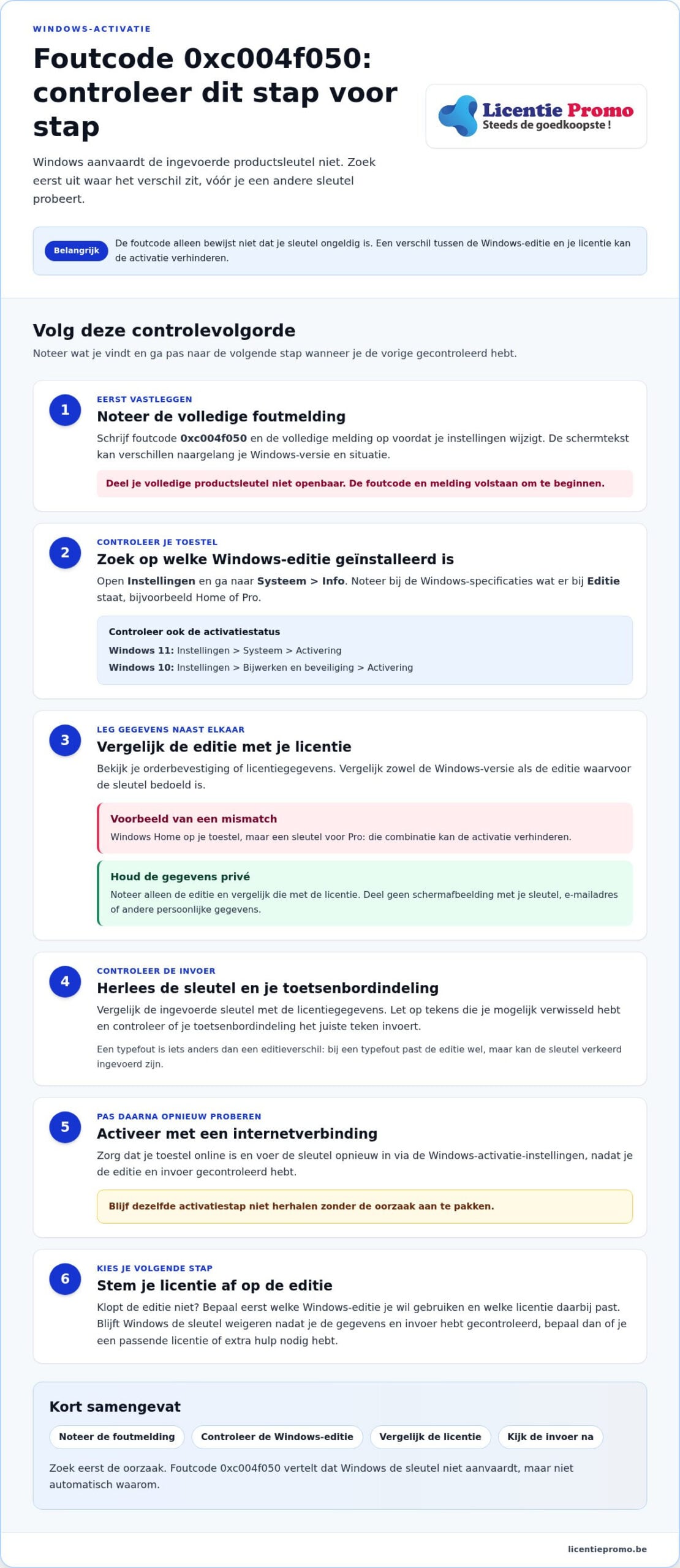
Approach it step by step: note the message, determine which Windows edition is installed and compare it with your license details. Then check the input. Only when those steps provide no explanation should you choose a next action. This way you avoid repeated activation attempts or an unnecessary purchase of another product key.
First check whether your Windows edition matches your product key
First check which Windows edition is on your device before trying another key. A product key for Windows Pro will not simply activate an installation of Windows Home. Microsoft cites a difference between the key and the installed edition as a possible cause of error code 0xc004f050. See the causes of error code 0xc004f050 and then carefully compare your own details.
This is how you check which Windows edition is installed
Open Settings and go to System > About. Under Windows specifications, look at Edition and note what it says, for example Home or Pro. The exact wording may differ depending on your Windows version.
Also check your activation status. In Windows 11 you can find it via Settings > System > Activation. In Windows 10, the activation page is under Settings > Update & Security > Activation. The displayed names may differ slightly per version.
Do not share a screenshot that shows your product key, email address, or other personal data. Only note the edition and error message for your own reference.
This is how you compare the edition with your license
Place your order confirmation or license details next to the edition you just noted. Compare both the Windows version and the edition, not just the brand name. Does your device say Windows Home, but is your key intended for Pro? Then that combination can prevent activation. That differs from a typo: with a typo, the edition does match, but the key may have been entered incorrectly.
- Note the installed edition.
- Look in your license details to see which edition the key is intended for.
- Compare the two entries and keep your full key private.
If the edition does not match, do not keep re-entering the key. First determine which edition you want to use and which license fits it. If you are looking for a license for Windows 11 Pro, then check the Windows 11 Pro license. Only choose it when Pro matches the edition you want to use. That way you tackle error code 0xc004f050 Windows activation in a targeted way, without blindly trying another key.
Follow these safe steps to resolve error code 0xc004f050
Now that you have compared the edition with your license details, you can check the input. Work in this order. This way you avoid repeating a failed activation without addressing the cause.
- Re-read the license details. Compare the key with the details you received at your purchase. Watch for swapped characters and re-enter the key via the Windows activation settings.
- Check the edition and input. Verify whether the key is intended for the Windows edition on your device. Also check the keyboard layout, as it determines which character you enter.
- Try again with an internet connection. Make sure your device is online and perform the activation again via Settings. If the error appears again, note the exact message.
Check the product key without revealing it
Keep your order confirmation or license details at hand and compare the key character by character. Never share the full product key in a public question, forum reply, or screenshot. The error message and Windows edition are enough to describe the problem. Also, do not use keys that you find on forums or unknown websites. They do not prove that you have a suitable, valid license.
Try the built-in activation help
Windows has a troubleshooter for activation. That option is intended for a device on which Windows is not activated. Sign in as administrator. Open in Windows 11 Settings > System > Activation. Open in Windows 10 Settings > Update & Security > Activation. If you see the Troubleshoot button there, select it and follow the on-screen instructions.
The menus may differ depending on your Windows version. Follow the options that appear on your device and note the outcome, even if the troubleshooter does not find a solution. This way you know which step you have already tried.
Stop re-entering if your edition does not match the license or if the same error keeps recurring. Repeating will not change an edition mismatch or a key that is not suitable for your installation. Does the cause remain unclear? Keep your edition, error code, and license details at hand when you contact customer service for activation help . That way you can move forward in a targeted way with error code 0xc004f050 Windows activation.
When is a different product key or extra help needed?
A new product key is not automatically the solution. First determine what your checks show. With error code 0xc004f050 windows activation, there are three situations, each with a different next step:
- The edition does not match: do not reuse the key for that installation. Check which license matches the Windows edition you want to use.
- You suspect an input error: compare the key with the details you received and enter it carefully again. Do not share the full key publicly anywhere.
- The edition and entry are correct, but activation still fails: stop repeating and ask for targeted help, including the error message and your license details.
When should you not try the same key again?
Stop as soon as you see that the key and the installed edition do not match. Repeated entry will not change that difference. Also stop when you have carefully checked the key and the error keeps coming back after the basic checks. Then note the error code and Windows edition and have your order confirmation or proof of purchase ready.
If you purchased the license from LicentiePromo, have the error message and order confirmation ready when you contact customer service. This way, the situation can be reviewed using the correct information. Also review the terms of the activation guarantee that applies to your purchase.
How do you choose an appropriate next step?
Does the edition not match? First determine whether you want to keep the current edition or use a different edition. Only then choose a license that fits. If Windows 11 Pro is the right edition for your device, then look at the Windows 11 Pro license. A Pro license is not a solution if you want to keep using Windows Home.
If you suspect a typo, simply recheck the received data calmly. If the error persists afterwards, have the error code, your Windows edition, and your proof of purchase at hand when you request help. This way, you avoid going through the same steps without new information.
Would you like to view other customers' experiences before choosing a next step? Read the customer reviews about LicentiePromo. Look for experiences that match your question and assess your own license details separately.
Did you know that Windows 11 Pro is the right edition? Then check the Windows 11 Pro license after you have verified the edition and existing key.
Activate Windows with the correct license and prevent the same error
Avoid entering another key blindly. Work in the right order: save the error message, determine your Windows edition, compare it with your license details, and only then check which step is needed. A valid license must match the Windows edition on your device. That way you tackle error code 0xc004f050 windows activation in a targeted manner.
What should you check before a new Windows license?
Compare these details one more time:
- The full activation message and error code.
- The edition that is on Windows on your device, such as Home or Pro.
- The edition and key details on your order confirmation or in your license details.
Does everything match, but Windows still refuses the key? Then save the message and your proof of purchase. That information helps to request targeted support, without sharing your full key publicly. LicentiePromo sells legal Microsoft licenses with an activation guarantee and a refund option. Check the terms that apply to your purchase.
Activate your license within 30 days. After payment, you will receive your digital license by email. First check that the edition is correct and then try the activation with the correct key.
Choose a next step without guesswork
Does the key not match the installed edition? First determine which Windows edition you want to use and find a license that matches it. Do you need Windows 11 Pro and does that edition match your choice? Then view the Windows 11 Pro license.
Still in doubt? First re-read your existing key and activation message. That way you avoid a new purchase while a typing error or edition difference may be the cause. Only then choose a license for the edition you actually want to activate.
Have you checked your edition and do you know which license you need? View the Windows licenses and choose with purpose. With the right check beforehand, you take the next step with more confidence.
Choose your next step with certainty
Error code 0xc004f050 Windows activation does not automatically mean you need a new product key. First note the error message, check your Windows edition and compare it with the license details. Only then check the input or determine what help you need. This way you avoid repeating the same activation step.
A valid license must match the Windows edition on your device. If your checks show that you need a different license, then what? LicentiePromo sells legal Microsoft licenses with an activation guarantee and a refund option. Review the terms that apply to your purchase. You can also read reviews from Belgian customers for experiences.
Ready to choose with purpose? First compare the edition you want to activate with the available license details. View the Windows licenses and choose with purpose. With the right check beforehand, you can take the next step with more confidence.
Frequently Asked Questions
How do I resolve error code 0xc004f050?
First, check which Windows edition is on your device and compare it with the edition for which your key is intended. Then verify the key using your license details and check your keyboard layout. Try the activation again while your device is online. If the activation troubleshooter appears in Windows, follow the instructions. If the error keeps coming back, note the message and stop repeating the same attempt.
Can an incorrect Windows edition cause error code 0xc004f050?
Yes. A product key for Windows Pro does not simply work with an installation of Windows Home, and vice versa. Check the edition via Settings and compare it with the information on your order confirmation or in your license details. An edition difference is not the same as a typo. Do not keep re-entering the key if the editions do not match. First determine which Windows edition you want to use.
Can I fix error code 0xc004f050 without buying a new license?
Yes, that is possible. A new license is not always necessary: the cause may be an incorrect entry, a customized keyboard layout, or a difference between the key and the Windows edition. Check those points first and then try to activate again. You can also use the built-in troubleshooter if it is available on your device. Only choose a different key once you have determined that your existing license does not match your edition.
What do I do if my Windows product key still doesn't work after checking?
Stop re-entering if your edition and key details match, but Windows keeps rejecting the key. Save the full error message, note your Windows edition, and have your order confirmation or proof of purchase ready. If you bought the license from LicentiePromo, contact customer service. Never share your full product key publicly. With the error code and your edition, you can ask for targeted help.
Is error code 0xc004f050 a sign that my Windows license is illegal?
No, the error code by itself does not prove that your license is illegal. It indicates that Windows does not accept the entered key, for example due to an edition mismatch or an input problem. Therefore, first check the license details and the Windows edition. Review the terms that apply to your purchase if activation fails.