
Install Microsoft Office with a product code: step-by-step plan for smooth activation in 2026

Why keep paying monthly for software that you can simply own once? More and more users in Belgium are tired of ongoing subscription costs and deliberately choose the certainty of a permanent license. Yet getting started sometimes causes doubts. Where can you safely get the official installation files, and what do you do if the activation process gives an error message? Fortunately, installing Microsoft Office yourself with a product code doesn't have to take hours!
After all, you want to get started with Word and Excel right away, without complicated procedures or glitchy software. In this practical guide, you'll discover within five minutes how to safely download, install, and activate your Microsoft Office package with a valid product key. We guide you step by step through your official Office account, tackle any error messages promptly, and ensure a definitive activation on your PC or Mac!
Key Points
- Check in advance whether your PC or Mac meets the current System Requirements so that the installation runs smoothly and without hiccups.
- Discover the concrete step-by-step plan to easily install Microsoft Office with product code yourself via the official redemption page and your own Office account.
- Put an end once and for all to hiccups during the activation process thanks to targeted solutions for typos and messages about codes that have already been used.
- Understand the differences between a permanent license and Microsoft 365, so you can enjoy lasting software security without monthly subscription costs!
- Get absolute certainty about 100% legal software from controlled European overstock with a lifetime activation guarantee.
What do you need for the installation of Microsoft Office?
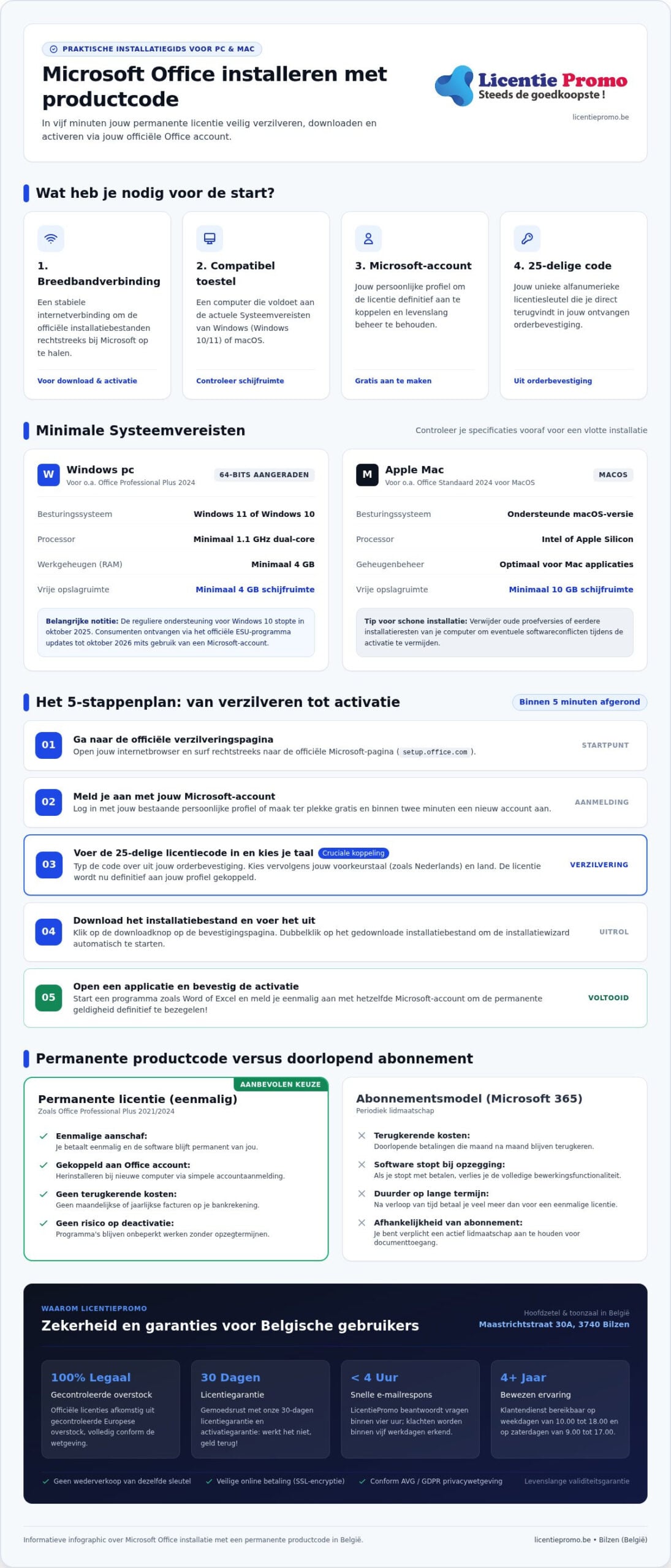
A well-thought-out preparation will save you a lot of time and unnecessary frustration later. If you want to smoothly install Microsoft Office with product code, make sure you have the right elements ready on your desk right away. You need four essential things: a stable broadband connection, a compatible device, an active Microsoft account and of course your unique 25-character alphanumeric license key from your order confirmation. With this basis you immediately set the tone for a flawless start!
The minimum system requirements for your device
Always first check whether your computer meets the current System Requirements. For modern versions such as Microsoft Office Professional Plus 2024 you need at least Windows 10 or Windows 11 . Are you still working on Windows 10 at the moment? Then know that regular support ended in October 2025, although consumers can still receive updates until October 2026 via the official ESU program, provided they use a Microsoft account.
Also provide sufficient computing power and storage space. On a Windows device, the installation requires at least a 1.1 GHz dual-core processor, 4 GB RAM and at least 4 GB of free disk space. For users on macOS, a requirement of 10 GB of storage space applies. The system behind Microsoft Product Activation immediately checks the compatibility of your operating system during the rollout. Therefore, deliberately choose the 64-bit variant on modern hardware to get maximum computing power from Excel and Access!
Preparing your Microsoft account
Sign in in advance with a personal Microsoft account or create a new profile for free. Linking your license to your own Office account will save you an enormous amount of hassle later on. If you switch computers or format your hard drive in the future, a simple sign-in is all it takes to retrieve everything again. You will then never have to manually retype your original key.
Finally, remove all old trial versions or conflicting Office remnants from your computer before you start. Such leftover files regularly cause annoying error messages during the activation process. So make your hard drive completely clean beforehand! That way, you can independently and smoothly install Microsoft Office with a product code within moments.
Step-by-step plan: Installing Microsoft Office with a product code
Ready to start? Installing microsoft office with a product code yourself follows a fixed pattern that Microsoft uses for all standalone licenses. No complicated IT knowledge required! With this concise guide, we'll walk you through the entire process in just a few minutes, from entering the code to a working package on your screen.
Step 1 to 3: entering and linking the code
Open your web browser and go directly to Microsoft's official redemption page (setup.office.com). Sign in here with your personal Microsoft account. Don't have an account yet? Create one right there. It's free and takes barely two minutes.
Then enter your 25-character license code. You will find this alphanumeric key directly in the order confirmation you received by email. According to the official Microsoft guide , the license is permanently linked to your profile after validation. Finally, select your preferred language, such as Dutch, and confirm your country selection.
Handy tip: Even if your license comes from European overstock, you link it to your own Office account in exactly the same way as a retail box. Completely transparent and one hundred percent compliant with the rules!
Step 4 and 5: download and complete
Once the linking is done, the button to start the installation appears. Go through these simple steps:
- Download the installation file: Click the download button and save the setup file to your computer.
- Run the installation: Double-click the downloaded file and let the wizard do its work. All your familiar programs will now be set up neatly in the background.
- Confirm the activation: Once complete, open an application such as Word or Excel. Sign in once with the same Microsoft account to seal the permanent validity.
There you go, your office suite is immediately operational! Do you need additional software for your PC or laptop after these steps? Feel free to take a look at our complete license shop for other reliable software solutions with immediate delivery.
Solutions for common problems during the activation process
Does activation unexpectedly stall? Don't panic! In most cases, the cause is a simple reading error or a leftover installation file on your computer. Installing Microsoft Office yourself with a product code almost always succeeds when you perform these targeted checks. We have clearly listed the most common stumbling blocks and their direct solutions.
Error messages when entering the product code
Are you told that the key is invalid? First look for confusing characters. Certain letters and numbers look very similar: think of the number 8 and the letter B, or the number 0 and the letter O. The official step-by-step plan from Microsoft excludes certain letters by default, which makes a mistake easy to make.
Always check your order confirmation. Copy and paste the license code directly into the input field to rule out manual typing errors. Make sure you do not include a space before or after the series of digits. If you get the message that the code has already been used, that almost always means the key was already successfully linked to your account during an earlier attempt. Log in to account.microsoft.com and download the package directly from your overview!
Cleaning up conflicting software and previous installations
Did your new computer already have a temporary trial version of Microsoft 365 pre-installed? Manufacturers often ship devices with such pre-installed software. When you then add a permanent license, Windows' license managers regularly get tangled up with each other. Two different Office variants on one machine invariably cause activation errors.
Solve this quickly with this approach:
- Thoroughly remove old versions: Go to Windows settings, open ‘Installed apps’ and remove all previous Office and Microsoft 365 entries.
- Restart your computer: Restart your device to fully reset registry files and background processes.
- Check security: Temporarily disable active VPN connections or strict Firewall and network security when Microsoft servers appear unreachable.
With a clean slate, installing microsoft office with product code proceeds without further hiccups. Still stuck? Our expert customer service is ready to help you further by email within four hours!
Permanent product code versus Microsoft 365: the differences
Still unsure whether to choose a recurring subscription or a permanent license? The way you manage your software differs significantly. With Microsoft 365, you pay a recurring monthly or annual fee to keep editing your files. If you stop paying, the programs switch to read-only mode. By choosing install Microsoft Office with product code , on the other hand, you opt for unconditional ownership. You purchase the software once and retain full usage rights forever!
No subscription costs with a lifetime license
No more unnecessary monthly charges on your bank account. A permanent license key provides peace of mind and financial control. You install the software on your PC or Mac and use it for as long as you want, with no surprises afterward. Especially for budget-conscious families and Belgian self-employed individuals, this delivers significant savings compared to rental formulas. Discover all the details about an affordable Office license without subscription and make the definitive switch to worry-free ownership today!
Which applications are included in your package?
Classic suites deliver exactly those familiar desktop applications that keep you productive every day, without unnecessary bloat:
- Word and Excel: For flawless word processing and advanced calculations with powerful formulas.
- PowerPoint and Outlook: For professional presentations and clear management of your emails and calendar.
- Access and Publisher: Powerful databases and formatting tools, included with extensive editions for Windows.
Unlike cloud subscriptions, these programs continue to function locally on your hard drive, even when you are offline. Would you like to have the most complete and up-to-date equipment for your computer right away? View and order today Microsoft Office Professional Plus 2024 to get started within a few minutes!
Choose maximum autonomy at the office or at home. Once you take the step to install Microsoft Office with a product code yourself, you enjoy stable software without anyone interrupting your workflow with subscription renewals.
Buy your legal Microsoft Office license at LicentiePromo
Choose absolute peace of mind and avoid shady intermediaries. If you want to complete microsoft office install with product code yourself, you can count on a flawless ordering process at LicentiePromo. We supply exclusively 100% legal software from controlled European overstock, fully in line with applicable EU legislation. Ron from Belgium, Bart from Belgium & 1 other bought this today. Join thousands of satisfied consumers and businesses who chose reliability and tangible savings!
Certainty thanks to our activation guarantee
No unpleasant surprises when entering your license key. Every code undergoes a strict check for validity and correct functioning in advance. Should you encounter a blockage during activation? Don't worry: if activation doesn't work, money back! Our 30-day license guarantee and lifetime validity guarantee fully cover your purchase. See how easy it is to succeed in our license shop and choose guaranteed results today.
Our Dutch-language support is also ready to assist you. Do you have a question about compatibility with your operating system, or are you stuck with linking your account? We aim to respond to received emails within four hours. That way, you are never on your own.
Lightning-fast digital delivery to your inbox
Waiting for a mail carrier or physical packages is now a thing of the past. As soon as your payment has been processed via our secure SSL connection, the official order confirmation with your unique activation code will be in your inbox within five minutes. So you can literally get started right away!
- Immediate delivery: The key in your inbox within 5 minutes.
- Direct installation: No waiting times, download and redeem immediately.
- Complete peace of mind: Including clear instructions for a smooth rollout.
Want to give your computer a complete update right away? Then combine your office package with a reliable Windows 11 Pro license code for maximum system performance and the latest security. Take advantage now! That way you successfully complete installing microsoft office with product code yourself with the very best software foundation on your PC or Mac.
Start today with your permanent office license
Installing microsoft office with product code yourself gives you ultimate control over your digital work environment. You avoid expensive monthly subscriptions and enjoy a familiar office suite that remains definitively your property. By deleting old trial versions in advance and linking the key directly to your own Office account, your workspace is ready to go within minutes.
Choose complete peace of mind with no risk whatsoever. At LicentiePromo you can count on 100% legal licenses with a lifetime activation guarantee. Thanks to our lightning-fast delivery within 5 minutes by email, you can get started right away on PC or Mac. Join thousands of satisfied customers across Belgium who give us excellent reviews every day!
Order your legal Office license and install within 5 minutes! Take advantage of maximum productivity and work from today without recurring software costs!
Frequently asked questions about Microsoft Office installation
Can I install Microsoft Office without a Microsoft account using a product key?
No, a Microsoft account is required for modern editions. When redeeming on the official website, you link the 25-character code to your personal profile. This account serves as digital proof of ownership and securely stores your license rights. Without an account, you cannot download the official installation files or receive updates. Creating a new account takes barely two minutes and costs nothing.
What should I do if my product code says it has already been used?
This message usually appears when you accidentally try to redeem the code a second time. First check whether the license is already linked to your Microsoft account via account.microsoft.com under the 'Services and subscriptions' tab. Do you see the software listed there? Then download the package directly from that overview. Does the problem persist? At LicentiePromo, a reliable activation guarantee applies: our customer service will help you right away!
How long does a one-time purchased Office product code remain valid after installation?
A one-time license remains valid for life on the linked device. There are no monthly or annual costs associated with it. However, you must activate the provided product code via Microsoft within 30 days of purchase. Once activated, your software will continue to function indefinitely and you will continue to receive important security updates, without fear of sudden termination or rising subscription prices.
Can I transfer my Office license to another computer later?
Licenses linked to your personal Microsoft account can, in most situations, be transferred to a new computer. To do this, first remove the entire office suite from your old device to avoid license conflicts. Then log in to your account on your new computer and start the download. Note: a standalone license can only be active on one computer at a time.
What is the difference between a retail product code and a volume license?
A retail code is intended for individual consumers and links directly to a Microsoft account. Volume licenses, such as Professional Plus, are designed for organizations and are activated via controlled network keys. Thanks to European legislation, unused overstock licenses may be resold completely legally. If you want to install Microsoft Office with a product code smoothly, both methods work excellently, as long as you buy from a reliable distributor with an activation guarantee.
Do I need to remove old versions of Office first before the new installation?
Yes, we strongly recommend it. Old trial versions of Microsoft 365 or earlier Office editions regularly cause registry errors during activation. Go to the Windows settings under ‘Installed apps’ and thoroughly remove all existing office software. Then always restart your computer first. A clean start ensures that installing Microsoft Office with a product code succeeds flawlessly within a few minutes!
Does an Office product code for Windows also work on an Apple Mac?
No, a license code for Windows does not work on macOS. Microsoft uses separate installation files and license structures for Apple users. Are you looking for a package for your MacBook or iMac? Then choose specifically Microsoft Office Standard 2024 for Mac or Microsoft Office Home & Business 2024 for Windows and Mac. Check the specifications in our license store in advance to obtain the compatible version right away.