
Microsoft 365 family vs Office 2024: what is the best choice for you in 2026?
Paying monthly for software you've been using for years: it feels like throwing money away for many people. The comparison between Microsoft 365 Family vs Office 2024 seems simple at first glance, but the real question is this: are you cheaper in the long run with a subscription that never ends, or with a one-time purchase that is simply yours?
You're right to have doubts. Because that monthly bill keeps coming, year after year, whether you use all the features or not. And in the meantime you wonder which apps are actually included, what happens to your files when you stop, and whether that cloud is really necessary for you.
In this article you get an honest, concrete overview. We compare the costs over multiple years side by side, clarify which package works on your laptop and show you when a one‑time license is the smartest choice. No sales talk, just the facts you need to make the right decision.
Key Points
- When comparing Microsoft 365 Family vs Office 2024, everything comes down to one fundamental difference: do you rent your software forever, or buy it once and own it?
- Both packages include the core apps you need daily, but a long‑term subscription costs significantly more — even for features you never use.
- Over a period of five years — the average lifespan of a laptop — the price difference between a subscription and a one‑time licence rises sharply.
- Whether a subscription or a one‑time purchase is the smartest choice depends on how many users you have at home and whether you really need the OneDrive cloud features daily.
- With LicentiePromo you receive a legal Office 2024 licence within 5 minutes in your mailbox, with no hidden costs or recurring invoices.
the big difference: subscription versus one-time purchase
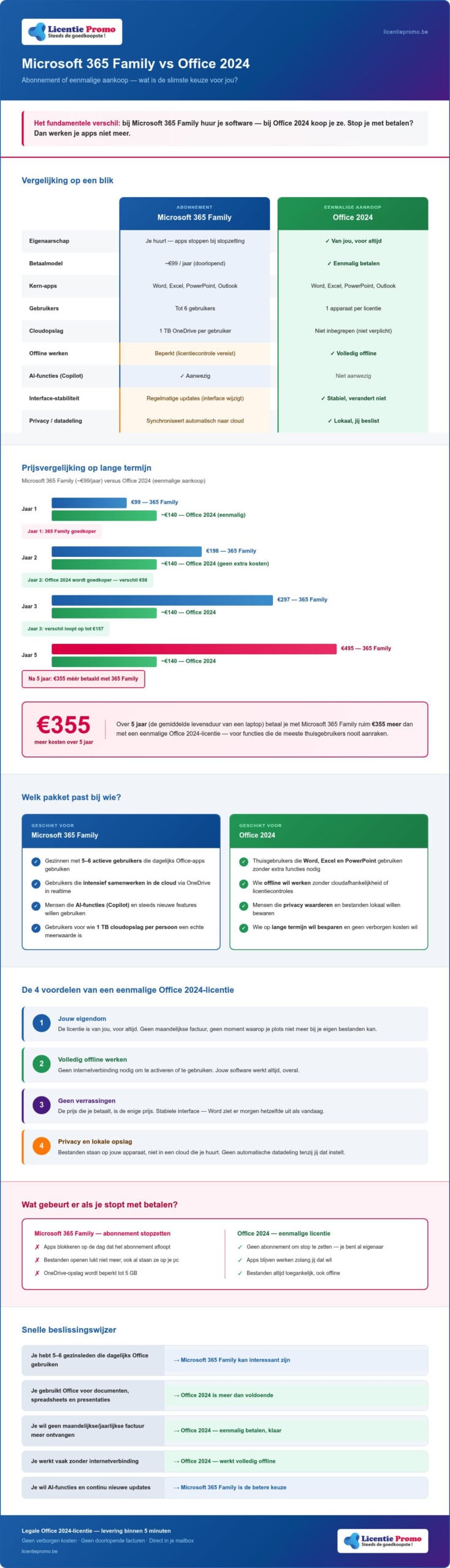
The fundamental difference between both products is simpler than you think: with Microsoft 365 Family you rent software, with Office 2024 you buy it. That one sentence explains everything that follows.
Rent means: as long as you pay, it works. If you stop paying, your apps disappear. Not tomorrow, not next week, but on the day your subscription ends. Your files remain saved, but you can no longer open and edit them. Buying means the opposite: you pay once, and the software continues to work as long as you want.
What exactly is Microsoft 365 Family?
Microsoft 365 Family is a subscription plan that you share with up to five other family members or friends. Each member gets access to Word, Excel, PowerPoint and Outlook, plus 1 TB of cloud storage via OneDrive. Sounds generous, but there’s a catch: your device regularly checks whether your subscription is still active. Without an active connection and a valid license, the apps will block after a while.
For families who collaborate intensively in the cloud and actually have six users who use all features daily, this model can be worth its money. But for those who just want to type a document or keep a spreadsheet? Then you pay for a lot of extra’s that you never touch.
what does office 2024 entail?
Office 2024 is the classic, permanent license. You install Word, Excel and PowerPoint on your device, and they work. Period. No monthly bill, no license check via the internet, no moment when you suddenly can no longer access your own files.
When comparing microsoft 365 family vs office 2024 this is the difference that is decisive for most home users: Office 2024 works fully offline and stores your files locally. No mandatory cloud storage that you might not need, no extra costs for services you never use.
- Your ownership: the license is yours, forever
- Offline work: no internet connection needed to activate or use
- No surprises: the price you pay is the only price
- Local storage: files are stored on your device, not in a cloud you rent
Do you want to know which version of Office 2024 suits you? LicentiePromo offers both Office Professional Plus 2024 and Office Home & Self-Employed 2024 with delivery within five minutes by email and without an ongoing invoice.
features and capabilities compared
Both packages include Word, Excel, PowerPoint and Outlook. These are the apps that 95% of home users need daily. The claim that Office 2024 “has fewer features” than Microsoft 365 is technically correct, but does not tell the full story. The features you miss are largely AI experiments and cloud tools that the average user never touches.
Microsoft 365 continuously receives new features, including Copilot integrations and real-time collaboration tools. Sounds impressive. But every update also means a changed interface, new buttons in places you don’t expect, and features that disrupt your workflow rather than improve it. In the comparison of Microsoft 365 Family vs Office 2024 this is an underestimated advantage of the one-time license: stability. You open Word, and Word looks the same tomorrow as it does today
There is also a privacy dimension that is rarely discussed. Microsoft 365 is designed around the cloud. The apps send usage data, automatically sync to OneDrive, and are optimized for a permanent internet connection. Office 2024 forces you nothing. Your files are on your device, you can work offline if you want, and you do not share data with cloud servers unless you choose to. For those who prefer to keep their documents locally, this is not a detail, it is a principled difference.
- Core apps: identical in both packages (Word, Excel, PowerPoint, Outlook)
- AI features: present in Microsoft 365, absent in Office 2024
- Interface stability: Office 2024 does not change without your permission
- Privacy control: Office 2024 stores nothing in the cloud unless you set it
updates and support
Microsoft 365 receives regular feature updates; Office 2024 receives only security updates. That may sound like a disadvantage, but for most users it is exactly what they need. Security is guaranteed for both packages for the coming years. Anyone who follows Microsoft software trends sees that the shift to subscriptions mainly benefits Microsoft, not the user. Office 2024 also runs flawlessly on Windows 11, without compatibility issues or mandatory updates that interrupt your workflow.
cloud storage and extra services
OneDrive is with Office 2024 optional and not included. Do you already have an external hard drive or your own backup solution? Then you pay for 1 TB storage with Microsoft 365 that you simply don’t need. The Microsoft mobile apps are available for both versions via the App Store and Google Play, so that is also not a decisive argument for a subscription.
Do you just want reliable office apps without a monthly bill? Then check out the Office Professional Plus 2024 license at LicentiePromo, delivered within five minutes by email.
the hidden costs: a long-term price comparison
Monthly amounts may seem small. But add them up over several years, and the picture changes quickly. That's exactly what many people overlook when choosing between microsoft 365 family vs office 2024: the actual total cost in the long term.
the price of Microsoft 365 after 3 years
Microsoft 365 Family costs you a fixed amount each year that is automatically debited from your account. After three years you have paid a substantial amount, and after five years, the average lifespan of a laptop, that amount continues to increase. But it does not stop at the initial price. Microsoft has raised its subscription prices several times in recent years, and there is no reason to assume that this pattern will stop. Whoever signs up today may pay more tomorrow, without having any say in it.
There is another detail that is rarely mentioned: if you stop paying, you lose access to your software. Not only the future features, but the entire suite. After paying for five years, and on day één after your last invoice you will not be able to open any Office file. If you still want to save on a subscription, be sure to read our guide about Microsoft Office 365 discount in België, because there are ways to limit the damage.
the savings with Office 2024
Office 2024 works differently. You pay één time, and that's it. No domiciliëring, no annual renewal, no price increase that surprises you. The license you buy today will work just as well in five years as it does now. For students who watch their budget, or families who don't want to think about software every month, that's a huge advantage.
The savings compared to a subscription over five years is significant, and you'd rather spend that money on something else. At LicentiePromo you receive the Microsoft Office Professional Plus 2024 license code within five minutes by email, with activation guarantee and no hidden costs.
In short, these are the financial benefits of the one‑time license:
- No price increases: you pay today's price today, forever
- No direct debit: no automatic charge that you forget to cancel
- Full control: your software keeps working, even if your budget is tight
- No loss of access: your files and apps remain available, always
The invoice is quickly created. Anyone who doesn't want to be stuck with a subscription that rolls on year after year chooses smarter with a one-time license.
Making the right decision for the long term brings peace, whether it's about your digital tools or your personal health. For those seeking support with major life choices in the area of recovery, the expertise of Good Hope GGZ can be a valuable guide.
who is each package most suitable for?
The comparison of Microsoft 365 Family vs Office 2024 always ends with the same question: what do you actually need? Not what Microsoft likes to sell, not what the advertising promises, but what you need daily on your screen. The answer varies per person, per family, and per situation.
Ask yourself three questions. Do you use OneDrive every day? Are there really six people in your environment who need an active Office license at the same time? And do you value the latest AI features more than financial predictability? If you answer “yes” three times, read the next paragraph. If you are unsure or say “no” once, skip it.
when do you choose Microsoft 365 Family?
Microsoft 365 Family has its purpose. If your family consists of six active users each needing 1 TB of cloud storage, the shared cost per person is much lower than six separate licenses. Moreover, if you work on three different devices simultaneously—a tablet, a smartphone, and a laptop—and want to keep the same files everywhere in real time, the subscription offers a smooth cloud experience. And if you want to test the latest Copilot integrations in Excel as soon as they roll out, a subscription is the only way.
But honestly: that profile fits only a small minority of Belgian home users.
why Office 2024 is the best choice for most Belgians
Most people in Belgium use Office to write letters, create invoices, keep a household budget, or prepare a presentation. Period. For that you don't need 1 TB of cloud storage, no real‑time collaboration, and certainly no monthly charge on your bill.
Office 2024 gives you exactly what you need, without the rest. The license is yours. It works on Windows 11 without compatibility issues. And it will still work tomorrow, the day after tomorrow, and in five years. No surprise on your bank statement, no moment when you suddenly can't access your own files because you forgot to renew.
For freelancers the story is even clearer. Keeping costs low is not a choice, it is a necessity. A one‑time license fits perfectly into that picture. Read more about the specific benefits in our guide on Microsoft Office Home and Business 2024 for entrepreneurs who want to save smartly.
- Home users: Office 2024 more than sufficient for daily tasks
- Self‑employed: no ongoing costs, full control over your expenses
- Students: één purchase covers the full study period
- Retirees: simple, stable and without subscription hassle
Choose security and ownership. View the Office Home & Self-Employed 2024 license at LicentiePromo and receive your activation code within five minutes by email.
buy your Office 2024 license at LicentiePromo
You have made the comparison of Microsoft 365 Family vs Office 2024 and the choice is clear. Now it comes down to this: how do you purchase that license as quickly and safely as possible? At LicentiePromo the answer is simple. You place your order, and within five minutes your product code is in your mailbox. No waiting time, no hassle, no physical installation media that have to arrive by post.
Each license comes with an activation guarantee. If your code doesn't work, we will fix it. Period. You are never alone, and you never pay for something that doesn't work.
why our licenses are so cheap
No hidden trick, just a smart purchasing strategy. LicentiePromo buys unused software inventories from companies that do not fully utilize their licenses. These purchases are made in large volumes, which significantly reduces the cost per license. We pass that advantage directly on to you. Completely legal, because European legislation on software resale explicitly permits this. You are buying a genuine, unused Microsoft license at a fair price, nothing more and nothing less.
- Unused corporate inventories: legally purchased in large volumes
- Direct savings: no intermediaries, no inflated margins
- European legislation: software resale is fully permitted and protected
- Activation guarantee: each code is checked before delivery
start directly without a subscription
No credit card needed for a recurring subscription. No direct debit that you forget to cancel after six months. You buy once, and your software works for life. That is the freedom a one‑time license provides.
Ready to switch? Choose the version that suits you:
- Microsoft Office Professional Plus 2024 for the full suite on Windows
- Office Home & Self-Employed 2024 for Windows and Mac
Do you want to upgrade your operating system right away? Combine your Office license with a Microsoft Windows 11 Pro license code for a complete, future‑proof PC setup. Everything delivered within five minutes, everything legal, everything yours.
The choice has been made: stop paying for what you don't use
The comparison of microsoft 365 family vs office 2024 leads to één clear conclusion. For most Belgians, home users, freelancers, students and retirees, a one‑time license is the smartest choice. You pay één time. Your software always works. No surprises on your bank statement, no loss of access if you forget to renew.
Office 2024 gives you everything you need daily: Word, Excel, PowerPoint and Outlook, stable and reliable on your device. Without a cloud you don’t need. Without a monthly bill that runs year after year.
At LicentiePromo you receive your activation code within five minutes by email, with activation guarantee and no hidden costs. Legal, fast and yours forever.
Buy now Office 2024 Professional Plus without a subscription at LicentiePromo and eliminate that monthly bill from your mind for good.
Frequently Asked Questions about Microsoft 365 Family vs Office 2024
Is buying Office 2024 as a one‑time purchase really cheaper than Microsoft 365?
Yes, absolutely in the long term. You pay ééonce for Office 2024 and use the software for years without extra costs. With Microsoft 365 Family the bill continues every year, and Microsoft has raised its subscription prices several times in recent years. The longer you use Office, the larger the price difference becomes in favor of the one‑time license.
Can I install Office 2024 on multiple computers?
A standard Office 2024-license is linked to één device. If you want to install Office on multiple computers, you need a separate license code for each device. At LicentiePromo you can easily order multiple codes at once, each delivered within five minutes by email. This way you keep everything organized and only pay for what you really need.
What happens to my files if I stop using Microsoft 365 Family?
Your files do not disappear, but you can no longer edit them with the Office apps. Documents that are stored locally remain on your computer. Files that are only in OneDrive also remain accessible via the browser, but only in read‑only mode. If you want to edit them again, you need an active subscription or an alternative office application.
Will I still receive updates for Word and Excel in Office 2024?
Yes, security updates are received Office 2024 just automatically via Windows Update. What you don't get are new feature updates such as Copilot integrations that Microsoft rolls out for subscribers. For the vast majority of users that makes no difference: the core features of Word and Excel remain fully up-to-date and safe to use.
Are the LicentiePromo licenses legal and official?
Fully legal. LicentiePromo sells unused Microsoft licenses that have been purchased from companies with surplus software inventories. European legislation explicitly permits software resale, a principle that has been confirmed by the European Court of Justice. Each code is a genuine, unused Microsoft license that you activate via the official Microsoft servers, exactly as with a purchase directly from Microsoft.
Do I need internet to be able to use Office 2024 on my laptop?
No. After the one-time activation, it works Office 2024 fully offline. You can open Word, Excel, or PowerPoint without your laptop needing to be connected to the internet. That is a concrete advantage over Microsoft 365, which periodically performs an online license check. If you regularly work in locations without a stable connection, then Office 2024 the more reliable choice.
What is the difference between Office 2024 and Office Professional Plus 2024?
Office Home and Small Business 2024 includes Word, Excel, PowerPoint and OneNote, and works on both Windows and Mac. Office Professional Plus 2024 is exclusively for Windows and adds Outlook, Access and Publisher. For those who need a full suite with an email client on a Windows PC, Professional Plus is the most complete choice. Both versions are available at LicentiePromo with delivery within five minutes.
Can I later convert my Microsoft 365 subscription to Office 2024?
Yes, that can be done without any problems. You cancel your subscription on the desired date, purchase a Office 2024-license from LicentiePromo and install the software on your device. Your existing files remain usable, because the file formats are identical. In the comparison of Microsoft 365 Family vs Office 2024, switching therefore presents no technical barrier, but simply a conscious choice for greater financiëal freedom.