
Office 2024 download after purchase: the complete guide for a quick start
Stop paying monthly rent for software that you can simply own. You choose the certainty of a one‑time purchase and want to see results directly on your screen. The process for office 2024 download after purchase must be simple, safe and above all lightning‑fast. We understand the skepticism you feel when looking for the right links. No one wants unsafe files or the confusion caused by Microsoft’s constant push towards their monthly subscriptions.
In this guide we walk you flawlessly through the complete installation. You will learn how to download, install, and activate your new license on your computer within five minutes without any delay. We put an end to all confusion about accounts and different versions once and for all. We show you the exact steps via the official portal, so you immediately have a fully functional package with no hidden costs afterwards. No technical jargon, just a practical guide for a hassle‑free start with Word, Excel and PowerPoint.
Key Points
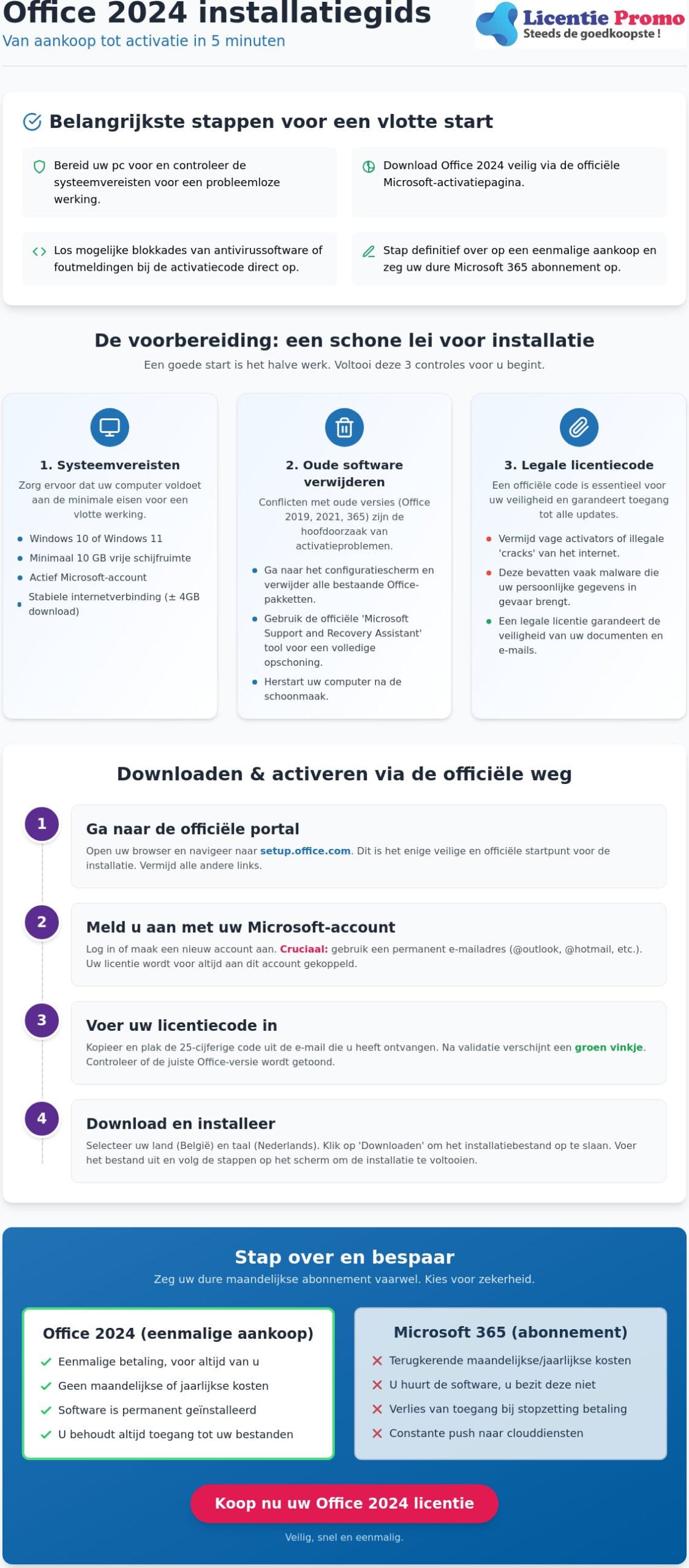
- Prepare your PC for installation and check the minimum requirements for smooth operation.
- Follow our step-by-step guide to safely download Office 2024 after purchase via Microsoft's official activation page.
- Install Office 2024 Professional Plus within minutes and grant Windows the proper access rights.
- Bypass antivirus software blocks and immediately resolve activation code error messages.
- Switch permanently to a one-time purchase and cancel your expensive Microsoft 365 subscription today.
preparation for the installation of Microsoft Office 2024
A good start is half the battle. You don't want to get stuck halfway through the installation because your PC isn't cooperating or because old software is in the way. You have already received your unique license code in your mailbox. That is step één. Now it's time to get your system ready for the latest version of Microsoft Office. The process for office 2024 downloading after purchase starts with a clean slate and the right settings. Ensure a stable internet connection. The installation file is about 4 GB in size. A shaky connection can lead to corrupted files and error messages during activation.
system requirements for smooth operation
Is your computer running Windows 10 or Windows 11? That is essential. Older Windows versions support Office 2024 not anymore. You also need sufficient free space on your hard drive. Although the download is 4 GB, we recommend at least 10 GB of free space for a smooth installation and future updates. Also, do not forget that an active Microsoft account is required. With it you permanently link the license to your identity. This makes any future reinstallation much easier.
remove old software without leftovers
This is where it often goes wrong for most users. Old versions such as Office 2019, 2021 or trial versions of Office 365 can cause conflicts. They often leave invisible registry files behind that block the new activation. Go to your Control Panel and remove all existing Office packages. If you really want to be sure of your piece? Use the official Microsoft Support and Recovery Assistant. This tool wipes all stubborn remnants that a standard de‑installation overlooks. Always restart your computer after this cleaning. Only then is your system écht ready for download office 2024 after purchase.
the importance of a legal license code
Security is not a luxury, it is a necessity. Avoid vague activators or illegal cracks from the internet. These often contain malware that puts your personal data at risk. An official license gives you not only peace of mind, but also guarantees access to critical security updates. You want your documents and e‑mails to stay safe. Don't have a code yet? Then check the Office 2024 Professional Plus license for a legal and direct activation. This ensures that your software always remains up‑to‑date and legitimate.
step-by-step guide for downloading via the official Microsoft portal
Forget vague links in dubious emails or unclear download buttons on shady websites. The only safe way to download office 2024 after purchase goes through the officiële channels of Microsoft itself. Navigate directly to setup.office.com. This is the starting point for any legitimate installation. Here you link your unique code to your personal identity. The process is simple and effective, but it does require your full attention during the initial steps. This way you prevent your license from getting stuck somewhere in the system without being linked.
log in or create an account
Choose an email address that you have permanent access to. Preferably use a personal @outlook.com or @hotmail.com address. Your license will be permanently linked to this specific account. This is a crucial step. If you lose access to this email address, you will also lose the ability to reinstall your software on another device in the future. Already have an account but forgot the password? Recover it first through the official channel before entering the code. This ensures a flawless registration of your new purchase.
Enter the license code and confirm
Now comes the moment of truth. Grab the 25‑digit license key that you received in your mailbox immediately after your order. Copy and paste the code directly from the email to avoid annoying typing errors. Microsoft validates the code immediately after entry. This process usually takes only a few seconds. As soon as the green check appears, you know the code has been accepted. Check on this screen that the portal displays the correct version, such as the Microsoft Office Professional Plus 2024 edition. Is everything correct? Then click confirm.
Then select your country and specifically choose Dutch (België) as the language setting. This ensures that your spell check and the interface of your apps are immediately set correctly for your region. Click the ‘volgende’ button and then the central download button. Your PC now retrieves the officiële installation file. This is the most reliable method, as also detailed in the officiële download guide from the software maker. This bypasses all the confusion that often arises between the different Microsoft portals. While other sites often direct you to complex business environments, this setup page keeps the process clear and transparent for every user.
Do you see the file appear in your download folder? Excellent. You are now only één step away from a fully activated system without monthly costs. If you have any doubts about your account settings? Our specialists at LicentiePromo are happy to help you set the connection correctly right away, so you can work worry‑free for years.
completing the installation of Office 2024 Professional Plus
You now have the installation file on your computer. The heavy download is behind you. Now follows the actual installation. Look in your download folder for the file, which is usually called Setup.exe. Double‑click this file to start the process. Do you get a Windows User Account Control prompt? Click immediately on ‘Yes’. This gives your computer the necessary permission to configure the files correctly. This is the standard procedure for software that comes from the official Microsoft website. You now see a window appear that shows the progress of the installation.
The progress bar slides slowly to the right. This is the moment when the software finally settles into your system. Important: do not turn off your PC and do not disconnect your internet connection. Even though you already have the main files, the installer often still fetches the very last small patches for optimal security. The full process of office 2024 downloaden na aankoop is only truly completed when the installer gives the relieving message. As soon as you see “You are done! Office is now installed”, you may close the window with confidence.
what to do during the background installation
Waiting doesn't have to be boring and you don't lose precious time. While the bar is running, you can just keep surfing or working in other program’s. Microsoft designed the installer so that it doesn't interfere with your daily activities. Keep an eye on the small Office icon in your taskbar at the bottom right. As long as that icon is visible, your computer is still performing crucial tasks in the background. It's best to stay connected to your network until the icon disappears. This ensures a flawless completion of the setup.
the first time launching Word or Excel
Ready? Search now via the Windows Start button for “Word” or “Excel” and open the application. On the very first launch you will see the license agreement. Click without hesitation on ‘Accept’. After all, you have a legitimate Microsoft Office Professional Plus 2024 license purchased. Want absolute certainty that everything went perfectly? In Word go to ‘File’ and click bottom left on ‘Account’. Here you should clearly see that the product is activated. No red bars, no vague warnings about expiring trial versions. Just a powerful suite that is now fully yours.
common issues when downloading and activating
Nothing is as annoying as an error message just when you want to start working. Although the process for office 2024 download after purchase usually runs smoothly, local settings on your PC can sometimes throw a wrench in the works. Do you get the message “Code already used”? No panic. This usually means that the linking with your Microsoft account has already succeeded. Do not try to enter the code again on the setup page. Instead, go directly to your Microsoft account under the ‘Services and subscriptions’ tab. You will see that your license is already neatly listed there, ready for installation.
The download doesn't start at all? Your antivirus software or firewall may be set too aggressively. Temporarily disable this protection for the duration of the process. Be sure to reactivate it immediately once the installation is complete. Seeing a general system error? First check for pending Windows updates. Office 2024 requires an up-to-date operating system to run stably. Does the software suddenly ask for a subscription after installation? Then you are probably logged in with an old account or a trial version of Office 365. Log out completely and sign in again with the email address you used on setup.office.com.
Do you as a senior need extra assistance? Visit 55 Plus Computer Help LLC for patient and expert support with all your software installations.
solving license code problems
A small typo happens faster than you think. Pay extra close attention to the difference between the letter O and the number 0 in your 25‑character code. This is the most common reason why an activation initially fails. Still can't figure it out? LicentiePromo's customer service offers you a full activation guarantee. We will never leave you in the cold with a non‑working code. Want to learn more about how to permanently avoid subscription pitfalls? Then read our guide on Installing Office 2024 without a subscription for extra tips and tricks.
error codes during the download
Does the specific error code 30015-11 appear on your screen? This almost always indicates conflicting software. As mentioned earlier, all remnants of previous Office versions must be completely removed. Use Microsoft's official repair tool if a regular uninstall is insufficient. Is the download painfully slow? Then switch from Wi‑Fi to a wired internet connection. A stable line is crucial for a 4 GB file. Do you have insufficient disk space? Then run a disk cleanup to free the necessary 10 GB. This gives the installer the space it needs for a successful setup.
Do you need help with a stubborn error message or want to be sure of a trouble‑free start? Order your legitimate Microsoft Office Professional Plus 2024 from us and count on our expert support at every step of your installation.
your Office 2024 license via LicentiePromo: safe and fast
Now you have completed all steps to successfully install your software. The process for Office 2024 download after purchase does not have to take hours. At LicentiePromo we understand that you want to get started immediately. Therefore you receive your legal license code within 5 minutes directly in your mailbox. No waiting, no physical mail, but instant delivery. We remove all barriers so you can focus on your work. You get a product that works, period.
Security is our top priority. The market for software licenses can sometimes seem opaque. We make it transparent. Every code we deliver is 100% original and unused. We offer you a rock-solid activation guarantee. Do you still encounter a problem during installation? Our Belgian support is ready to help you personally. You speak with experts who know the software inside and out. That is the assurance you get with a local partner.
Why choose a one-time purchase?
Make a definitive break with those monthly invoices that drain your budget. After één payment the software is yours forever. You save hundreds of euro’s in the long term. Want to know exactly how much you can save and how to get the cheapest office suite without a subscription obtain? We explain that in detail in our comparison guide. This is the smartest choice for entrepreneurs and freelancers who want to keep their fixed costs low. You are no longer dependent on a subscription to access your own documents. Working on an Apple device? Then check out our Office Home & Freelancers 2024 for a perfect match with macOS. It is an investment that pays for itself immediately
our promise to you
We are more than just a webshop; we are your practical guide in the world of software. For Belgian companies and freelancers we offer simple invoicing. You receive a correct invoice that you can process directly in your accounting. No hassle with foreign VAT rules or vague providers. Our helpdesk is not a distant authority, but a helpful partner who points the way. We ensure maximum hassle‑free service from purchase to activation. Are you a freelancer looking for the best deals? Then discover our complete guide on affordable software for freelancers and save hundreds of euros’s on your digital office.
Choose the fastest path to a working system. You don't need any technical knowledge to succeed. With our clear instructions and reliable licenses, office 2024 download after purchase is a breeze. Stop renting and start owning. Ready to save and get started right away? Buy your Office 2024 license now at LicentiePromo!
Start today with your new Office 2024
Now you have all the tools at hand to make the switch to a subscription‑free future. We have shown the path from a clean installation to the final activation via the officiële portal. The main lesson is simple: prepare your system properly and rely only on legitimate sources. The process for office 2024 download after purchase is now no longer a technical mystery, but a quick action of barely five minutes that will give you years of work pleasure.
Choose the shortest route to results. With LicentiePromo you receive a license that is in your mailbox within 5 minutes, backed by a 100% activation guarantee. No subscription needed, no surprises. You invest once in software that truly remains yours. Our expert helpdesk is ready if you still have a question about the installation on your computer.
Are you ready to give your productivity a boost without the burden of monthly bills? Order your Office 2024 license with instant delivery here! You are just a few mouse clicks away from a fully optimized workspace. Good luck with your new software!
Frequently Asked Questions about Office 2024
How long does it take to receive my Office 2024 download link?
You will receive your license code and the full instructions within 5 minutes directly in your mailbox. Our automatic delivery ensures you don't lose a second after your payment. Once the transaction is completed, the email is sent immediately to the specified address. Be sure to also check your spam folder if you don't see anything after a few minutes. You can therefore start immediately with download Office 2024 after purchase without having to wait for physical packages or slow mail delivery.
Can I download Office 2024 on more than one computer?
A standard license for Office 2024 is strictly bound to één device. This is an essential feature of a one‑time purchase compared to a subscription. You purchase the software for één specific PC or laptop. Want to use Office on multiple devices at once? Then you need a separate, unique license code for each device. For families or small offices we recommend buying multiple licenses at once so each device has its own legal activation.
What should I do if my license code is not recognized on setup.office.com?
First check for small typos, especially characters such as the letter O and the number 0 which are often confused. Still getting an error message? Then the code may already have been successfully linked to your account during a previous attempt. Check your Microsoft account under the ‘Services and subscriptions’ tab to see if the product is already listed there. Our customer service also offers a 100% activation guarantee to resolve any technical problem instantly and professionally for you.
Is it possible to download Office 2024 without a Microsoft account?
No, a Microsoft account is a hard requirement for activation and download. Microsoft uses this account to permanently register and secure your license. This works to your advantage: if your computer crashes, your license remains safe in the cloud linked to your email address. You don't need to be a technical expert; just log in and the system will immediately recognize your rights. Always use an email address that you will have long‑term access to.
Can I re-download Office 2024 if I buy a new laptop?
Yes, you can transfer the software to a new device provided you first remove the installation from your old computer. This frees the license for a new association. Then simply log in to your new laptop via your trusted Microsoft account. Under your personal purchases you can retrieve and run the installer again. This makes office 2024 download after purchase a safe investment for the future, even when you decide to upgrade or replace your hardware.
What is the difference between the download of the Professional Plus and the Home version?
The difference lies solely in the included applications and not in the way of downloading. Microsoft Office Professional Plus 2024 is the most comprehensive package with extra business tools such as Microsoft Access. The version for Home & Self‑Employed contains the essential core apps such as Word, Excel and Outlook. Both versions are downloaded via the same official portal. The unique license key you enter automatically determines which specific programs’ and features are installed and activated on your computer.
Does the Office 2024 download also work on a Macbook?
Yes, but you need to make sure you purchase the correct version for your operating system. Microsoft Office Professional Plus 2024 is developed exclusively for Windows systems. Apple users must specifically choose Microsoft Office Home & Business 2024. This version is fully optimized for macOS and offers exactly the same familiar interface and powerful features. So check your order carefully so that you download the installer that is perfectly compatible with your MacBook for flawless operation.