
Office 2024 install without subscription: the complete step‑by‑step guide
Are you still paying every month for software that you actually just want to own? It's a frustration shared by many Belgian entrepreneurs and home users. You want the latest features of Word and Excel. You don't want an endless Microsoft 365 subscription. Fortunately, there is a solution. Office 2024 installing without a subscription is the smartest way to regain full control over your budget. Stop renting. Start owning!
You probably recognize it. The uncertainty about the correct version is great. You fear illegal software or activation problems that block your PC. That's not necessary at all. We understand that you are looking for a safe and legal way outside the expensive Microsoft Store. You want a working installation without recurring costs. Choose certainty and avoid unnecessary risks’. Our method guarantees a legitimate license without hassle.
In this complete guide you will discover how to Office 2024 installs easily with a one-time license. We make the process transparent and remove all technical hurdles. You will learn how to choose the right version, safely download the software and activate it immediately. Save instantly on your software costs and work with the most recent tools on the market. Let’s get started right away with your new installation.
Key Points
- Learn how to install Office 2024 without a subscription to be permanently free from those monthly costs.
- Discover which edition suits you best, from the comprehensive Professional Plus package for freelancers to the Home & Self-Employed version.
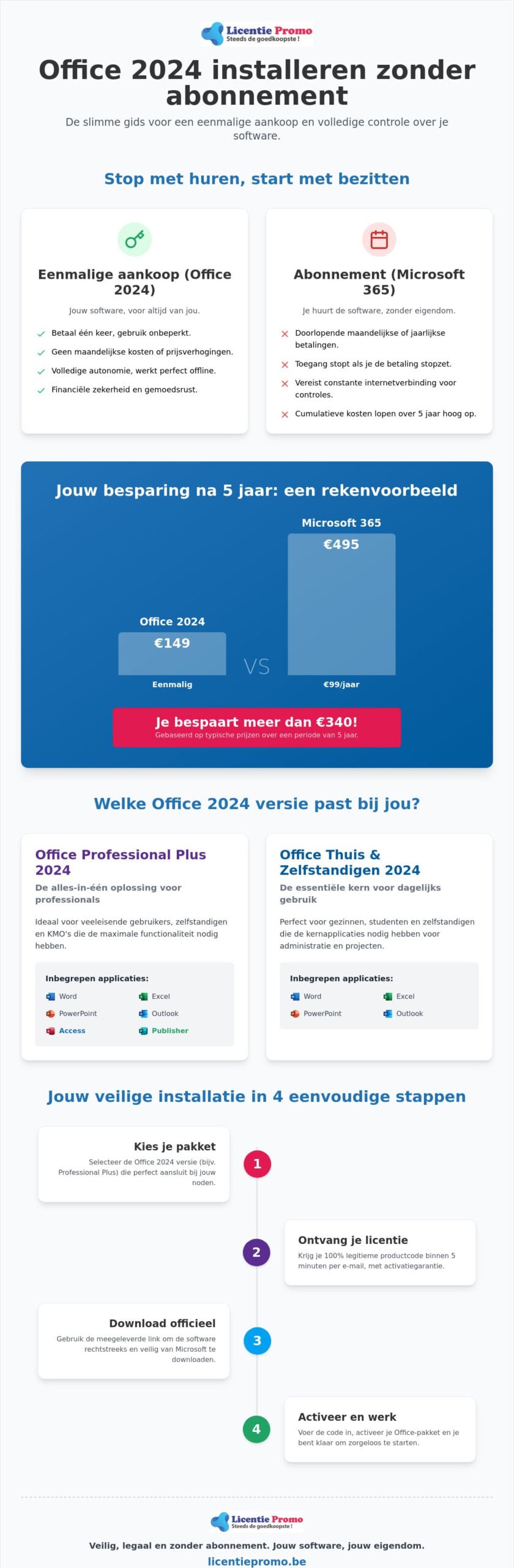
- Save hundreds of euro’s over a period of five years by choosing a one-time purchase instead of an ongoing subscription.
- Follow our step-by-step plan for a safe installation via the official Microsoft channels with a 100% legitimate product key.
- Get instant access to your software with our activation guarantee and fast delivery by email within five minutes.
What is Office 2024 without a subscription and why is it so popular?
Office 2024 is the newest member in the family of ‘on-premises’ software. This simply means that you install the package locally on your computer and fully own it. No cloud, no monthly invoices, no hassle. You purchase a permanent license. This gives you the right to use the software unlimitedly on a single device. While the world is being pushed more towards subscriptions, savvy Belgian consumers consciously choose this classic method. It offers a stability that you often miss with modern cloud services
Many users simply want to use the familiar programs’s of Microsoft Office without being tied to a digital umbilical cord. Office 2024 install without subscription is therefore dé trend of this year. You get access to Word, Excel and PowerPoint with the latest 2024 features, but with the peace of mind of a one‑time investment. For freelancers in Flanders this is a no‑brainer. You know exactly what you are financially up to. No surprises on your bank statement at the end of the month.
The disadvantages of Microsoft 365 subscriptions in 2026
Subscriptions may seem cheap at the start, but appearances are deceiving. In 2026 we see that the cumulative costs of Microsoft 365 increase sharply. You pay again each year. Stop paying? Then you immediately lose access to your own documents. That is an unacceptable risk for professionals. Moreover, the subscription model requires a constant internet connection for license checks. That is annoying and unnecessary. Why rent what you could simply own?
The power of a one-time purchase
Choosing a one‑time purchase means full autonomy. You pay één once and the software remains yours. It's that simple. There are no hidden costs or automatic incasso’s that silently drain your budget. This provides psychological peace of mind. You never have to think about expiration dates or price increases again. Want to know exactly how to approach this technically én financially smart? Then read our Office 2024 Professional Plus buying guide for all details. It is the fastest way to a hassle‑free digital work environment.
The different versions of Office 2024 that you can purchase outright
You have made the decision: you want install Office 2024 without a subscription. That is a wise investment. But which edition really fits your way of working? There is often confusion between the different licensing models. Many IT platforms focus only on the LTSC version for large multinationals. That is a missed opportunity. For most Belgian freelancers and families, a Retail license is much more interesting. You get the same robust software without the administrative hassle of volume centralization. The choice usually falls between Professional Plus and the Home & Self‑Employed edition.
Choose consciously based on the programs you use daily. According to the PCMag review of Office 2024 this suite remains the absolute standard for professional productivity. The stability is unprecedented. You are not dependent on constant updates that interrupt your workflow. Instead, you get a package that simply does what it is supposed to do. Each version has its own strengths and limitations. We list the main differences for you, so you can immediately make the right choice.
Microsoft Office Professional Plus 2024: the all-in-one solution
This is without doubt the most complete suite. It is the favorite of demanding users and SMEs. You get not only the classics such as Word, Excel and PowerPoint, but also Outlook, Access and Publisher. Especially Access is indispensable for those working with complex databases. Publisher helps you with designing professional marketing material. Looking for the maximum value for your money? Then view directly the Microsoft Office Professional Plus 2024 license. It is the ultimate toolbox for your computer.
Office Home & Self-employed 2024 for Windows and Mac
Do you prefer to work on an Apple device or is the basics enough for you? Then this is your match. This version includes Word, Excel, PowerPoint and Outlook. The big advantage is compatibility with both Windows and macOS. You will miss the extra tools such as Access and Publisher. For many home users and small self‑employed, however, this is not a problem at all. You have everything you need for your administration and communication. Check here the possibilities of Office Home & Self‑Employed 2024 for your specific setup.
Don't forget the system requirements before you start. To install Office 2024 without a subscription smoothly, you need a PC with Windows 10 or Windows 11. Older operating systems are no longer supported. Ensure at least 4 GB RAM and sufficient free disk space. A 64-bit processor is now the standard and ensures that heavy Excel files load quickly. Still unsure about the best choice? Choose the Professional Plus version and you will be guaranteed all the features Microsoft has to offer.
Installing Office 2024 or taking a subscription: the comparison for 2026
Do you choose the freedom of a perpetual purchase version or the rental trap of a subscription? In 2026 the choice is clearer than ever. While Microsoft pushes you towards a monthly fee, practice shows that installing Office 2024 without a subscription saves hundreds of euro’s in the long run for Belgian SMEs and families. A subscription may seem cheap at the start. But add up the months. Over a period of three to five years you pay for Microsoft 365 many times the cost of a one‑time license. You rent software you never own. That simply isn’t smart business.
Often you hear that a subscription is safer. That is a persistent myth. Microsoft provides for Office 2024 just all the critical security updates you need. You only miss the constant stream of new ‘bells and whistles’ that often only slow down your workflow. Stability is worth its weight in gold in a professional environment. Why would you pay for features you never use? Office 2024 installing without a subscription means choosing a package that works when you want it to, without being dependent on an active internet connection for license verification.
The hidden costs of Microsoft 365
Microsoft regularly raises the prices of their cloud services. What started as a small monthly cost has now become a serious annual burden. Many users overlook these automatic incasso’s. But don’t be mistaken. The total ownership cost of a subscription is already significantly higher than a one‑time purchase after three years. Want to see the exact calculation? Then read all about the Office 2024 vs 365 price. Stop throwing money away on a rental model that never ends.
The integration with OneDrive is also often presented as essential. But do you really need that expensive cloud storage? For most Belgians, free alternatives or a simple local backup on an external drive are sufficient. This way you save twice: on your software and on your storage space.
When is Office 2024 the best choice for you?
Don’t need AI helpers like Copilot that rewrite your texts? Do you often work in places where the internet isn’t always stable? Then Office 2024 is your ideal partner. It’s the perfect solution for those who embrace a ‘set it and forget it’ mentality. For freelancers there’s an extra advantage: tax depreciation. A one‑time investment is often easier to handle in your accounting than an endless series of small invoices. You buy a work tool that lasts for years. It’s the ultimate choice for those who value simplicity and full financial control over their digital toolbox.
Step-by-step guide: Safely install and activate Office 2024 with a product key
The biggest mistake users make? Starting the installation right away without first sweeping their system. Microsoft 365 trial versions are persistent. They often keep running in the background and cause conflicts with your new license. Do you want install office 2024 without a subscription in a way that works in één one go? Then a ‘clean’ installation is essential. We see daily that customers get stuck because old remnants from previous versions throw a wrench in the works. Follow these steps closely for a flawless start.
Choose safety. A legal installation starts at the source. We do not use vague external servers or unofficial downloads. Everything goes through Microsoft's official channels. This ensures that your software is safe and that your system continues to perform optimally. With your LicentiePromo license in hand, you are only a few minutes away from a fully working package without recurring costs.
Step 1 & 2: Clean up and download
First, remove all existing Office installations. Preferably use the Microsoft Support and Recovery Assistant for this. This tool removes every hidden file from previous subscriptions. Is your PC clean? Then browse to setup.office.com. This is the official portal where you link your product key to your Microsoft account. Sign in with your own account and enter the 25-digit code you received from us. Then choose the language ‘Dutch’ and select the 64-bit architecture. This is the default for modern Windows PCs and provides the best performance.
Step 3 & 4: Installation and permanent activation
Once the download is complete, run the .exe file. You will now see a progress bar. Please be patient, the installation is happening in the background. Is the process finished? Then open any program, such as Word. A window appears immediately to complete the activation. Click on ‘I want to activate the software over the internet’. Within a few seconds your license is verified. You can now check that everything is in order via ‘File’ and then ‘Account’. It should state that the product is activated as a permanent license.
Congratulations, you are now officially free from monthly invoices. You have just successfully install Office 2024 without a subscription completed. Want to get started right away with the most complete version for your business? Buy your Microsoft Office Professional Plus 2024 license here and receive your code within five minutes in your mailbox. Our activation guarantee ensures you can install worry‑free.
How to obtain a legal license via LicentiePromo
Why would you pay full price in the officiële Microsoft Store? Many consumers and freelancers hesitate when they see our sharp prices. That is a healthy reflex. However, the explanation is simple and completely legal. LicentiePromo specializes in buying up unused corporate stock. These are legitimate licenses that have been purchased by large organizations but never activated. The European Court of Justice has determined that the resale of these software licenses is 100% lawful. You therefore get exactly the same software as in the store, but at a fraction of the price. It is dé way for those who office 2024 installeren zonder abonnement op een budgetvriendelijke manier wil aanpakken.
We offer you more than just a competitive price. You can count on a rock‑solid activation guarantee with us. If a problem occurs while entering your code, we will resolve it for you immediately. You are never alone. While you often hit a wall of automated chatbots with large international players, you receive personal support from us. Moreover, you don’t have to wait for a package in the mailbox. Speed is our strength. Within five minutes of your order you will receive the license key and the official download link in your inbox. You can start working right away.
Buy software safely in Belgium
The internet is teeming with shady websites that offer invalid or illegal codes. You often recognize them by the lack of transparent company information or an unreachable customer service. LicentiePromo is your local, reliable partner in België. We understand the needs of the Flemish entrepreneur and provide support in your own language. Need help transitioning from an old subscription to your new license? Our experts will guide you through it. For optimal results we recommend also checking your operating system. A modern Windows 11 Pro license provides the perfect foundation for your new Office suite. This ensures maximum stability and the latest security features.
Your benefit at LicentiePromo
Choose a hassle‑free process. We no longer ship physical dvd’s or USB sticks. That is slow, expensive and outdated. With us you receive a digital download link immediately after purchase that takes you directly to the officiële Microsoft-servers. This guarantees that you always install the most recent and secure version of the software. No hidden shipping costs, no waiting times at the door. Office 2024 installing without subscription was never so accessible to everyone. Stop paying endless monthly rental costs. Make the decision today to manage your software budget wisely. Order your license, follow our step‑by‑step plan and enjoy the freedom of software that écht is truly yours!
Take control of your software budget today
The choice is simple. Do you want to keep renting or finally own? You have seen that a one‑time license saves you hundreds euro’s and gives you the peace of mind of software that never expires. No more price increases. No unexpected incasso’s. Office 2024 installing without a subscription is the smartest move you can make this year for your digital workspace. You choose stability, security and full financiële freedom. It is a strategic investment in your own productivity.
Don't wait any longer for the next monthly Microsoft invoice. At LicentiePromo you receive your legal product code within five minutes by email. You enjoy our 100% activation guarantee and never have to pay recurring fees again. It's time for a clean slate and a powerful suite that simply does what it should. Take the step towards a more efficient way of working without a digital umbilical cord.
Save now and buy your Office 2024 license without subscription at LicentiePromo. You are only a few clicks away from a hassle‑free installation!
Frequently Asked Questions about Office 2024
Is installing Office 2024 without a subscription legal?
Yes, it is completely legal to purchase and use a one‑time license. The European Court of Justice has confirmed that reselling unused software licences is lawful. At LicentiePromo you therefore buy a legitimate product that comes from officiële corporate stock. This is the safest way to install Office 2024 without a subscription to achieve without having to worry about legal risk’s or illegal activations.
Do I need to uninstall my old Office 365 before installing Office 2024?
Yes, this is a crucial step to prevent technical conflicts. Microsoft 365 remnants can block your new license or cause error messages during activation. It is recommended to use the official Microsoft Support and Recovery Assistant to delete all hidden files from your previous subscription. A completely clean system ensures that your new package works immediately and without hiccups.
Will I still receive security updates if I don't have a subscription?
Yes, you receive all critical security updates throughout the product’s full support period. Microsoft continues to patch the software to protect your data from new threats. The only difference with the subscription model is that you do not receive new functional updates or AI features. For most users, a stable and secure package is, however, much more important than constant changes to the interface.
Can I transfer my Office 2024 license to a new computer?
It depends on the type of license you purchased. A Retail license is linked to your Microsoft account and you can deactivate it on your old PC to then install it on a new device. OEM licenses, on the other hand, are often permanently tied to your computer's motherboard. When buying, make sure to check which version you choose if you plan to change hardware soon.
What is the difference between a Retail license and an OEM license?
A Retail license offers the most flexibility because you can transfer the software to another device. This is ideal for entrepreneurs who regularly upgrade their laptop. An OEM license is usually cheaper, but it is technically tied to the hardware on which you first activate the software. Both versions provide exactly the same program’s and features, so the choice purely depends on your future hardware plans.
Do I need an internet connection to use Office 2024?
You only need internet for the initial download and the one‑time activation of your product key. Once the installation is complete, program’s such as Word and Excel work fully offline. Unlike Microsoft 365, your PC does not need to periodically connect to the servers to verify your license. This gives you the freedom to work anywhere, even in locations without a stable internet connection.
What should I do if my product key is not accepted immediately?
First, check that you haven’t made any typos and that all old Office versions have truly been removed from your computer. If activation still fails, contact our Belgian customer service directly. We offer a 100% activation guarantee on all our codes. Our experts are happy to assist you via remote help to resolve the issue within a few minutes, so you can get started right away.
Can I install Office 2024 on both Windows and Mac?
That depends on the specific edition you choose. Office Home & Self-Employed 2024 is designed to work on both Windows and macOS. The extensive Professional Plus version, however, is exclusive to Windows users. So pay close attention when ordering to ensure you get the correct license for your operating system. Office 2024 installing without a subscription is therefore possible on both platforms with the right package.