
Upgrade from Windows 11 Home to Pro: The Ultimate Guide for 2026
Why would you spend more than 100 euros on a software update that you can find elsewhere for a fraction of the price? An upgrade from Windows 11 Home to Pro is often the only way to gain access to essential security features, but the official route through Microsoft is unnecessarily expensive. You want that extra power and business tools, but you refuse to pay top dollar or struggle for hours with a complicated installation.
We agree: the switch to the pro version should be smooth, secure, and above all affordable. No one wants the risk of data loss or unclear licenses that stop working after a week. You are looking for a legal solution that delivers immediate results without having to reconfigure all your software. That is exactly what we offer you today.
In this ultimate guide for 2026, you'll discover how to take your system to the next level within 5 minutes. We'll explain in detail how to use a legitimate key via LicentiePromo, why you don't need to worry about your files, and how you can immediately enjoy features such as BitLocker and Remote Desktop. No technical hassle, just a quick path to a more powerful PC.
Key Points
- Learn why BitLocker is essential for your privacy and how to optimally protect your files against theft.
- Discover how to run professional software and virtual machines directly with Hyper-V and Windows Sandbox.
- Perform a flawless upgrade from Windows 11 Home to Pro without any risk of data loss or reinstallations.
- Save significantly on the official Microsoft Store price with a legal license from LicentiePromo.
- Receive your activation code within 5 minutes in your mailbox and start directly with the full pro experience.
Why you want to upgrade from Windows 11 Home to Pro today
Windows 11 Home is fine for those who just browse the web or watch movies. However, for the modern Belgian professional, it falls short. You hit walls as soon as you want to be truly productive. An upgrade from Windows 11 Home to Pro is then the only logical step. It's not just about extra buttons. It's about security, control, and efficiency. Different Windows 11 editions each offer their own advantages, but the Pro version is the absolute standard for business use. Stop muddling through and choose the tools that truly support your work.
Security and encryption for your data
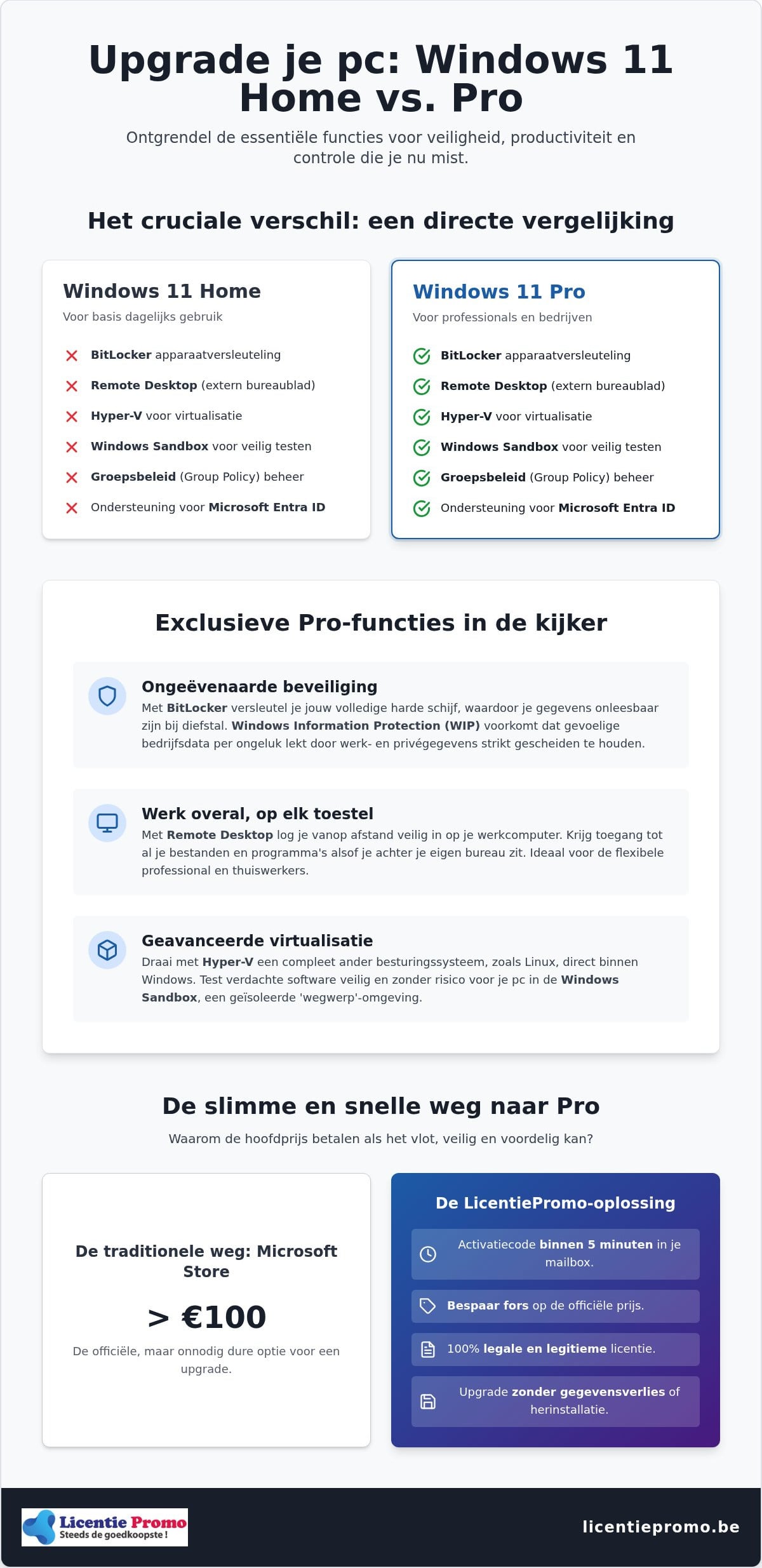
BitLocker is the absolute star here. Imagine: your laptop gets stolen during a site visit or on the train to Brussels. Without BitLocker, all your quotes, passwords, and customer data are exposed. The Pro version encrypts your entire hard drive. Without your unique key, no one can get in. Windows Information Protection (WIP) takes it a step further. It strictly separates your private photos from your business documents. This prevents sensitive data from accidentally ending up in the wrong cloud or app. In 2026, hackers are more active and sophisticated than ever. The Home edition is simply not sufficiently armed in this digital landscape to guarantee your privacy.
Business features and network management
Do you want to be able to work from anywhere? With Remote Desktop, you can take your entire PC environment with you wherever you go. You securely log in to your powerful desktop from a lightweight laptop or tablet. For those who work in a team or have clients with strict IT requirements, support for Microsoft Entra ID is essential. You can connect your device to a professional corporate network in no time. Don't forget Group Policy either. With this, you have full control over your system settings. You decide when updates happen and which apps get access to your hardware. You are the boss of your system, not Microsoft. That saves time and frustration during your workday.
The switch is small, but the impact on your daily workflow is enormous. You work faster, more securely, and with much more peace of mind. With a Windows 11 Pro license from LicentiePromo, you bring this power directly into your home. Don't wait until a security vulnerability forces you to act. Perform that upgrade from Windows 11 Home to Pro today and experience the difference of a professional operating system.
The exclusive features of Windows 11 Pro that you are currently missing
The Home edition of Windows often feels like a stripped-down version. Once you dive deeper into the settings, you'll notice that the truly powerful tools are locked away. An upgrade from Windows 11 Home to Pro gives you direct access to features that turn your computer into a professional workstation. According to this official Microsoft comparison , there are dozens of differences that make the difference between a basic PC and a business powerhouse. Stop searching for complicated workarounds and choose the built-in power of Pro.
Virtualization with Hyper-V and Sandbox
Hyper-V is indispensable for developers and IT enthusiasts. It allows you to create virtual machines without installing additional third-party software. Because Hyper-V runs directly on the hardware, system load is minimal. You can effortlessly run a Linux environment or an older Windows version alongside your current system. Received a suspicious file? Use Windows Sandbox. This is a temporary, isolated environment where you can safely test apps. Once you close the Sandbox, everything is permanently deleted. No virus gets the chance to infect your main system. This saves you a lot of time and headaches compared to external tools that often slow down your system.
Remote management and deployment
For Belgian SMEs, efficiency is everything. With Azure Active Directory (now Microsoft Entra ID), you seamlessly connect all your devices to your company network. One login is enough for all your cloud services and local files. Dynamic Provisioning ensures that you configure your new PCs in no time. You don't have to set up each device separately; a predefined profile does all the work for you. Want to take over a computer at the office from your tablet at home? The full version of Remote Desktop makes this possible. You work remotely as if you were sitting at your own desk. This is not a luxury, but a necessity for those who want to do business flexibly.
In addition to these technical highlights, you also get Kiosk mode. This locks a PC to a single specific app, ideal for demo devices or point-of-sale systems. The Microsoft Store for Business also opens the door to specialized software you won't find in the regular store. It's a complete package that gives your productivity an immediate boost. Don't want to be limited by the Home version any longer? Order your Windows 11 Pro license from LicentiePromo and unlock these features today. An upgrade from Windows 11 Home to Pro is the smartest investment you can make for your hardware this year.
Step-by-step plan: how to perform the upgrade without data loss
Many users think that switching to a more advanced Windows version requires a full reinstallation. That is a myth. An upgrade from Windows 11 Home to Pro is in fact nothing more than unlocking features that are already hidden on your hard drive. Your files, apps, and settings remain exactly where they are. The entire process often takes less than five minutes and requires hardly any technical knowledge. For those still unsure about the technical changes, this in-depth upgrade guide provides a clear overview of what exactly changes under the hood of your system.
Preparing your system
Start with a quick check-up of your computer. Although Windows respects your data during this process, backing up your most important documents to an external drive or to the cloud is always a smart move. Additionally, make sure your current Home version is fully up to date. In August 2026, version 26H1 is the most recent standard. Go to Windows Update and install all available patches before you begin. Also check that you have at least 10 GB of free disk space. The extra Pro components need some breathing room to install correctly. A stable internet connection is essential here to ensure the activation goes smoothly.
Enter and activate the license code
Do you have your LicentiePromo code at hand? Navigate on your computer to Settings > System > Activation. Here you will immediately see your current status. Click on the button “Change product key” and paste the 25-character code you just received in your mailbox. As soon as you click “Next”, Windows will start the process. Your PC will probably restart once while the new features are being configured. You are always assured of a working system thanks to the direct activation guarantee from LicentiePromo. If the upgrade does not start immediately, don't panic. Usually a pending update is blocking the progress. Restart your device and try again; in 99% of cases it will work flawlessly afterwards.
Once your PC has restarted, you will see in the system information that you are officially running Windows 11 Pro . You can now immediately get started with BitLocker or setting up your remote desktop. An upgrade from Windows 11 Home to Pro has never been this easy and risk-free. You now have a fully equipped system ready for any professional challenge.
Costs and licenses: why pay more in the Microsoft Store?
Why would you spend 100 euros or even more on a digital key that you can find much cheaper elsewhere? The official Microsoft Store charges hefty prices for an upgrade windows 11 home to pro. For many Belgian self-employed people and SMEs, this feels like an unnecessary bite out of the budget. You're paying for the massive marketing machine and physical support that you, as a conscious consumer, often don't even need. It can be smarter. By buying smart, you save up to 80% on your software costs without compromising on quality or legality.
Price Comparison: Microsoft vs. LicentiePromo
In 2026, prices in the official store for an upgrade often hover around 100 euros, with higher outliers. That's a lot of money for software you only activate once. At LicentiePromo, we do things differently. We offer a one-time purchase with lifetime validity. No monthly costs. No surprises. You get exactly the same features and the same security updates as when you pay full price. For the price-conscious Belgian, the choice is quickly made. You'd rather invest that saved money in your own business than in the coffers of a tech giant. Want to know exactly how to score the best deal? Then read our guide about buying a Windows 11 Pro license cheaply for a complete overview.
The legality of cheap licenses explained
Many people hesitate when they see low prices. Is this legal? The answer is a clear yes. LicentiePromo buys up unused business inventory. Large companies often purchase licenses in bulk, but don't use all of them. According to European legislation, the resale of these unused software licenses is completely lawful. So you are buying a legitimate, unused key that simply works. Moreover, we offer a 100% activation guarantee. Doesn't the code work? Then you'll immediately get a new one or your money back. Our Belgian customer service is ready to help you at every step. So you run zero risk.
Stop overpaying for your operating system. An upgrade from Windows 11 Home to Pro should be accessible to everyone, from students to business owners. You'll receive your code in your mailbox immediately after payment. No shipping costs, no waiting times. Just direct results. Get your Windows 11 Pro license now and experience the power of a professional system at the sharpest price on the market.
Your Windows 11 Pro license at Licentiepromo: fast, legal, and cheap
Waiting for a package with a USB stick or DVD is definitely a thing of the past. At LicentiePromo, everything revolves around speed and immediate results. You will receive your license code in your mailbox within 5 minutes. No hassle with shipping costs or slow mail carriers. You can start the upgrade from Windows 11 Home to Pro as soon as you have completed your payment. That is the power of our digital delivery. You won't lose a second of productivity and can immediately get started with the new features of your system.
Why customers choose LicentiePromo
The reason why thousands of Belgians choose us is simple: we offer absolute certainty. You get a working code or you get your money back. No vague promises, but a rock-solid activation guarantee on every key we sell. Unlike many other platforms, you are never tied to hidden costs or monthly subscriptions with us. You pay a sharp one-time price and the license remains yours for life. For the Belgian self-employed person or company, there is another crucial advantage. You receive an official invoice for your accounting. This way you neatly deduct the VAT and your business expenses are perfectly documented for the tax authorities. Our Trustpilot score of 4.8 stars confirms that we deliver on this promise every day.
Get started directly with your upgrade
Immediately after your payment, you will receive an email with the official download link and your unique license code. We include a clear, step-by-step installation guide with every order. This way, you can perform the upgrade from Windows 11 Home to Pro flawlessly, even if you're not an IT expert. If you still have a specific question about activation or the process, our Belgian customer service is ready for you every working day. We don't work with annoying chatbots, but with real experts who help you in your own language. Want to truly complete your computer for professional use? Then combine your upgrade with Microsoft Office Professional Plus 2024 for the ultimate work experience on your PC.
Choose the fastest and most reliable way to a professional operating system. You benefit from the sharpest price in Belgium without any risk of illegal software or non-working keys. Your data remains safe and your PC immediately gets the powerful features you need for your business. Stop hesitating and choose the certainty of a local partner. Order now from LicentiePromo and unlock the full potential of your hardware today.
Choose the power of Windows 11 Pro today
Your computer is more than a screen; it is your most important work tool. By choosing the Pro version, you secure your data with BitLocker and safely test new software in the Sandbox. You have now seen that an upgrade from Windows 11 Home to Pro does not require hours of work and your files simply remain safe. It is the fastest way to give your productivity a serious boost without technical headaches or unnecessary costs.
Why wait any longer? As the best-rated software store in Belgium, LicentiePromo guarantees you a flawless experience. Your code will be delivered within 5 minutes and you enjoy a 100% activation guarantee on every purchase. No monthly subscriptions, but a one-time investment in your digital security and convenience.
Buy your Windows 11 Pro license now and upgrade within 5 minutes!
Take the step to a professional working environment today and get the most out of your hardware!
Frequently asked questions about upgrading to Windows 11 Pro
How long does the upgrade from Windows 11 Home to Pro take?
The full upgrade typically takes less than five minutes. Since the Pro features are technically already present on your computer, Windows only needs to unlock them. After entering your new product key, your system performs a quick update, usually followed by one automatic restart. So you don't have to wait for hours or download complicated software packages. Your PC is almost immediately ready for any professional challenge in the office.
Will I lose my files during the upgrade to Pro?
No, you will keep all your files, applications, and settings during the process. An upgrade from Windows 11 Home to Pro is a software switch and not a clean installation. Your documents on your desktop and your installed programs will remain exactly where they are. Although the risk of data loss is negligible, we always recommend making a backup of your most important data before starting major system changes for safety.
Can I reuse my Windows 11 Home key later?
That depends on the type of license you are currently using. Most pre-installed Home licenses on laptops are OEM keys and remain tied to the motherboard of that specific device. Once you upgrade to Pro, the new license becomes the active standard for that computer. You usually cannot transfer the old Home key to another PC. However, the Pro license from LicentiePromo offers you a permanent and legal solution for your current hardware.
What is the difference between an OEM and a retail license for Pro?
An OEM license is tied to the hardware of your computer and cannot be transferred to another device. A Retail license is personal and can be taken to a new PC if you no longer use the old one. LicentiePromo sells legal licenses that often come from unused business inventories. This allows us to offer the sharpest prices while you enjoy the same functionality and official security updates from Microsoft.
Do I need to reinstall Windows 11 for the upgrade?
You absolutely do not need to reinstall Windows 11 for this transition. Simply go to the activation settings of your current Home version and enter your new Pro product key there. Windows will recognize the key immediately and automatically add the extra business features. This saves you the hassle of formatting your drive or reconfiguring your favorite software and drivers. An upgrade from Windows 11 Home to Pro is therefore very simple.
Does the upgrade code from LicentiePromo also work on a new PC?
Yes, you can use our license code on any PC that is currently running Windows 11 Home. Whether it's a brand new laptop you just bought in the store or a desktop you've been using for a while, the code works immediately. It's the ideal way to equip a new device with professional security like BitLocker right away. Simply enter the code during or after the initial setup of your system.
Do I get an official invoice for my company at LicentiePromo?
Absolutely, every order comes with an official VAT invoice that you receive directly in your mailbox. This is essential for Belgian self-employed individuals and companies who want to claim the purchase as a business expense. You enter your company details during checkout and our systems automatically generate the document for your accounting. This way you meet all tax obligations while saving significantly on your Windows and Office software licenses without any risk.
What if my activation code doesn't work right away?
Don't worry, we offer a 100% activation guarantee on all our keys. If there is a problem, our Belgian customer service is ready to help you directly via email or chat. Often the cause is a pending Windows update that blocks activation. We usually resolve this for you within a few minutes. If the code technically doesn't work, you will immediately receive a new code or a full refund of your purchase amount.