
Which Microsoft Office package to choose: the complete guide for 2026

Are you dutifully paying your Microsoft invoice every month while prices have already risen by more than 10 percent again in July 2026? It's time to turn off that money tap. Many computer users wonder which Microsoft Office package to choose is the smartest move for their wallet and their productivity. You are tired of those constant subscription costs and are looking for a legal, permanent solution without hidden pitfalls or fear of non-working licenses.
We understand that feeling of subscription fatigue all too well. No one wants to deal with a recurring cost that gets more expensive every year for features you barely use. In this guide, you'll discover within five minutes which package best fits your needs and budget, without being tied to unnecessary expenses. We compare the latest Office 2024 versions with Microsoft 365, clear up the confusion between the different editions, and show you how to get direct access to your software at the sharpest price. No hassle, just a quick and safe solution that delivers immediate results.
Key Points
- Discover how to determine which Microsoft Office package to choose is the smartest move for your wallet and daily work.
- Understand the crucial difference between the recurring invoices of Microsoft 365 and the one-time investment in a permanent Office 2024 license.
- Identify which profile suits you, from student to self-employed, so you never pay for features you don't use.
- Learn how to legally save hundreds of euros by smartly using unused volume licenses.
- Start installing your new software within 5 minutes thanks to our lightning-fast email delivery and activation guarantee.
Which Microsoft Office package to choose? It starts with your usage
Stop blindly paying for software features you never open. The right choice easily saves you hundreds of euros in the long run. Many users are in the dark when they have to decide which Microsoft Office package to choose is the best move. The reality is simple: you only pay for what you actually use. Whether you are a student typing reports or an entrepreneur analyzing complex data, you always start with your own needs.
Word, Excel and PowerPoint form the heart of every package. These classics are indispensable for almost everyone. Those who look at the history of Microsoft Office will see that this foundation has always remained stable. However, the extras make the big price difference. Do you really need Outlook for your email, or is a free web version sufficient? Do you use Publisher for layout or Access for heavy databases? If the answer is ‘no’, you choose a lighter and cheaper package. Also always check your system requirements. A modern Microsoft Office Professional Plus 2024 license runs smoothly on Windows 10 and 11, but for a Mac you need a specific version.
The three most important questions before you start
First, ask yourself these three questions to make the decision. What will you use the software for? Personal use requires fewer bells and whistles than a professional business environment. Just like when selecting business partners with a long history, such as prevozi-likovic.si which has been active in passenger transport since 1978, with software it's all about reliability and a good price-quality ratio. Also think about the number of devices. You usually link a one-time license to one PC or laptop. If you want to work on multiple devices at the same time, that changes things. The most important consideration remains the payment method: do you want to own your software outright or do you prefer to pay a monthly fee to Microsoft?
The different editions in a nutshell
There are three flavors that dominate the market. The Office Professional Plus 2024 is the absolute champion for demanding users. You get everything, from Word to Access, without restrictions. For the typical Flemish self-employed person, Office Home and Business is often the best match. It includes Outlook, which is essential for professional communication and calendar management. Are you only dealing with schoolwork or simple administration? Then Office Home and Student suffices. You get the core programs for the lowest price. Are you also looking for an operating system? Then combine your package with a Windows 11 Pro license for a stable working environment. This way you make a conscious choice that fits your daily tasks and your budget.
Microsoft 365 vs. Office 2024: the big difference explained
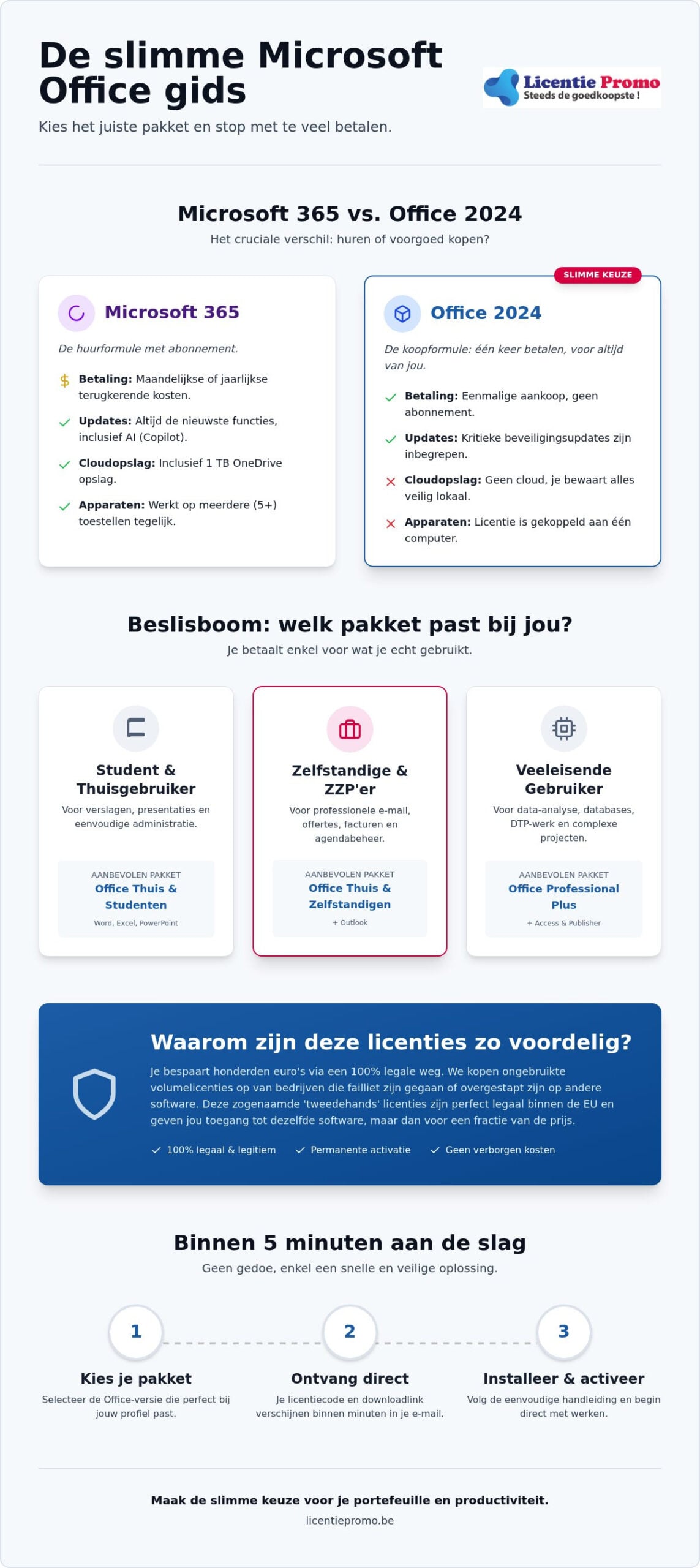
The battle between renting and buying is in full swing in the software world. Microsoft 365 is the rental model where you pay a monthly or annual fee. Office 2024 is the purchase model: you pay once and the software is yours forever. According to the official Microsoft comparison , the biggest difference lies in the extra cloud services and the way updates are handled. For many Belgians, the question of which Microsoft Office package to choose has become mainly a financial matter. Especially now that Microsoft 365 subscription prices have risen by an average of 12 to 16 percent on July 1, 2026, it pays to take a critical look at your invoice.
Cloud storage is a handy extra, but do you really need that 1 TB OneDrive? If you prefer to keep your documents safely stored locally on your own hard drive, Office 2024 offers more peace of mind and control. Critics often claim that a one-time package is less secure, but that is not true. You receive all critical security updates to keep your system stable and protected. You only miss out on the latest cosmetic features or experimental AI functions that Microsoft continuously rolls out to subscribers. For most users, those small extras do not outweigh the annual costs.
When to choose a Microsoft 365 subscription?
A subscription like Microsoft 365 Personal is the right choice if you want to work on more than 5 different devices at the same time. Think of your laptop, tablet, and smartphone. A subscription is also necessary for those who swear by the latest AI features of Copilot. You always get the most recent version of the apps without ever having to buy a license again, as long as you keep paying.
Why Office 2024 Professional Plus is often the better deal
Choose a perpetual license if you want to be free from recurring costs. You pay a sharp one-time amount and you're set for years. With Microsoft Office Professional Plus 2024 you won't have to worry about future price increases. The software also works perfectly without a constant internet connection. This is ideal for those who value privacy and stability. In three years' time, you'll easily save hundreds of euros compared to a subscription. Curious about the possibilities? You'll find the best options in our license shop where you can get started right away.
Decision tree: which package suits your profile?
Stop guessing and choose based on your actual needs. Your profile determines which features are essential and which you can safely skip. For a student who only writes theses, the decision is completely different than for a self-employed person who organizes their entire customer management in Outlook. By determining your profile in advance, you immediately know which Microsoft Office package to choose is the most profitable investment for the long term. This way, you avoid paying money every month for software that gathers dust on your hard drive.
The average home user and student usually have enough with the basics. Word, Excel, and PowerPoint form the foundation for any administration, hobby, or school assignment. The advantage of a one-time license here is enormous: you pay a sharp price once and are free from recurring Microsoft invoices for the rest of your study time or free time. No stress about renewals, just install and get started right away.
For the Belgian self-employed, the bar is set higher. You need Outlook for your professional communication and flawless calendar integration. Moreover, an official invoice with VAT is essential for your bookkeeping to properly prove your expenses. A professional appearance starts with the right tools that are always available, even without internet. As described in the analysis about Microsoft 365 vs. Office 2024: The Core Difference, the strength of the purchase version lies in the financial predictability for your business. You invest once and have no more worries about your office software for years.
For the demanding professional
Are you a power user who wants to get the most out of your PC? Then choose Microsoft Office Professional Plus 2024. This package is the absolute all-in-one solution for those who don't compromise. You get not only the standard apps, but also full versions of Outlook, Access, and Publisher. It's the ideal partner for those who manage complex databases or design their own professional publications. Combine this package with a Windows 11 Pro license for maximum security and performance on your workstation.
For the Apple enthusiast
Mac users often fear compatibility issues, but there's no need for that. You simply need a specific license that is fully optimized for macOS. Check the Microsoft Office 2024 standard for macOS for seamless integration with the Apple ecosystem. You get the familiar Office experience with the specific look and feel of your Mac. No hassle with slow emulation or glitchy software, but a direct activation that works immediately and stably on your MacBook or iMac.
Why are licenses at LicentiePromo so cheap?
Why do you pay only a fraction of the official retail price with us? We hear that question often when people decide which Microsoft Office package to choose is the best financial move. The answer is simple and transparent. We make use of unused volume licenses from the business sector. Large organizations often purchase software in enormous quantities. When a company downsizes or switches to another system, these licenses remain unused on the shelf. We buy up these surpluses and offer them to you at rock-bottom prices.
This process is completely legal. The European Court of Justice ruled in a landmark decision that the resale of software licenses is lawful. Once a manufacturer such as Microsoft sells a license within the European Union, their right to control further sales is ‘exhausted’. So you are purchasing a product that is 100 percent legally sound. Moreover, we save significantly on unnecessary costs. With us, you do not pay for shiny cardboard boxes, physical DVDs, or expensive marketing campaigns. You only receive what you need: a legal digital code and a direct download link.
We understand the skepticism about low prices. That is why we offer a rock-solid activation guarantee on every purchase. Does your code not work immediately? Our Belgian customer service is ready to resolve the issue within minutes. So you run no risk at all. You get the full functionality of an official package without paying the full price.
Buying software legally and safely in Belgium
Safety is paramount in every transaction. We thoroughly verify the authenticity of each license before it appears in our webshop. Moreover, you always download the software via the official Microsoft servers. This ensures you don't bring in any harmful files. Want more details about the legislation? Read more about buying legal Microsoft software in Belgium and discover why thousands of Belgians have already gone before you.
Avoid the pitfalls of rogue sellers
Beware of ‘too cheap’ keys on vague international marketplaces. Often these are temporary codes that get blocked after a few weeks. At LicentiePromo, you get a permanent license and an official VAT invoice. The latter is essential for Belgian self-employed individuals to correctly process the purchase in their accounting. Need help with your choice? Our experts are happy to help you determine which Microsoft Office package to choose is the smartest solution for your situation. Check out our full range in the license shop and save today.
Installing your Office package: this is how you start within 5 minutes
You've made the decision. You now know which Microsoft Office package to choose is the best option for your situation and budget. Of course, you don't want to waste hours on complicated installation procedures or wait for the mailman. At LicentiePromo, everything is about speed and results. No physical boxes or DVDs, but direct digital delivery. Follow this simple step-by-step plan and open your first Word document or Excel sheet within five minutes.
Step 1 starts in our clear license shop. Choose the package that suits you, such as Microsoft Office Professional Plus 2024, and pay securely via Bancontact. Our Belgian payment environment guarantees a smooth and trusted transaction. Immediately after payment, our system kicks into action. Step 2: check your mailbox. Your unique product code and instructions will land in your inbox within 5 minutes. No waiting times, no hassle.
Step 3 is the actual download. Use the official Microsoft link in your confirmation email to get the software directly from the source. This is the only safe way to install a clean and legitimate version. Once the download is complete, start the installer. Step 4: enter your license key when the software prompts you. Activation happens immediately via Microsoft's servers. You are now the official owner of your software and can get started right away with Outlook, PowerPoint, or one of the other powerful apps.
What do you need for a smooth installation?
A good preparation saves you time and frustration. This principle applies to everything, from installing software to planning your transport to the airport; for example you can discover Easy Taxi for a comfortable and punctual ride to Schiphol. Ensure a stable internet connection for the initial download of the package. Also check that you have enough free disk space on your laptop or PC. A golden tip: remove all old trial versions or remnants of previous Office installations before you start the new installation. This prevents conflicts during activation and guarantees a stable system from the first second.
Running into a technical hurdle? No need to panic. First, check our extensive downloads page for detailed guides that walk you through step by step. Getting a rare error message during activation? Our Belgian customer service speaks your language and will help you right away. We offer a 100 percent activation guarantee on every license we sell. Still not entirely convinced? Then take a look at the reviews from other Belgian customers who have already successfully switched to a permanent license without monthly costs. We make the process transparent and fast, so you can be productive right away.
Start saving on your Office software today
You now have all the tools in hand to make the right decision. You know exactly which Microsoft Office package to choose is the smartest move for your specific situation. Whether you go for the complete power of Office Professional Plus 2024 or the simplicity of the student version, you will definitively stop paying monthly rent to Microsoft. You choose financial peace of mind, a stable system, and a one-time investment that fully pays for itself within a year.
With more than 10,000 satisfied customers in Belgium, LicentiePromo is the trusted partner for legal software licenses. We guarantee direct delivery within 5 minutes and offer a 100% activation guarantee on every package. No hassle with vague keys or non-working software, but a professional solution that delivers immediate results. View all Office packages in our license shop and say goodbye to those recurring subscription costs today. You are just a few clicks away from a worry-free and permanent Office experience!
Frequently Asked Questions about Microsoft Office
Is a one-time purchase of Office 2024 really permanent?
Yes, a one-time purchase is completely permanent. You pay only once and the software remains yours forever without any further invoice ever following. This is the ideal solution for those who are unsure about which Microsoft Office package to choose, to avoid monthly subscription fatigue. You receive all critical security updates throughout the entire support period. The software never stops working, even after many years of intensive use on your PC.
Can I transfer my Office license to a new computer?
You can certainly transfer your license to a new device. Most one-time licenses are technically linked to one device at a time. If you buy a new computer, you simply remove the software from your old system and reinstall it on your new hardware. Microsoft usually allows this once every 90 days. This way, your investment remains protected, even if you decide to replace your current laptop or desktop with a more powerful model.
What is the difference between Office 2021 and Office 2024?
Office 2024 offers noticeably better performance and a more modern interface compared to the 2021 version. The new edition is fully optimized for Windows 11 and includes advanced features in Excel and Word that were previously only available in the expensive subscription versions. Accessibility and search functions have also been greatly improved. For those who now need to decide which Microsoft Office package to choose, the 2024 version is the most future-proof choice thanks to longer support and better stability on modern systems.
Do I need an internet connection to use Office?
You only need internet for the initial download and the activation of your unique product code. Once the software is on your hard drive, programs such as Word, Excel, and PowerPoint work completely offline. This is a huge advantage compared to online word processors. Your documents are safely stored on your own PC, and you are not dependent on a stable Wi-Fi connection. You only need to connect occasionally to retrieve security updates.
Does Office 2024 work on a Chromebook?
No, the full desktop version of Office 2024 does not work on a Chromebook. These devices run on ChromeOS and only support web-based applications or Android apps via the Google Play Store. For a Chromebook, you are therefore limited to the online versions of Microsoft 365. However, if you want to use the powerful and full desktop features of Office Professional Plus 2024, you will need a laptop or PC with Windows 10, Windows 11 or a supported version of macOS.
Do I receive an official invoice for my Belgian business?
Every customer receives an official invoice in their mailbox immediately after purchase. For Belgian self-employed individuals and businesses, this is essential for proper bookkeeping and VAT recovery. During checkout, you can easily enter your company name and VAT number. The invoice meets all Belgian legal requirements and is sent automatically. This way, you can effortlessly prove your business expenses and enjoy the tax benefits of your purchase without extra administrative hassle.
What should I do if my activation code does not work?
In that rare case, contact our Belgian customer service directly. Although our codes almost always work immediately, sometimes a small technical glitch can occur with Microsoft's servers during activation. We offer a 100 percent activation guarantee on every license we sell. Our experts are happy to assist you via email or chat to resolve the issue within minutes. You are never alone, and we will not rest until your software is running.
Are LicentiePromo licenses legal?
Yes, all our licenses are 100 percent legal and official. We make smart use of unused volume licenses that come from companies that no longer need them. The sale of these legal licenses is explicitly permitted by the European Court of Justice in a binding ruling. So you are buying a legitimate product that fully complies with European legislation. We thoroughly check every code for authenticity before offering it in our webshop at the lowest price.