
Windows 11 Pro OEM vs Retail: which license is the best choice for you?
The most expensive license is not always the smartest purchase for your computer. Many people think they have to lay down hundreds of euro’s for security, but often you just pay for extra’s you never use. The discussion around windows 11 pro oem vs retail creates a lot of unnecessary doubt about the legality of sharp prices. You are probably afraid of annoying activation errors or fear that your license becomes worthless as soon as you install a new motherboard.
That feeling is completely logical. The market for software licenses sometimes seems like an opaque maze full of technical terms. Discover the crucial differences between OEM and retail licenses so you never overpay for your Windows 11 pro activation code. We explain in detail how the fork in the handle works regarding transferability and Microsoft support. You will learn exactly when to choose the ultimate flexibility of retail and when an OEM license is the most cost-effective choice for your PC. Thus you can activate your system with peace of mind, without spending a single euro too much.
Key Points
- Understand the fundamental difference between OEM and retail to make the right investment for your PC.
- Learn why a motherboard swap is decisive for the validity of your license and its transferability.
- Discover that with a cheap OEM key you don't have to miss any Windows feature such as BitLocker or Hyper‑V.
- Use our practical decision framework for Windows 11 Pro OEM vs retail to make the most cost‑effective choice.
- Learn how to legally save on your Windows 11 Pro license by smartly using unused corporate stock.
What is the difference between Windows 11 Pro OEM and retail?
The difference between an OEM and a retail license is not in the pixels on your screen or the features in your menu. The software is identical. The confusion around windows 11 pro oem vs retail arises purely from the license terms and the price you pay. Many consumers are groping in the dark about why one code costs tens of euro’s and the other hundreds. The answer lies in the distribution.
In Belgium and the rest of the European Union there is a specific legal framework for this software trade. The European Court of Justice has determined that the resale of unused licences is permitted. This is exactly the reason why OEM keys are often up to 80% cheaper than the official retail price. You are essentially buying a legitimate licence that was originally intended for another channel, but is now available to you without paying the full price. Want to learn more about the facts and myths surrounding a cheap Windows 11 activation code and how European legislation makes this possible? Then you can read all about it in our comprehensive guide.
The OEM license explained
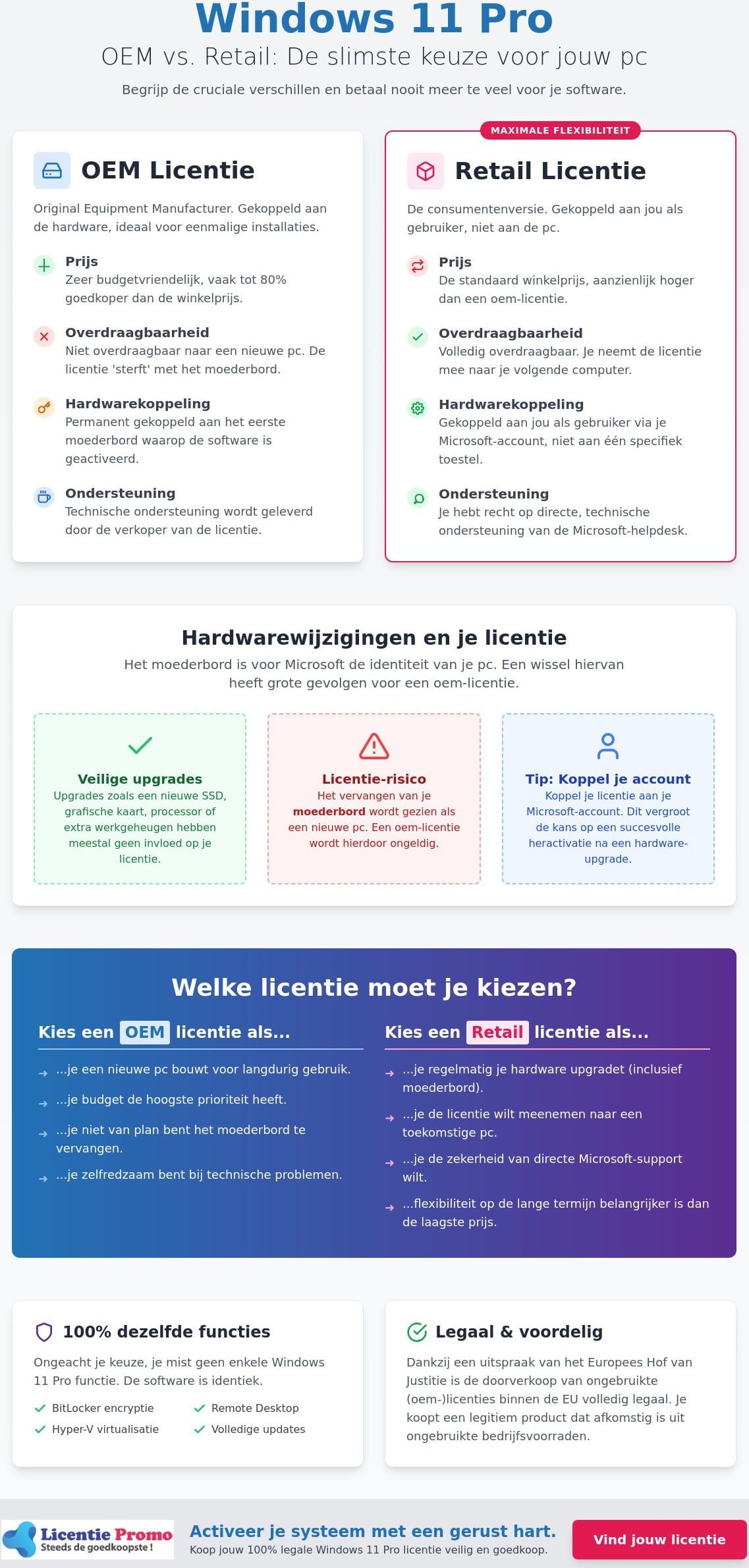
What is an OEM license? OEM stands for Original Equipment Manufacturer. These licenses were originally designed for PC builders who pre-install Windows on laptops or desktops. The activation code ties itself directly to your motherboard during the first installation. This means the license dies with the hardware. Changing computers? Then you need a new code. It is the ideal choice for budget-conscious builders who assemble a system for the long term. Support is not provided by Microsoft, but by the seller of your license.
The retail license explained
This is the classic consumer version you used to buy physically in the store. You pay a premium for maximum freedom of movement. A retail license is tied to you as a person, not to the machine. If you buy a brand‑new PC in two years, you simply take the license with you. You deactivate the code on your old device and activate it on the new one. In addition, you are entitled to direct support from the Microsoft help desk for technical problems. For those who regularly upgrade their hardware, this is often the most logical investment.
Whether you choose a Windows 11 Pro license via OEM or retail, the functional experience is the same. You get the same access to BitLocker, Remote Desktop and Hyper-V. Security updates are identical and arrive at the same time. The choice therefore only revolves around the balance between your budget today and your hardware plans for tomorrow. You purchase the same quality, but under different terms.
Portability and hardware changes: the fine print
Making your PC faster often starts with new hardware. A powerful SSD or a modern graphics card gives your system an immediate boost. Fortunately, these upgrades have no impact on your Windows activation. The real pain point in the battle between windows 11 pro oem vs retail lies with the motherboard. For Microsoft, the motherboard is the identity of your computer. If you replace this component, the system treats the PC as an entirely new device. With an OEM version, this usually means your license becomes unusable.
It is crucial to understand that an OEM license ‘trouwt’ with your hardware. The activation code nests in the firmware of your machine. This provides a financial advantage at purchase, but limits your freedom during major repairs or upgrades. A retail license works differently. It is linked to you as the user. Do you need a new motherboard or are you buying a completely new computer? Then you simply move the license with you. You deactivate the old installation and smoothly start again on your new hardware.
When you give your license the spirit
The digital license ID is stored in the BIOS or UEFI of your motherboard. Microsoft defines a ‘major hardware change’ almost always as a replacement of this central component. With an OEM license you often get the message that Windows is not activated after such a swap. Reactivating is then officially not possible. However, if you have only replaced your processor or RAM? Then use the built‑in activation troubleshooter in the settings. By linking your license to your Microsoft account in advance, you increase the chance that Windows recognizes your system after a small upgrade.
Retail as a long-term investment
For many users and gamers, the retail version is often the smartest investment. Anyone who opens up their system every few years for a new motherboard constantly faces extra costs with OEM. Over a period of ten years, repeatedly purchasing OEM codes can end up being more expensive than investing once in a retail license. With this you buy the certainty that you will never have to pay again, regardless of how often you change hardware. The premium translates directly into maximum flexibility and peace of mind for the future.
Do you want to get started right away without worrying about your next hardware upgrade? Then check out our Windows 11 Pro license for a guaranteed and fast activation of your system. This way you can be sure of a legitimate code without the hassle of unclear intermediaries.
Features and support: do you get fewer Windows with OEM?
Do you get less value for your money with a cheaper license? The short answer is no. The software code you install is identical down to the last bit. The discussion about windows 11 pro oem vs retail never concerns the contents of the package. In both cases you get access to the full professional suite. Think of BitLocker for your disk encryption or Remote Desktop for working remotely. Hyper‑V for running virtual machines also works flawlessly; regardless of which label your license carries.
Some users fear that OEM users are at the back of the line for updates. That is a myth. Microsoft makes no distinction in the priority of security patches or new features. As soon as an update is available for Windows 11 Pro, it rolls out to all activated systems. Windows 11 version 25H2, for example, receives standard 24 months of support for Pro editions; whether you use a retail or OEM key. Your PC therefore always remains optimally protected against the latest threats.
No compromise on security
For the Belgian entrepreneur or the demanding home worker, Windows 11 Pro offers crucial extra’s. Windows Sandbox allows you to test suspicious files in a safe; geïsoleerde environment. This works perfectly on both license types. Business integrations with Azure AD and Intune are also fully available. This is essential for anyone who wants to log in professionally to the corporate network or manage devices remotely. You enjoy the highest level of Virtualization-Based Security (VBS) without extra costs on your system.
Support and activation guarantee
The biggest difference lies in who helps you when something goes wrong. With a retail license you are entitled to technical support from Microsoft itself. In practice you rarely need that help for the software itself; since Windows 11 is a very stable platform. Most customer questions are about the activation process itself. This is where LicentiePromo makes the difference. We act as your direct point of contact for all your installation questions.
Our 100% activation guarantee removes any risk you might encounter on unclear foreign marketplaces. You receive your code directly by e‑mail and within 5 minutes your system is fully operational. No technical hassle; just a smoothly running PC with all the professional features you need.
Which license should you choose? A practical decision framework
Choose OEM if your budget is limited and you do not plan to replace your motherboard within three to five years. It is the most logical choice for a stable PC that you ‘use up’ until it is technically worn out. Conversely, choose retail if you are an enthusiastic builder who regularly renews the core of your system. The discussion about windows 11 pro oem vs retail ultimately revolves around the question: how often do I want to pay again? For most users who buy a single fixed computer, the OEM version is financially the smartest move.
Do you currently Windows 11 Home and want to upgrade to Pro? It’s easier than you think. You don’t need to reinstall Windows completely. Simply go to ‘settings’, choose ‘system’ and click on ‘activation’. Select ‘change product key’ and enter your new Pro license key. Your system automatically downloads the necessary professional extras and after a short restart you’re done. This step-by-step guide works with both OEM and retail keys from LicentiePromo and saves you hours of installation work.
Scenario’s for individuals and students
Are you building a new gaming PC? Then it's better to invest your budget in a faster graphics card and save on your software with an OEM key. Students often need powerful features for their studies without having to spend hundreds of euro’s on them. By choosing wisely, you keep more money for your hardware. Also read our guide on Buy Windows 11 Pro license cheapest to see exactly how much you can save on your next purchase.
Entrepreneurs and self-employed in Belgium
For Belgian self‑employed individuals the choice is often even simpler. Software licences are fully tax‑deductible as a business expense. This reduces your taxable base directly. Moreover, a legal licence is indispensable in the event of an audit of your company. Do you use a fleet of laptops for your employees? Then retail offers more convenience when transferring licences to new devices as old hardware is written off. Also read our comprehensive guide on the Windows 11 Pro licence for entrepreneurs to discover how, as a Belgian self‑employed, you can legally save hundreds of euro’s and operate safely and in compliance with legislation in 2026. Combine your Windows installation with Microsoft Office Home and Self‑Employed 2024 for a fully legal and professional workplace.
Stop hesitating and choose the license that fits your usage. Order today your Windows 11 Pro license and receive your activation code instantly in your mailbox for a flying start.
Buy your Windows 11 Pro license safely and cheaply at LicentiePromo
You no longer have to doubt the legality of low prices for software. The European Court of Justice is crystal clear on this: reselling unused software licenses is completely legal. This principle of ‘exhaustion’ forms the core of our business model at LicentiePromo. We purchase large batches of unused licenses from companies that no longer need them. As a result, you benefit from prices that are significantly lower than those in the official Microsoft Store; without compromising on quality or legality.
We understand the skepticism that often accompanies the discussion about windows 11 pro oem vs retail. Many consumers are afraid of invalid codes or activation issues. That's why we offer a 100% activation guarantee on every code we provide. Our licenses come from reliable sources and are checked before shipping. So you're not buying uncertainty; you're getting a guaranteed working system that instantly provides access to all professional features of Windows 11 Pro.
Simple ordering process and immediate activation
The ordering process is fully optimized for speed and ease of use. You don't feel like dealing with endless forms or waiting days for a package. After you have placed your order, our system processes the transaction immediately. Windows 11 Pro license key in your mailbox. You enter the code in your PC's settings and you're done. It is a one-time investment with no hidden subscription fees or monthly invoices. You remain the full owner of your software.
Reliability and certainty in Belgium
Thousands of Belgians have already chosen the certainty of LicentiePromo. Whether you are a student building your first gaming PC or a manager of a growing SME; we provide the support you need. For freelancers and entrepreneurs we always provide an official invoice that is perfectly usable for accounting. This makes the purchase of your license a fully deductible business expense; giving you a tax advantage on your next tax return.
Our customer service is the final piece of our reliability. We never leave you in the cold with technical questions or activation problems. If a code unexpectedly does not work right away, our team is ready to guide you personally. Our promise is simple: if it doesn't work, you get your money back immediately. You therefore take no financial risk at all. Choose the smartest path to a legal and powerful operating system and activate your copy of Windows 11 Pro.
Activate your system today without worries
The choice between windows 11 pro oem vs retail does not revolve around technical performance; but about the future of your PC. Those who choose a fixed computer and a sharp price; make a golden deal with OEM. Those who prefer to retain the freedom to take licenses to new motherboards; find the necessary flexibility in retail. You get in both cases exactly the same powerful features and security updates. You never have to doubt the quality of your operating system.
At LicentiePromo we make it easy for you. You receive your code within 5 minutes via email and enjoy a lifetime activation without a monthly subscription. We fully stand behind our offer with an activation guarantee or money back. No hassle; just a smoothly running PC that is ready for any challenge.
Buy now your Windows 11 Pro license with 100% activation guarantee and start immediately with a legitimate and safe system!
Frequently asked questions about Windows 11 Pro licenses
Is a cheap Windows 11 Pro OEM key legal in Belgium?
Yes, buying and selling unused OEM licenses is completely legal in België and the rest of the European Union. The European Court of Justice has determined that software licenses may be resold once they have been placed on the market. LicentiePromo purchases unused surplus from companies that no longer need them. You therefore receive a legitimate code that complies with all European regulations. Read more about the facts and myths about a cheap Windows 11 activation code to be fully informed when making your purchase.
Can I transfer an OEM license to another PC?
No, an OEM license is permanently tied to the motherboard of the computer on which you first activate the code. In the battle between Windows 11 Pro OEM vs Retail this is the main difference. If you want the freedom to take your license to a completely new system, choose a retail version; it is linked to you as a user, not to the hardware.
What is the biggest disadvantage of an OEM license compared to retail?
The lack of transferability is the biggest downside. If your motherboard fails or you buy a new PC; your OEM license officially becomes void. Additionally, Microsoft does not provide direct technical support for OEM users; as they assume the PC builder handles this. Fortunately, LicentiePromo covers this with its own activation guarantee; ensuring you never end up with a non‑working code.
Do I need a new license if I replace my SSD?
No, you do not need a new license when replacing an SSD or graphics card. Windows still recognizes your system as long as the motherboard remains the same. You can Windows 11 Pro simply reinstall it on your new drive. Activation happens automatically as soon as you connect to the internet, because the digital license is stored in your hardware.
Can I upgrade from Windows 11 Home to Pro with an OEM key?
Yes, you can use an OEM key to quickly upgrade your current Home edition to Pro. You do not need to perform a full clean installation for this. Simply enter the new code in Windows' activation settings. Your system will download the additional features and after a short restart you will enjoy all the professional benefits such as BitLocker and Remote Desktop.
How can I tell if my current Windows license is OEM or retail?
You can check this easily via the Windows command prompt. Type ‘cmd’ in the search bar and open the program. Then type the command ‘slmgr -dli’ and press Enter. A window will appear that clearly indicates whether your license is of the type OEM, Retail, or Volume. This lets you immediately know if your license is transferable to another system.
Do I also receive all Windows updates with OEM versions?
Yes, there is absolutely no difference in the updates you receive. Both license types get exactly the same security patches and feature updates at the same time. The comparison between windows 11 pro oem vs retail shows that the software experience is identical. Your system therefore remains always optimally protected and equipped with the latest Windows features.
Why is there zo’n large price difference between LicentiePromo and the Microsoft Store?
We purchase unused licenses from large corporate inventories that would otherwise be lost. Microsoft sets high consumer prices for individual retail packages; while we keep prices low through volume discounts and smart purchasing. With us you only pay for the activation code itself; without the overhead costs of physical packaging or extensive marketing campaigns from the manufacturer.