
Windows 11 Pro upgrade key: how to switch to the Pro version in 5 minutes
Why would you pay over 250 euros in the official Microsoft Store when you can get it for a fraction of that price? Many computer users hesitate to switch because they fear illegal keys that don’t work or worry about losing all their files. That’s unnecessary. You want the powerful features of the Pro version, such as BitLocker and Remote Desktop, but without the headache. With a legal Windows 11 Pro upgrade key you can get this done within 5 minutes from your own desktop. No hassle. No data loss. Just results.
We understand that you are looking for certainty and speed. You want a system that works immediately, without having to reinstall your PC completely. In this article you will discover how to effortlessly upgrade your Windows 11 Home to Pro with a legitimate license code. We show you the exact process to transform your system while preserving all your programs’s and data. You get a guarantee of a successful activation, so you can benefit today from a professional work environment at the best price from LicentiePromo. Windows 11 Home moeiteloos upgradet naar Pro met een legitieme licentiecode. We tonen je het exacte proces om je systeem te transformeren met behoud van al je programma’s en data. Je krijgt de garantie op een succesvolle activatie, zodat je vandaag nog profiteert van een professionele werkomgeving tegen de scherpste prijs van LicentiePromo.
Key Points
- Discover why BitLocker and Remote Desktop are essential for your privacy and business productivity.
- Learn how to unlock hidden features with a Windows 11 Pro upgrade key without reinstalling your PC.
- Follow our simple step‑by‑step guide to complete your activation successfully within 5 minutes via the Settings menu.
- Save significantly on the official retail price by choosing a legal license from unused corporate stock at LicentiePromo.
- Experience the certainty of a working activation guarantee and immediate digital delivery to your inbox.
Why switch from Windows 11 Home to Pro?
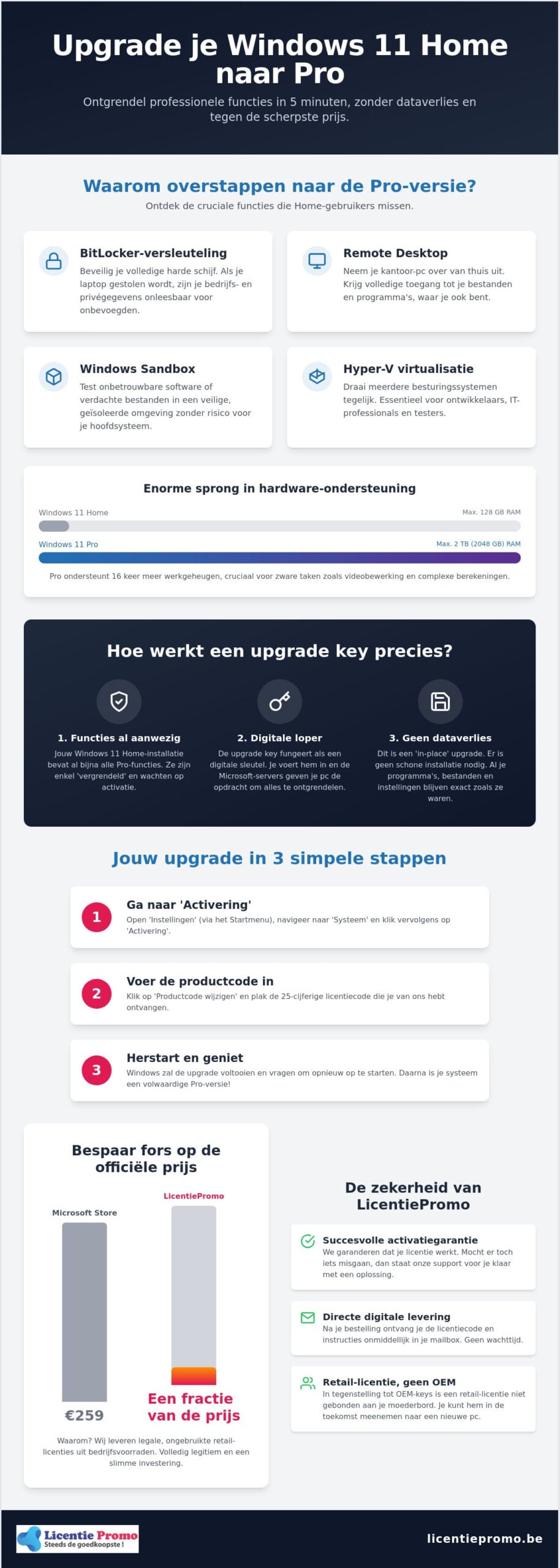
Windows 11 Home is fine for Netflix or casual browsing, but falls short as soon as you start working professionally. Do you use your computer for work or as a freelancer? Then you quickly run into limits. The biggest frustration is often the lack of BitLocker device encryption. Lose your laptop or have it stolen? Without the Pro version, all your business secrets and privédata are exposed. With a windows 11 pro upgrade key you solve this problem instantly. You protect your entire hard drive with powerful encryption that is unbreakable for outsiders. windows 11 pro upgrade key los je dit probleem direct op. Je beveiligt je volledige harde schijf met krachtige encryptie die onkraakbaar is voor buitenstaanders.
Additionally, Pro offers features that are simply indispensable in a modern work environment. Think of Remote Desktop. With it, you can fully take over your powerful PC from the office while sitting at the kitchen table at home. Also, connecting to a corporate network via a domain or Microsoft Entra ID is only possible with the Pro edition. In the officiële list of Windows 11 editions you can clearly see that the Home version lacks these crucial business tools. You remain limited to the basics, which hampers your productivity and security.
security and business features for self-employed
Flemish entrepreneurs are massively choosing the Pro version because of Windows Information Protection (WIP). This tool strictly separates personal data from your business data. This prevents sensitive info from accidentally leaking via social media or privé-mail. Windows Sandbox is also a huge asset for those who want to work safely. With it you can test unknown apps or suspicious files in a fully geïsoleerde environment. You take no risk of your main system getting infected. For a small investment in a Windows 11 Pro license you get this professional security directly in house. It gives you the peace of mind you need to focus on your business.
the difference between home and pro in 2026
In 2026 the difference is greater than ever before. With the release of version 26H1 on February 10, 2026, new AI features are fully optimized for the Pro environment. You get more control over how Copilot interacts with your local files and business data. The hardware support also differs dramatically. While Home is limited to 128 GB RAM, Pro supports up to 2 TB of memory. This is essential for heavy video editing or complex calculations. Do you use virtual machines for development or testing? Hyper‑V is only available in the Pro version. With a windows 11 pro upgrade key you unlock this computing power without reinstalling your PC. It is the fastest way to turn a simple consumer device into a truly professional workstation.
How a Windows 11 Pro upgrade key actually works
A windows 11 pro upgrade key is actually a digital runner. Don't think of it as a completely new package that you have to install. In reality, your current Windows 11 Home version already contains almost all the code of the Pro edition. The features are just behind a lock and key. As soon as you enter the license code, the Microsoft activation servers immediately contact your system. They recognize the code as a valid ticket for the Pro version and issue the command to unlock the extra features. This process is lightning fast because the base files are already on your hard drive.
Entering a windows 11 pro upgrade key is therefore the smartest way to gain more functionality. Microsoft distinguishes between different license types. At LicentiePromo you often receive a retail license. This is a major advantage over cheap OEM keys. A retail code is linked to you as a user and not inseparably to your motherboard. This allows you to transfer the license to a new PC in the future if needed. That is a sustainable investment in your digital toolbox.
no clean installation required
The biggest fear of many users is losing photos’s or program’s. This is completely unfounded with this method. We are talking about an in-place upgrade. This means Windows updates the software while everything stays as is. So you don’t have to restore backups or re‑download your favourite apps. After entering the code your PC automatically downloads a few extra components. According to the official Microsoft upgrade guide this is the safest way to upgrade. You keep your settings, your desktop and your files.
system requirements for a flawless upgrade
Although the process is simple, there are three things you need to watch out for before you start:
- Activation status: Your current Home version must be legally activated. An unactivated system can sometimes block the upgrade.
- Disk space: Make sure you have at least 5 to 10 GB of free space on your C drive. The extra Pro components need some room.
- Internet connection: A stable connection is crucial. Communication with the activation servers must not be interrupted during the switch.
Have you checked everything? Then you can immediately purchase a Windows 11 Pro license and make the switch. It's a matter of seconds for your system to recognize the new status.
Step-by-step guide: activate your Windows 11 Pro upgrade
You have your code in hand. Now it's time for action. The process is surprisingly simple. You don't need to be an IT expert to bring this to a successful conclusion. In less than five minutes you transform your system from the Home version to the powerful Pro environment. No complicated steps. No hours of waiting. Just immediate results on your own screen.
First open the Start menu and click the gear icon for Settings. Go to ‘System’ and then choose ‘Activation’. Here you will see your current Windows version. Click the arrow next to ‘Upgrade your edition of Windows’ to expand the options. You will now see the button ‘Change product key’. This is the moment when you enter your windows 11 pro upgrade key Paste the code carefully into the text field and click Next.
Activation via Settings
Once you click the button, the magic begins. Windows checks your code with Microsoft's servers. This usually takes only a few seconds. Then a notification appears that the upgrade is being prepared. You see a progress bar on your screen. On a modern laptop, this whole process takes on average five to ten minutes. Your PC will probably restart één times to permanently install the new features. In the official guide from Microsoft is advised to save all your work before clicking ‘Start’. This prevents you from losing unsaved files during the automatic reboot. Do you want a complete overview of the download and activation process? Then view our complete guide for downloading and activating Windows 11 Pro for a detailed step-by-step explanation.
what to do about activation errors?
Sometimes it doesn't go smoothly right away. Do you get error code 0xc004f050? No panic. This often means that Microsoft's servers are temporarily not cooperating or that an important update is still in the queue. The golden rule: restart your PC and try again. If it still doesn't work, check whether your internet connection is stable. By choosing a Windows 11 Pro license code original new at LicentiePromo, you eliminate problems with invalid keys. Our codes are guaranteed to work and are legal. After the restart you can go to ‘Settings’ > ‘System’ > ‘Info’ to verify whether ‘Windows 11 Pro’ appears in your specifications. You are now ready for the real work with all professional features at your disposal.
Where to buy a reliable Windows 11 Pro upgrade key in Belgium?
The price in the officiële Microsoft Store scares many people off. You quickly pay the full price there for exactly the same software. Why would you spend hundreds of euro’s more when the solution is closer? In België we see savvy entrepreneurs and consumers massively looking for an alternative that is both legal and affordable. LicentiePromo fills this gap in the market. We offer you a windows 11 pro upgrade key for a fraction of the officiële price. We do this by purchasing unused licenses from corporate inventories and reselling them. That is smart, sustainable and especially good for your wallet.
Choosing a Belgian webshop gives you the necessary certainty. You don't have to gamble with vague foreign websites where support is often non-existent. With us you receive an invoice directly in your name. That is essential for your accounting as a freelancer or SME. You can deduct the costs and prove the legitimacy of your software at every audit. Our reputation speaks for itself. With more than 14,000 customer reviews and an average rating of 4.8 out of 5, you know you're in good hands. No empty promises, but a working activation guarantee on every code we send.
save on your license without risk
The price difference between the Store and a reseller is huge. Sometimes you can save up to 92 percent on the purchase price. Many people wonder if that is possible. The answer is simple: yes. You buy a permanent license. There are no monthly fees or hidden subscriptions attached. Once activated, your system will run the Pro version forever. Want to know more about how this works legally? Also read more in our article about cheap Windows 11 activation code. There we explain all the facts and myths in detail for you.
legal licenses and activation guarantee
The trade in unused licenses is fully legal within the European Union. This is established in the ruling of the Court of Justice (case C-128/11). Software manufacturers may not prohibit the resale of their licenses. LicentiePromo checks each windows 11 pro upgrade key manually for shipping. This ensures that the code works immediately as soon as you enter it. If you still encounter a problem during activation? Our support is ready for you. We will help you via email until your system is fully up-to-date. You are never alone. Buy your Windows 11 Pro license and experience the speed of our digital delivery.
Get started right away with your new Windows 11 Pro license
You have no time to lose. As soon as you order your windows 11 pro upgrade key our system springs into action. Within five minutes the activation code is in your mailbox. No packages delayed by the post. No physical boxes lying around. You start the upgrade immediately from your own desktop. It is the fastest way to give your productivity a boost. While others are still waiting for their delivery, you are already working with BitLocker and Remote Desktop.
A powerful operating system is just the beginning. For a truly professional environment you need the right tools. Combine your new system with Microsoft Office Professional Plus 2024 for the ultimate workplace. Thus you have not only the security of Windows 11 Pro, but also the latest versions of Word, Excel and Outlook at your disposal. Your PC transforms in no time from a standard device to a fully‑fledged business workstation.
immediate delivery via e‑mail
Our automated system works around the clock. Whether you order on Monday morning or Sunday evening, you receive your license immediately. In your confirmation email you will find not only the code, but also a clear guide. We explain step by step how to perform the activation. We recommend that you keep your windows 11 pro upgrade key safe, for example in a password manager or a printed invoice. This way you always have the code at hand if you need to reinstall your system in the future. It is simple, transparent and extremely efficiënt.
support for a smooth process
LicentiePromo is the favorite partner of Belgian IT users for a reason. Our experts know the ins and outs of the trade. Stuck during the transition from Home to Pro? Our support helps you directly via email. We ensure that every customer has a working system. Are you specifically looking for solutions for your business? Also check the possibilities for Windows 11 Pro for entrepreneurs. In 2026 the Pro version is the standard for those who want to grow safely and smartly. We provide you with the licenses, the guarantee and the speed you need to achieve immediate results.
step today over to a professional work environment
You now have all the tools at hand to take your computer to the next level. An upgrade to the Pro version is no longer a time‑consuming task, but a smart investment that you can arrange within a few minutes. By using a legitimate windows 11 pro upgrade key you instantly unlock essential features such as BitLocker encryption and Remote Desktop. You retain all your personal files and programs, without having to reinstall your system completely. It is the fastest way to maximum security and productivity.
At LicentiePromo you choose security and speed. You receive your code within 5 minutes in your mailbox and benefit from our 100% activation guarantee. Our Belgian customer service is also ready to support you at every step. Stop doubting and choose the professional standard you deserve.
Buy your Windows 11 Pro upgrade key now and save instantly!
Your PC is fully ready. Click today to a safer and more powerful digital workplace.
frequently asked questions about the windows 11 pro upgrade
how do i use a windows 11 pro upgrade key?
You simply enter the code via the settings menu on your PC. Navigate to ‘System’ and then click on ‘Activation’. Choose the option ‘Change product key’ and paste your new code there. Windows checks the license directly with the Microsoft servers and starts the upgrade. You do not need to perform any technical actions yourself; the system automatically handles the full activation for you.
Do I need to reinstall Windows 11 for the Pro upgrade?
No, a clean installation is absolutely not necessary. The transition from Home to Pro is a so‑called in‑place upgrade. This means the software only unlocks the extra features that were already present on your hard drive. Your program’s, settings and personal files remain exactly where they are. It saves you hours of work on backups and configurations.
Is a cheap Windows 11 Pro key from licentiepromo legal?
Yes, our licenses are 100 percent legal and legitimate. We use unused corporate stock that may be resold under European legislation. This has been confirmed by the Court of Justice in judgment C-128/11. You are therefore buying an officiële windows 11 pro upgrade key with full activation guarantee, but at a much sharper price than in the standard store.
What is the difference between an OEM and a retail upgrade key?
A retail license is linked to you as an individual and can be transferred to another computer in the future. An OEM key becomes irrevocably tied to the motherboard of your current PC upon first activation. At LicentiePromo we provide quality licenses that give you the necessary flexibility. This way you are also covered when purchasing a new laptop in the future.
Can I upgrade from Windows 11 Home to Pro without data loss?
Absolutely, you won't lose any file during this process. Because the upgrade only activates the professional components of the operating system, your documents, photo’s and video’s stay safe in place. It is the most hassle‑free way to obtain extra features such as BitLocker. You can get back to work with all your trusted program’s and data right after the restart.
What should I do if my upgrade key is not accepted?
First restart your computer and check that you are connected to the internet. Often a small hiccup in the connection is the cause of an error message. Does the problem persist? Then contact our Belgian customer service directly. We will look at it with you personally and ensure that your windows 11 pro upgrade key is correctly activated. You are never alone.
Does a windows 11 pro upgrade key also work on windows 10?
This specific license is designed for the Windows 11 platform. Do you still have Windows 10 Home? Then we recommend first making the free upgrade to Windows 11 Home via the officiële Windows Update. Once that process is completed, you can use our upgrade key to move to the Pro version and benefit from all business advantages. For a detailed explanation of the full process of Windows 11 Pro download and activation, including the hardware check and TPM 2.0 requirements, we gladly refer you to our complete guide.
Do I receive an invoice with my purchase for my Belgian business?
Absolutely, we will send you a professional invoice by e‑mail immediately after the purchase. This invoice contains all the necessary information for your Belgian accounting, including the VAT details. This way you can easily deduct the investment as a business expense for your company or corporation. It is the ideal solution for freelancers and KMO’s who want to keep their IT costs under control without compromising on quality.