
Windows 11 Pro upgrade license: how to switch to the professional version affordably in 2026
Why would you pay more than 200 euros in the Microsoft Store for features you can get elsewhere for a fraction of the price? You're not the only one hesitating because of those sky-high prices and the fear of unreliable activation codes that suddenly stop working. A Windows 11 Pro upgrade license should make your system more powerful and secure, not eat up your budget.
You just want to get started right away with BitLocker protection and Remote Desktop without data loss or complicated installations. At LicentiePromo, we understand that better than anyone. Discover how you can upgrade your system to Windows 11 Pro within 5 minutes without data loss and at the sharpest price in Belgium. We show you exactly how digital activation works and why this switch is the smartest investment for your PC in 2026, especially now that official support for older versions is almost ending.
Key Points
- Transform your PC directly to the Pro version without time-consuming reinstallations or data loss.
- Activate essential features such as BitLocker encryption for your laptop with a Windows 11 Pro upgrade license.
- Make the smart choice between OEM and retail to maximize savings on your software budget.
- Perform the switch yourself within 5 minutes via the simple Windows settings.
- Benefit from a 100% activation guarantee and receive your legal code directly by email from LicentiePromo.
what is a windows 11 pro upgrade license and do you really need it?
A Windows 11 Pro upgrade license is not a physical product in a box. It is a powerful digital key. Think of it as a master key that opens the locked doors of your current operating system. Most people don't realize that all Pro features are already on their hard drive. They are simply locked by Microsoft. By entering a legitimate code, you activate this extra layer of professional capabilities within minutes.
In 2026, this transition is more important than ever. The digital world is changing rapidly. Cyberattacks on Belgian SMEs and self-employed individuals are becoming more complex. Hybrid working, where you alternate between working from home and the office, demands ironclad security. Different Windows 11 editions each offer their own level of protection, but only the Pro version gives you the tools needed for the modern workplace.
The biggest advantage? You don't need to perform a clean installation. Forget the hassle of external hard drives, backups of all your photos, or spending hours reinstalling your favorite software. A direct upgrade preserves all your files, shortcuts, and settings. You enter the code. Your PC performs a short update. After a restart, you have all the business features. This is the ideal solution for self-employed individuals with a side job, students who need secure connections to their college, and demanding home users.
why most laptops come with windows 11 home
Walk into a Belgian electronics store and you'll see rows of laptops. Almost every device runs on the Home edition. That's no coincidence. Manufacturers want to price their devices as competitively as possible. By saving on licensing costs, the selling price remains attractive to the masses. For those who only do some browsing or watch Netflix, this is more than sufficient.
However, once you start working professionally, you will notice the limitations. You cannot connect your laptop to a company domain. You lack the encryption that protects your data if your device is stolen. In Belgium, where we increasingly work on the go on the train or in coffee bars, that is a major risk. Fortunately, you do not need to buy a new, expensive business laptop. Your current hardware is powerful enough. You just need the right software key to unlock its full potential.
the difference between an activation code and an upgrade key
There is often confusion about these terms. In practice, they work the same way. An upgrade key is an activation code that instructs your system to download and activate the extra Pro components. You do not need any technical knowledge for this. You do not need to hire an expensive specialist to convert your system. No hassle. No waiting times.
The process is simple. You purchase an original Windows 11 Pro License and enter it in your PC's settings. Windows does the rest. The license is immediately linked to your Microsoft account. This means your activation is and remains secure. Even after major updates in the future, your system will continue to be recognized as the professional version. It is a one-time investment with no monthly costs. This way, you immediately take back control of your digital security.
the main advantages of windows 11 pro compared to the home version
Why would you invest in a Windows 11 Pro upgrade license? The answer is simple: control and security. The Home version is fine for entertainment, but falls short once you carry professional responsibilities. Switching to Pro gives you access to tools that make your data unreadable to thieves and allow you to stay productive anywhere in the world. According to the official comparison of Windows 11 versions , the differences are fundamental for anyone who takes their PC seriously.
Think, for example, of Windows Sandbox. With this, you open suspicious attachments or unknown apps in a fully isolated environment. Do you close the Sandbox? Then every trace disappears immediately. No risk of viruses infecting your main system. For those using advanced AI tools in 2026, the Pro version also offers better stability and management of system resources. Your PC keeps running smoothly, even during heavy tasks.
For those who manage a small team or run their own business, advanced network management is indispensable. With Azure Active Directory and group policy, you centrally determine who has access to which folders. You set security rules for all PCs at once. This saves you hours of manual work. It is the professional standard that the Home version simply cannot offer.
security that goes beyond windows hello
BitLocker device encryption is the absolute star of the Pro edition. For Belgian entrepreneurs with sensitive customer data, this is not a luxury, but a necessity. Is your laptop stolen from your car or on the train? Without your password, your files are worthless to the thief. Everything on your disk is encrypted with military precision. In addition, Windows Information Protection (WIP) helps you keep private and work data strictly separate. This is essential to comply with the strict GDPR legislation and protects you against unintentional data leaks.
boost productivity with pro-exclusive tools
Are you a power user who likes to experiment? Then you need Hyper-V. With it, you can run multiple operating systems simultaneously without slowing down your PC. Pro also supports up to 2 TB of RAM and multiple physical CPUs. That is more than enough for heavy video editing or complex calculations. This power truly comes into its own with full integration with the new Microsoft Office Professional Plus 2024 license code. Together they form the ultimate digital workplace for every professional.
Do you want to experience these benefits on your own computer today? You can directly purchase an original Pro code and upgrade your system to the highest level within minutes.
windows 11 pro oem vs retail: which license is the best choice for you?
You are faced with a choice that directly affects your wallet. When you search for a Windows 11 Pro upgrade license, you will come across two types: Retail and OEM. The difference does not determine what your software can do, but rather how you use the license in the future. A retail license is the king of flexibility. You can take it to a next computer if your current PC gives up the ghost. However, this comes with a hefty price tag. At Microsoft, you pay top dollar for this transferability.
OEM licenses work differently. These keys are tied to the motherboard of your current device. If you buy a completely new laptop tomorrow, you cannot transfer this specific code. For most Belgian users, however, this is the smartest move. The lifespan of a modern laptop or desktop is considerable these days. Why would you pay three times more now for a right you might only use in five or six years? With an OEM key, you immediately enjoy all the Pro benefits on your current hardware for a fraction of the price.
Is such a cheap license legal? Absolutely. In the European Union, the right to resell software licenses is legally established. Once a company has purchased a license and no longer uses it, it may be resold to third parties. This is exactly what we do. So you are buying a 100% legitimate product that fully complies with European regulations. No gray market imports, but legal software with an activation guarantee.
how LicentiePromo can offer such low prices
We do not engage in expensive marketing campaigns or physical high-street stores. Our strength lies in smart purchasing. We take over large batches of unused volume licenses from companies that are switching to other systems. Because we handle everything digitally, you won't have to deal with shipping costs or environmentally polluting packaging. You will receive your code within 5 minutes in your mailbox. We focus on large volumes and a fully automated process. This allows us to keep our margins small and your savings large. You save up to 80% with us compared to official store prices.
which license should you choose for your situation?
The choice depends on your future plans. Are you an IT enthusiast who builds a new PC every six months? Then choose retail. For the average self-employed person, student, or home user, the Windows 11 Pro License in OEM form is the most logical choice. You get exactly the same security and features without spending unnecessary money. Want to calmly review all the technical details again? Then check out our comprehensive guide on Windows 11 Pro OEM vs retail to discover which key perfectly fits your needs.
from home to pro in 5 minutes: how to use your upgrade license code
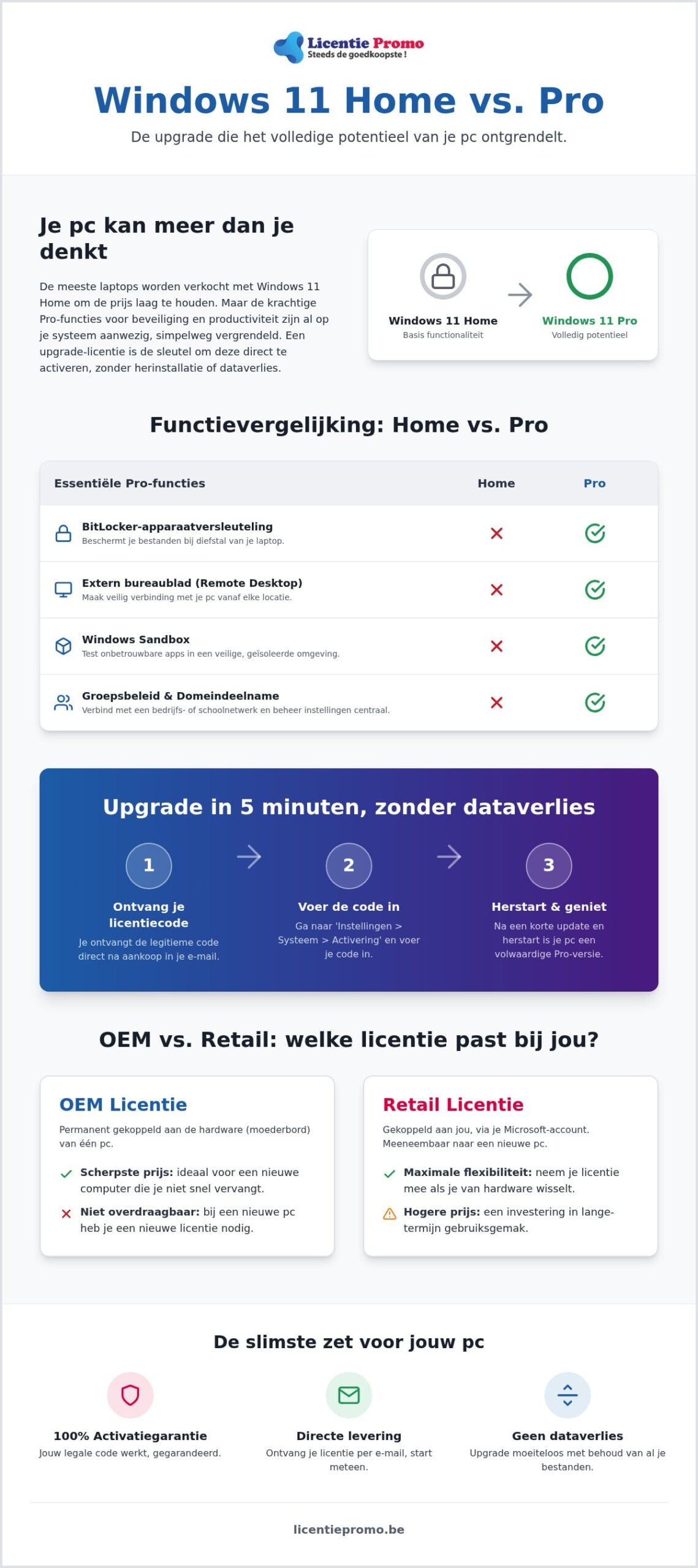
You want results and you want them now. A full reinstallation of your computer is a pure waste of time. With a Windows 11 Pro upgrade license from LicentiePromo, you completely skip that annoying step. You keep all your files, photos, and programs. You don't need to be an IT expert to get this done. Simply follow these four steps to transform your system to the professional version in record time.
- Step 1: Buy your original code on the windows 11 pro product page. You will receive the 25-digit key directly in your mailbox. No waiting times, no shipping costs.
- Step 2: Open the settings on your PC. Navigate to ‘System’ and then click on ‘Activation’. Here you will see your current Windows version.
- Step 3: Find the option ‘Change product key’ and click on the ‘Change’ button. Copy the code from your email and paste it into the input field to avoid typos.
- Step 4: Click on ‘Start’ to confirm the upgrade. Your PC will now download the additional Pro components. During this process, you will see a progress bar and your computer will restart once. Once you log back in, the transformation is complete.
During the transition, all your settings remain intact. Your desktop icons, browser history, and installed software are still exactly where they were. That is the big advantage of a targeted upgrade key over the cumbersome methods you find elsewhere on the internet.
common error messages and how to resolve them
Sometimes the process doesn't run smoothly right away. Getting error code 0x800f0805? Don't panic. This usually indicates a temporary communication issue with Microsoft servers. A simple manual restart of your PC usually resolves this immediately. Also ensure a stable internet connection. The system needs to download the additional business features. Microsoft often tries to make you believe you can only upgrade through their expensive store, but an external Windows 11 Pro upgrade license works technically exactly the same and saves you dozens of euros.
check your activation
After the restart, you naturally want to be sure everything is in order. Go back to ‘Settings’ > ‘System’ > ‘Activation’. There, it should now show ‘Windows 11 Pro’ with the status ‘Active’. The license is automatically linked to your Microsoft account, which is convenient for the future. If you still have a question or need help entering your code? The Belgian customer service of LicentiePromo is ready for you. We offer a full activation guarantee: we won't let you go until your system runs perfectly.
Don't wait any longer for a slower system and secure your data today. Order your Windows 11 Pro license now and experience the difference within minutes.
why buying your windows 11 pro license at LicentiePromo is the smartest move
You don't want to take risks with vague activation codes from foreign websites. Choose certainty and speed. At LicentiePromo, we understand that you want to see results immediately. That's why you'll receive your Windows 11 Pro upgrade license in your mailbox within exactly 5 minutes. No hassle with physical packages or long waiting times. You pay and can immediately start upgrading your system. Our processes are fully automated to guarantee you that speed.
We will never let you down. Every purchase comes with a 100% activation guarantee. If something goes wrong while entering the code, our Belgian customer service is ready to help you with real human advice. We will personally assist you until your system runs perfectly on the professional version. For Belgian entrepreneurs and self-employed individuals, we also provide an official proof of purchase. You will receive a proper Belgian invoice that is essential for your bookkeeping and VAT deduction. This way, your software is not only technically in order, but also fully compliant from a tax perspective.
save hundreds of euros on your software package
Why would you be tied to expensive monthly subscriptions? We believe in lifetime ownership. A one-time purchase of a Windows 11 Pro upgrade license means you never pay for your operating system again. You can increase this saving even further by combining your upgrade with a package for your daily work. For example, choose Microsoft Office Home & Business 2024. This gives you all the essential tools like Word, Excel, and Outlook without recurring costs. It is the most cost-efficient way to fully set up your digital workspace in 2026.
buy safely and confidently in Belgium
Safety starts at the purchase. Thousands of satisfied customers in Belgium and the Netherlands have already gone before you. We use trusted payment methods such as Bancontact and credit card, so your transaction is always protected. You don't have to worry about the legitimacy of your software. Our licenses are 100% legal according to European law. Want to know how we keep our prices so sharp? Discover in detail why we can offer the cheapest windows 11 pro license without compromising on quality or service. Stop overpaying and choose the smart way to a professional system.
Are you ready to make the switch? You no longer have to wait for a slow PC or limited features. Order your Windows 11 Pro license today and experience the power of a fully unlocked system within minutes.
make the switch to the professional standard today
You now have all the tools in hand to take your computer to the next level. An upgrade to Windows 11 Pro is no longer an unnecessary luxury; it is the foundation for secure and efficient work in 2026. You get immediate access to BitLocker protection and Remote Desktop without having to completely reinstall your PC. Thanks to a Windows 11 Pro upgrade license from LicentiePromo, you save hundreds of euros compared to the official store. The process is simple, legal, and completed within minutes.
You will receive your original code by email within 5 minutes, so you can get started right away. Belgian entrepreneurs will also immediately receive a correct VAT invoice for their accounting. With our 100% activation guarantee, you run no risk and are assured of a working system. Stop doubting complex installations and choose the fastest route to a professional workspace. You deserve a system that works as hard as you do.
buy your windows 11 pro license now for only a fraction of the price
frequently asked questions about switching to windows 11 pro
Can I upgrade from Windows 11 Home to Pro without losing my files?
Yes, you keep all your documents, photos, and installed programs during this process. The windows 11 pro upgrade license only unlocks the extra business features that are already on your hard drive. Nothing is erased or overwritten. It is a seamless transition where you continue working right where you left off after the restart.
Is a cheap Windows 11 Pro license from LicentiePromo legal?
Absolutely, our licenses are completely legal and comply with European legislation. The European Court of Justice has confirmed that the resale of unused software licenses is permitted. So you are buying a legitimate product with the certainty of permanent activation. We guarantee that every code we deliver is 100% official.
How long does it take before I receive my upgrade code?
You will receive the code within 5 minutes in your mailbox. Our system processes orders fully automatically and 24 hours a day. As soon as the payment via Bancontact or credit card is completed, the email with your unique key will be sent immediately. So you can get started with the upgrade right away.
Do I need an internet connection for the upgrade?
Yes, an active internet connection is necessary to complete the upgrade. Windows must connect to Microsoft's servers to download the new features and verify your license. Ensure a stable connection so the process is not interrupted during the installation of the additional components.
Can I transfer an OEM license to another PC later?
No, an OEM license is permanently linked to the motherboard of your computer. This is the reason why these licenses are considerably cheaper than the retail versions. For most users, this is the most cost-effective choice, as the license remains valid for the entire lifespan of your current laptop or desktop.
Does the upgrade code also work if I am still on Windows 10?
No, this specific upgrade key is designed for computers that are already running Windows 11 Home. If your system is still on Windows 10, we recommend that you first make the free switch to Windows 11 or purchase a specific Windows 10 Pro license. This way, you avoid technical conflicts during activation.
what if my activation code doesn't work?
We offer a 100% activation guarantee on every Windows 11 Pro upgrade license. If you encounter an error message, our Belgian customer service is ready to help you immediately. We will investigate the cause and provide a working solution or a new code. You are never alone with installation issues.
Do I get an official invoice for my business with the purchase?
Yes, every order is delivered with an official invoice including VAT. For Belgian self-employed individuals and SMEs, this is essential to process the purchase correctly in the accounting and to reclaim the VAT. You will find the invoice immediately after your purchase in the confirmation email of your order.