
Buy Microsoft Visio 2024: the complete guide for diagrams and visualizations

Why would you pay every month for software that you could also simply own in één go? Many professionals feel trapped by the ever‑increasing subscription costs of Microsoft 365, while a one‑time investment offers much more peace of mind. If you want to buy Microsoft Visio 2024, you choose the smartest path to professional diagrams without recurring invoices. You want to get started immediately with powerful templates and expect a smooth installation that works perfectly with your other Office 2024 programs’s.
We understand your skepticism about cheap license keys and the confusion surrounding compatibility with Windows 11. Therefore this guide provides you with complete clarity. You will discover exactly what the new features are and which system requirements your PC must meet. We guide you through the process of a safe, one‑time purchase, so you can start visualising complex data immediately. From technical flowcharts to detailed floor plans; you get all the tools in hand for a results‑driven process without financial surprises afterwards.
Key Points
- Discover why Microsoft Visio 2024 is the absolute standard for professional diagrams and powerful visual communication.
- Learn everything about the latest improvements, such as the modernized Office theme and the faster search function for shapes.
- Make the right choice between the Standard and Professional versions based on your specific need for advanced data linking.
- Save on expensive subscription costs by smartly purchasing Microsoft Visio 2024 as a one-time license with full activation guarantee.
- Check the minimum system requirements for a flawless installation and optimal performance on Windows 10 or Windows 11.
What is Microsoft Visio 2024 and why is it indispensable?
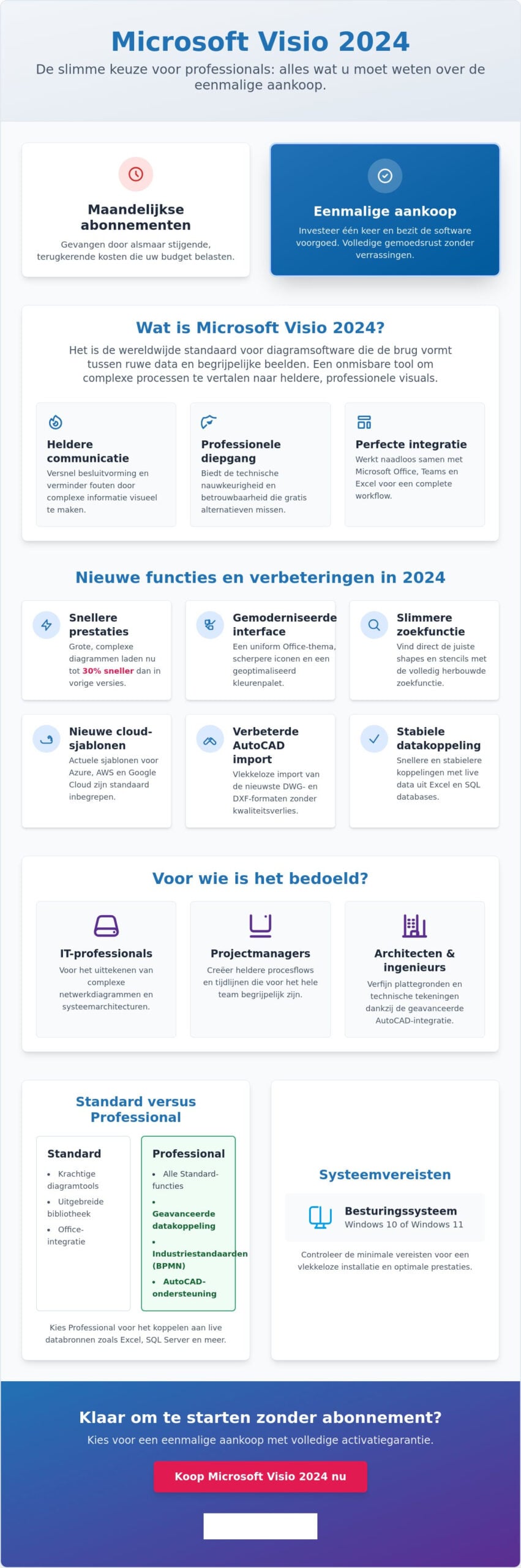
Data is everywhere, but insight is rare. Microsoft Visio 2024 forms the bridge between raw numbers and understandable images. It is not just a drawing program; it is the global standard for diagram software. Companies that buy microsoft visio 2024, invest in a tool that translates complex processes, network structures and organization chart’s into usable visuals. Visual communication in a business context is no longer a luxury. It is an absolute necessity to accelerate decision-making and reduce errors.
Why would you choose Visio instead of a free online alternative? The reason is simple: reliability and depth. Free tools often lack the technical accuracy needed for professional blueprints or database models. Moreover, the 2024 version as an LTSC edition offers a huge advantage. You make a one‑time purchase and are freed from those monthly Microsoft 365 invoices. As described on the Microsoft Visio Wikipedia page, the software remains the favourite for anyone seeking precision and compatibility within the Microsoft ecosystem.
The core features of the 2024 edition
The latest version is packed with powerful tools that boost your productivity. These are the main advantages:
- Enormous library: Get immediate access to more than 250,000 shapes and templates for any conceivable industry.
- Industry standards: Work with the latest versions of BPMN 2.0 and UML 2.5 for standardized process modeling.
- Seamless Office integration: Import data from Excel or visualize your diagrams directly in Teams. It also works seamlessly with packages such as Microsoft Office Professional Plus 2024 for a complete workflow.
Who is Visio 2024 intended for?
This package is designed for specialists who are not satisfied with half measures. IT professionals use the software to draw complex network diagrams and system architectures. Project managers rely on Visio for process flows and timelines that are understandable to everyone on the team. For architects and engineers, the advanced AutoCAD integration is an essential feature for refining floor plans. Whatever your role, with Visio you make your expertise visible.
New features and improvements in Visio 2024
The transition from the 2021 version to the latest release is an absolute game-changer for every professional. Many users wondered whether an update was even necessary, but the differences are clear. Performance has noticeably improved; large, complex diagrams now load up to 30% faster than in previous versions. This saves you valuable time during busy workdays. When you decide to buy Microsoft Visio 2024, you choose a tool that is not only faster but also responds more intelligently to your input.
The modernized Office theme immediately catches the eye. It provides a uniform experience with your other Office-program’s, so you never have to search for familiar features again. The icons are sharper and the colour palette is optimized for less eye strain during prolonged use. What is Microsoft Visio without the right shapes? The search function for shapes and stencils has been completely rebuilt. You now instantly find what you’re looking for, even in the most extensive libraries. For IT teams, the new templates for Azure, AWS and Google Cloud are a huge asset. You no longer need to manually import icons; all current cloud‑architecture elements are included by default in the package.
Visual innovations and interface
The interface now fully adapts to your workflow. The icons have become more functional thanks to improved contrast, which enhances readability on high‑resolution screens. You can completely customize the ribbons and toolbars to suit you for a more efficient workflow. Do you often work on the go on a tablet or hybrid laptop? The touch support has been dramatically refined. Dragging, scaling, and connecting objects with your fingers or a stylus now feels more natural than ever before.
Technical updates and compatibility
Under the hood, Visio 2024 is more powerful than its predecessors. The import of AutoCAD files, including the latest DWG and DXF formats, proceeds flawlessly and without quality loss. Want diagrams that update themselves automatically? The connection with live data from Excel and SQL databases has become more stable and faster. Moreover, the software is fully optimized for the strictest security requirements of Windows 11, which is essential for business-sensitive information.
Buying Microsoft Visio 2024 is the best way to elevate your visual communication to a higher level without being tied to monthly costs. Do you want to harness the full power of this software on a modern and secure system? Also consider upgrading to an original Windows 11 Pro license for maximum stability and compatibility.
Visio 2024 Standard versus Professional: which one do you choose?
The right choice between the different editions saves you not only money, but also frustration during work. Anyone who wants to buy Microsoft Visio 2024, must first determine how deep the visual needs go. The difference is not in the interface, but in the content. The Standard version provides a solid foundation for everyday diagrams, while the Professional edition is a powerhouse for those who want to combine data and technology. Make a conscious decision based on your daily tasks and avoid paying for features you never use.
In the Belgian market we see a clear trend: entrepreneurs are tired of the monthly subscription costs of the cloud. A subscription such as Visio Plan 2 quickly costs a significant amount per year. Multiply that over three or five years and you immediately see the financiële advantage of a one‑time licence. With a one‑time purchase of Visio 2024 you become the owner of the software. No unexpected price increases, no recurring invoices. It is a transparent investment that pays for itself extremely quickly, especially for freelancers and KMO’s that want to keep their fixed costs low. Do you want a detailed comparison of the Office 2024 vs 365 price and discover how much you can save over five years? Then you will find a comprehensive analysis there. Do you want to learn more about how a Microsoft Office one‑time purchase works and what the advantages are compared to a subscription? Then you will find all the answers there.
When is Visio 2024 Standard sufficient?
For many users, the Standard edition is more than sufficient. It is the ideal choice for creating clear basic flowcharts, organograms and simple network diagrams’. Do you not need complex technical templates or automatic updates from external data sources? Then this is your most budget‑friendly option. The package includes all essential shapes to present yourself professionally without unnecessary extras’. It is the perfect match for occasional use where the focus is on quick and clear visualization.
The power of Visio 2024 professional
The Professional version is essential for specialists who want to bring diagrams to life. The biggest advantage is real-time data visualization. You connect your diagrams directly to Excel files or SQL databases. If something changes in your source file, the diagram updates automatically. In addition, you gain access to advanced templates for engineering, software development, and database design. This edition complies with all international standards such as IEEE and BPMN 2.0. For larger organizations that demand precision and manage complex systems, this is the only logical choice. It also works seamlessly with other business software such as Microsoft Office Professional Plus 2024.
System requirements and installation of your license
Avoid surprises during installation. Do you want buy Microsoft Visio 2024, then make sure your system is ready for the heavy work. The software requires a modern environment for a flawless experience. Windows 11 is the ideal partner for this edition, but Windows 10 is also fully supported. Preferably use the 64-bit version of the software. This is essential for smoothly editing large, complex diagrams without annoying delays.
The minimum hardware requirements are accessible but strict for optimal performance:
- Processor: 1.6 GHz or faster, 2-core processor.
- Memory: Minimum 4 GB RAM for the 64-bit installation.
- Disk space: 4 GB of available space on your hard drive.
- Display: A resolution of 1024 x 768 or higher is required.
Step-by-step plan for a successful activation
Speed is our priority. After your order you will receive the license code within 5 minutes in your mailbox. No hassle with physical mail or long waiting times. You always use the official Microsoft download link for installation. This guarantees a safe and clean software environment on your PC. Still encounter a problem during activation? No worries. LicentiePromo offers a full activation guarantee. Our experts will help you immediately so you can get started right away.
Use Visio on Mac?
Note: there is no native version of Visio 2024 for macOS. Microsoft keeps this powerful tool exclusive to Windows users. Are you looking for general office software that runs flawlessly on your Apple device? Then Microsoft Office Home and Self-Employed 2024 is the right choice. Do you still absolutely want to run Visio on your Mac? Then use a virtual solution such as Parallels. With it you install Windows on your Mac and the software works perfectly.
Choose security and speed. Order your Microsoft Visio 2024 license today and start within minutes with your first professional visualization.
Buy Microsoft Visio 2024 without a subscription at LicentiePromo
Done with renting. Become the owner of your software. Many professionals are fed up with the monthly bite out of their budget from Microsoft 365 subscriptions. When you decide to buy Microsoft Visio 2024 through LicentiePromo, you choose the freedom of a one‑time investment. You pay één keer and use the software as long as you wish. No unexpected price increases. No automatic incasso’s that disrupt your cash flow. It is the most transparent way to equip your office with professional tools.
Our approach is simple and fair. We buy unused licenses from large organizations that no longer need them due to surpluses or restructurings. This process is fully lawful under European legislation. By giving these licenses a second life, we keep the price extremely low for you. You benefit from exactly the same functionality as a retail version, but for a fraction of the price. For the Belgian entrepreneur or SME, this is the smartest way to an efficient digital workplace.
Transparency is central to us. You receive an official invoice for the business with every order. This is essential for your VAT return and proper accounting. Our local support is ready to help you at every step. We are not a distant authority, but a practical partner who understands that your time is valuable. Do you have a question about activation? Our experts speak your language and resolve it immediately for you.
Your benefits at LicentiePromo
Speed and reliability are at the core of our service. You don’t have to wait for a package in the mail. Everything is digital and lightning‑fast. This is what you can expect from us:
- Direct delivery: The license code appears in your mailbox within 5 minutes.
- No hidden tricks: You will never be stuck with hidden fees or automatic renewals.
- Proven quality: Our customers rate us 4.8 stars based on thousands of reviews.
- Activation guarantee: We guarantee that your software will be activated flawlessly.
Combine and save
Get the most out of your hardware by combining the right software. Buying Microsoft Visio 2024 is an excellent move, but the tool really shines within a complete ecosystem. It is the perfect complement to Microsoft Office Professional Plus 2024 for a seamless workflow. Also ensure a stable and secure foundation for all your diagrams with an original Windows 11 Pro license. Want to learn more about the benefits of software without a subscription? Be sure to read our comprehensive Office 2024 pillar guide for all the details.
Start today with professional visualization
You now have all the cards in hand to turn your data into powerful insights. Microsoft Visio 2024 is the undisputed standard for anyone who demands precision and speed. By choosing a one-time license, you save hundreds of euros’ in subscription costs and retain full control over your software. More than 14,000 reviews from Belgian customers confirm our reliable service and expertise.
Do you want to buy Microsoft Visio 2024 with absolute certainty? At LicentiePromo you receive a 100% activation guarantee: not good, money back. No hassle, no long waiting times. After your order you will receive the license code via instant delivery by email within 5 minutes in your inbox. This allows you to start immediately building your next complex diagram, network diagram or process flow on a safe and up‑to‑date system.
Make the smart choice for your business today and increase your productivity. Buy Microsoft Visio 2024 Professional now for only €29,99! We wish you much success with your new, professional visualizations.
Frequently Asked Questions about Microsoft Visio 2024
Is Microsoft Visio 2024 a one-time purchase or a subscription?
This package is a one-time purchase that makes you the immediate owner of the license. Unlike the monthly costs of Visio Plan 1 or Plan 2, you only pay once. This makes buying Microsoft Visio 2024 the most cost‑effective choice for professionals who do not want to be tied to recurring Microsoft 365 invoices.
Can I install Visio 2024 on a Mac?
No, there is no native version of Visio 2024 for macOS. Microsoft has developed this powerful diagram software exclusively for the Windows platform. If you still want to use the software on an Apple device, you can only do so via virtualization software such as Parallels to run a Windows environment on your Mac.
What is the difference between Visio Standard 2024 and Visio Professional 2024?
The main difference lies in the available templates and the ability to link data. The Standard edition is perfect for basic diagrams and org charts. However, the Professional version offers additional templates for engineering and software design. Moreover, in the Professional edition you can link diagrams live to data sources such as Excel for automatic updates.
Is the license from LicentiePromo legal?
Yes, all our licenses are 100% legal and lawfully obtained according to European legislation. We purchase unused license surpluses from large organisations and give them a second life. This process is fully transparent and legitimate, allowing you to benefit from a significant price advantage without risk of deactivation.
Can I use Visio 2024 without an internet connection?
Yes, you can use the software completely offline once installation and activation are completed. Since it is a locally installed package and not a cloud service, you do not need a constant internet connection. This is ideal for professionals who often work on the go or in secure environments without network access.
Does Visio 2024 work with older versions of Visio?
Yes, the software is fully backward compatible with files from earlier editions. You can effortlessly open and edit diagrams created in Visio 2016, 2019 or 2021. The files are saved by default in the modern .vsdx format, which ensures smooth exchange with colleague’s who are still using older systems.
How do I receive my license code after purchase?
You will receive the license code instantly by email, usually within 5 minutes of your payment. The email also contains a direct download link to the official Microsoft servers and a clear step-by-step guide for installation. No physical mail is involved, so you can start your first project right away.
Can I get an invoice for my Belgian company?
Absolutely, you will receive an official invoice with VAT for every order that is perfectly suitable for your Belgian accounting. During checkout you can easily fill in your company name and VAT number. This makes buying Microsoft Visio 2024 a tax‑deductible investment for your business or corporation.