
One-time purchase office vs subscription: what is the best choice in 2026?
Are you still paying every month for software you could have owned long ago? It's a familiar problem. Those monthly invoices for Microsoft 365 keep rolling in, while prices for business subscriptions have risen sharply in July 2026. You just want a legal version of Word, Excel, and Outlook without being tied to an expensive contract that never ends. The choice between a one-time purchase of Office vs a subscription is more relevant than ever in 2026 due to these ongoing price increases.
You are probably more than tired of the confusion about features and the fear of illegal software. Today we will make the comparison crystal clear. In this article, you will discover whether you are better off with a one-time license for Office 2024 or if a subscription is still worth it for you. We will show you how to save hundreds of euros and get started right away with a legitimate version that perfectly fits your needs. No hassle with recurring costs, but a quick solution that works. That way, you get maximum certainty for the sharpest price.
Key Points
- Understand the fundamental difference between Microsoft 365 and Office 2024 to make the right choice for your workflow.
- Discover how the one-time purchase office vs subscription comparison works in your favor and save hundreds of euros in the long run.
- See exactly which apps such as Word, Excel, and Outlook are included in the Office 2024 package without being tied to monthly invoices.
- Calculate your own break-even point and discover why a fixed license in 2026 pays off faster than ever before.
- Learn how to obtain a legal license with activation guarantee within 5 minutes so you can start immediately and safely.
One-time purchase office vs subscription: which suits you?
You are facing an important choice. Microsoft is pushing everyone towards the cloud, but is that really the best deal for you? The battle between a one-time purchase of Office vs. subscription is about more than just euros. It's about ownership versus renting. If you look at the Microsoft Office history, you'll see that for decades we simply bought a license that we used for years. Today, the tech giant tries to force you into a monthly rhythm. That's smart for their numbers, but often detrimental to your own bank account.
Why would you keep paying for something you already have? The psychology behind ‘software-as-a-service’ is simple. It lowers the barrier, but the total cost over the years becomes enormously high. With a subscription, you rent access. If you stop paying, you lose access to your trusted programs. That doesn’t really feel like freedom. With a perpetual license, you are in charge. You install the software and it keeps working, period. No worries about your data or your access.
What exactly is a one-time purchase?
A one-time purchase, also called a ‘perpetual’ license, is software that you buy once and can use unlimited on your device. With Microsoft Office Professional Plus 2024 you won't have to deal with monthly deductions. You pay a sharp price and the license is yours. No surprises. No price increases mid-year. No stress about expired subscriptions. It is the most stable choice for those who just want to do their work without administrative hassle.
The rise of the subscription model
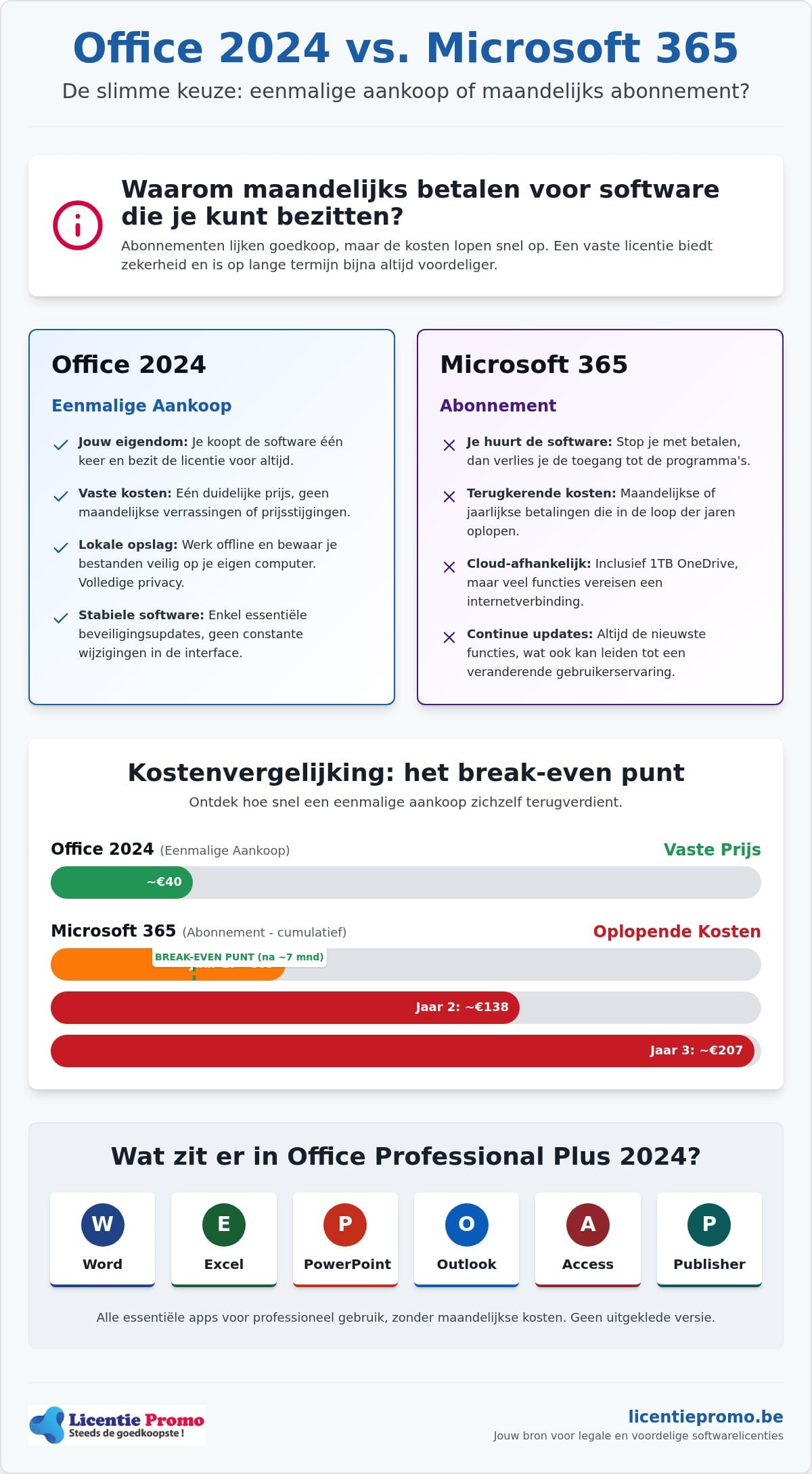
Microsoft 365 became popular due to extras such as 1TB OneDrive storage and access on multiple devices. It sounds attractive. You always get the latest version and access everywhere. But let's be honest. Do you really use that cloud storage to its full potential? And do you need those weekly updates for your daily Excel sheets? The hidden costs of a subscription that runs for five or ten years are enormous. In July 2026, we saw price increases for business plans again, ranging from 5% to more than 40% per user. That just proves it again. Those who rent are at the mercy of the landlord's whims. With a one-time purchase office vs subscription comparison, you quickly see that owning is almost always cheaper.
When do you choose which model?
- Choose Office 2024 if: you have a fixed PC or Mac, do not need 1TB of cloud storage, and want to pay once for legal software.
- Choose Microsoft 365 if: you work on more than five different devices and make intensive use of real-time collaboration in the cloud.
What exactly does a one-time purchase of office 2024 entail?
If you choose Office 2024, you are choosing peace of mind. Many people think that a one-time license is less complete, but that is not true. The package of Microsoft Office Professional Plus 2024 includes all the heavyweights: Word, Excel, PowerPoint, and yes, also Outlook. Some major web shops claim that Outlook is missing, but that only applies to the most stripped-down versions. With the Professional Plus edition, you even get Access and Publisher. In 2026, stability remains the biggest selling point. You get critical security updates without the interface changing every month due to unnecessary updates. Moreover, you don't need an internet connection for your daily tasks. You open your documents locally and continue working wherever you are.
Installation is child's play these days. You receive a digital license code and a direct download link. Within five minutes, everything is on your system. When purchasing, make sure you choose the correct version for your operating system. There are specific licenses for Windows 11 and macOS. The big advantage? No hassle with activation codes that expire after a year. Once activated, the software keeps working as long as your device lives. This makes the comparison between a one-time purchase office vs subscription very simple for many users.
The benefits of ownership
Privacy is worth its weight in gold these days. With a subscription, your files are often stored in the cloud by default. With a one-time purchase, you decide. Your documents stay on your own drive. You run no risk of data loss or blocked access if something goes wrong with your monthly payment. It is the ideal choice for those who prefer to work locally and want full control over their digital environment. You buy the software, install it on your PC or Mac, and it is yours. You are no longer a renter of your own work tools.
Limitations to keep in mind
Honesty lasts the longest. A one-time license also has its limits. You won't get automatic upgrades to a next major version, such as a possible Office 2027. The 1TB OneDrive storage from the subscription is also missing. The license is usually tied to one specific device. Still, for many, this doesn't outweigh the constant costs of a subscription. If you look at the pros and cons of each model, you'll see that the savings with a one-time purchase often amount to hundreds of euros over the total usage period. In the consideration between a one-time purchase office vs subscription , the choice for 2024 is therefore the most logical step for most price-conscious users. Want to save right away? Then check out our offer and get started today.
The big comparison: office 2024 versus microsoft 365
The battle between a one-time purchase office vs subscription is often clouded by marketing talk. Microsoft wants you to believe that the one-time version is “less”. The reality is different. For the vast majority of users, Word, Excel, and PowerPoint in Office 2024 are identical to the versions in Microsoft 365. You type the same letters, make the same complex calculations, and design the same presentations. The real difference lies in the extras you get around it, such as 1TB cloud storage and the ability to work on five devices at once. Don't need that? Then with a subscription, you're simply paying for air.
Another major point of discussion in 2026 is AI. Microsoft Copilot is the star of the show when it comes to subscriptions. Do you want an AI assistant to write your emails or analyze your data? Then Microsoft 365 is your only option. But let's be honest. Many professionals and students barely use these features or prefer free alternatives. For them, the extra cost of the subscription is money thrown away. That is especially true now that prices for business subscriptions have risen significantly in July 2026, with increases of up to 40% for some plans. With a one-time purchase, you get a powerful workstation without distractions or unexpected price increases.
Features and extras side by side
The core programs are nearly identical, but the difference lies in the licensing rights. A subscription allows you to install on five different devices, including tablets and smartphones. Office 2024 is tied to one specific PC or Mac. Do you always work in the same place? Then that limitation is no problem at all. Cloud storage is also a deliberate choice. Those who prefer to work locally for extra privacy and security don't need that 1TB OneDrive. Your documents stay on your own drive, exactly where you want them. This prevents your data from being held hostage if you decide to cancel your subscription.
Updates and future-proofing
There is often confusion about the longevity of your software. With a subscription, you get new “features” every month. Sometimes they are useful, but more often they are small changes that disrupt your familiar workflow. With a one-time purchase like Office 2024 , you receive all crucial security patches. Your system remains safe and stable, but without buttons suddenly moving around. This makes it a very reliable choice for those who simply want results without constant distractions. Want to know more about how to approach this smartly? Then read our guide on Office 2024 professional plus purchase: the ultimate guide. This way, you make an informed choice in the comparison between a one-time purchase office vs subscription and keep control over your own budget.
How do you calculate the best price for your situation?
Stop guessing at the costs. Time for the hard numbers. The comparison one-time purchase office vs subscription only becomes truly interesting when you look at the long term. Most people only see that small monthly debit on their bank statement. But add that up over three or five years. For a Microsoft 365 Personal subscription, you'll quickly pay more than €300 after three years. That's a hefty amount for software you never really own. The break-even point with a smart purchase often falls within the first year. So why would you keep renting?
For the average home user or student, the choice is quickly made. A yearly subscription adds up again every year, while your needs often remain the same. Do you really need a new update every month for a simple letter or a household budget in Excel? Probably not. The price increases of recent years show that subscription costs only go up. In July 2026, we saw significant increases in the market again. By choosing a one-time purchase now, you lock in the price. You buy your software today and still use it five years from now without paying a single cent extra. Now that's smart budgeting.
Business benefits for Belgian self-employed individuals
Are you a Belgian self-employed professional? Then the calculation is even simpler. A one-time investment is often more interesting from a tax perspective than an endless stream of small invoices that clutter your administration. Every monthly invoice is an extra task for you or your accountant. With us, you always receive a correct VAT invoice for your bookkeeping. This is crucial for a smooth tax return and for recovering your costs. You book the purchase once and you won't have to worry about it for years. No hassle with expired credit cards or failed direct debits that bring your work to a standstill.
For entrepreneurs in the beauty sector who want to digitalize their entire business operations alongside their office software, specialized software can be a huge help; learn more about Salonnare to see how an all-in-one platform can simplify your administration.
Want to know which specific version best suits your business? Then read our guide on Microsoft Office for home and self-employed 2024: the complete guide for entrepreneurs. It's time to take control of your software costs again. Choose certainty today and order your legal license directly from our store. This way, you'll be ready for the future within five minutes, without your bank account suffering every month.
Buy your microsoft office license at LicentiePromo
Enough comparing. It's time for action. At LicentiePromo, we understand the hesitation when choosing between a one-time purchase of Office vs. a subscription. That's why we make it simple for you. We offer legal licenses for a fraction of the price you'd pay at Microsoft itself. How is that possible? We buy unused licenses in large volumes from companies that no longer need them. This is completely legal within the European Union. So you get exactly the same software, but without the boutique price tag. This way, you keep hundreds of euros in your pocket while still working with the most recent Office 2024 .
The process is lightning fast. Forget waiting for a package in the mail. Within 5 minutes of your payment, you will receive the license code and a clear manual in your mailbox. No technical jargon, just clear steps. We also offer a 100% activation guarantee. Does your code not work? Then we will resolve it immediately. Our Belgian customer service is ready to help you at every step of the installation. So you are never left to your own devices. We will guide you through the process until everything runs perfectly.
Fast, secure and legal
Your order is processed immediately by our system. As soon as the payment is received, the email with your unique code is sent to you. Do you still have a question or is the activation not going as planned? No need to panic. Our experts speak your language and will help you smoothly. We are proud of our reputation and the satisfaction of our users. Be sure to check out our reviews to see how we have already helped thousands of other Belgian customers to a worry-free software experience. Safety and transparency are always our top priority.
Choose the right version for you
Not every user is the same. For Windows users who want to get the most out of their system, Microsoft Office Professional Plus 2024 is the absolute top choice. Do you prefer working on an Apple device? No problem. We also have specific licenses for Office 2024 for macOS. Although most of our customers choose the perpetual license after comparing one-time purchase office vs subscription , we understand that some still want the cloud features. We have a solution for that too with our Office 365 Personal discount. Whatever you choose, you are guaranteed the best deal and a flawless start with us.
Save today and become the owner of your software again
The choice is now yours. In 2026, the benefits of a perpetual license weigh more heavily than ever due to the ongoing price increases for subscriptions. You stop the endless stream of monthly invoices and invest in software that truly remains yours. The comparison one-time purchase office vs subscription proves that you start saving after just one year. You get all the powerful apps like Word, Excel, and Outlook without the burden of unnecessary cloud features or privacy risks.
Why would you keep renting any longer? With LicentiePromo, you choose speed and absolute certainty. You will receive your legal license code in your mailbox within 5 minutes with our unique activation guarantee. No subscription is required and there are no hidden costs. It is the smartest way to work professionally without burdening your bank account. Owning your software gives you the freedom to work on your own terms.
Buy Office 2024 now without a subscription at LicentiePromo and take back control of your digital budget today. You are only a few clicks away from a hassle-free installation!
Frequently Asked Questions
Is a one-time purchase of Office 2024 really forever?
Yes, a one-time license for Office 2024 is valid indefinitely. Once you have completed the activation, the software will continue to work as long as your device and operating system support it. There are no hidden costs or expiration dates. This is the biggest advantage in the battle between a one-time purchase office vs subscription. You pay once and are free from monthly invoices for years. It is a safe investment in your own productivity and digital freedom.
What happens to my files when I cancel Microsoft 365?
Your files will remain, but your access will be limited. If you stop paying, the Office apps will switch to read-only mode. You can still view and print your documents, but you can no longer edit them. Your OneDrive storage will also shrink back to the free 5GB limit. Are there more files? Then you must download them to avoid losing them. With a permanent license from LicentiePromo, you will never have this risk of data loss.
Can I transfer Office 2024 to a new computer?
In most cases, a license for Office 2024 is tied to one specific device. Are you buying a new computer? Then you must completely remove the software from your old device before reactivating the code on your new PC or Mac. Some licenses are more strictly tied to the hardware than others. At LicentiePromo, we are happy to advise you on the best option for your specific situation and any future device change.
Do I need an internet connection to use Office 2024?
No, you don't need a constant internet connection to work with your programs. Internet is only necessary for the initial download, the activation of your license code, and retrieving security updates. You can safely store your documents locally on your own hard drive. This makes Office 2024 ideal for users who are often on the go or work in locations where Wi-Fi isn't always stable or secure for cloud use.
Do I still get updates if I don't have a subscription?
You will receive all essential security updates and stability patches during Microsoft's support period. Your software remains safe and compatible with Windows 11. The big difference is that you won't get new features or AI tools that are released in the meantime. For many users, this is actually an advantage. The interface remains familiar and stable without buttons suddenly moving due to an unwanted automatic update that disrupts your workflow.
What is the difference between Office Home & Student and Professional Plus?
The difference lies in the number of available programs. Office Home & Student includes the basics: Word, Excel, and PowerPoint. The Professional Plus version is much more extensive. It also gives you access to Outlook, Access, and Publisher. For self-employed individuals and professionals, Professional Plus is the standard choice. It offers all the tools for a complete office environment without being tied to the monthly costs of a one-time purchase office vs subscription comparison. You get more value for your money.
Are LicentiePromo licenses legal?
Absolutely, our licenses are 100% legal and legitimate. We make use of European law that permits the resale of unused software licenses. This has been established by the European Court of Justice. Every license we sell comes from companies that have surpluses. You receive a unique activation code from us that is directly verified with Microsoft. This way, you enjoy legal software at a fair price without legal risks or unnecessary uncertainties about your license rights.
How do I receive my license code after payment?
You will receive your license code directly by email after a successful payment. Our automated system processes your order very quickly. In most cases, you will have the code and the accompanying installation guide in your mailbox within 5 minutes. So you never have to wait for a physical package. You can immediately start downloading and installing your new Office package. Just to be sure, always check your spam folder if the email does not appear immediately.