
Windows 11 Home vs Pro in Belgien: Welche Version brauchst du wirklich im Jahr 2026?
Wusstest du, dass inzwischen satte 80% der belgischen Computeranwender auf Windows 11 umgestiegen sind? Seit der offiziellen Unterstützung für Windows 10 Ende 2025 eingestellt wurde, ist der Umstieg für viele zur Notwendigkeit geworden. Dennoch bleibt die große Frage: Welche Version passt zu dir? Der Kampf zwischen Windows 11 Home vs Pro Belgien dreht sich um mehr als nur einen Preisunterschied. Es geht um die Sicherheit deiner persönlichen Dateien und die Stabilität deiner digitalen Arbeitsumgebung.
Du möchtest nicht unnötig viel für Funktionen bezahlen, die du nie nutzt. Gleichzeitig möchtest du die Sicherheit, dass deine Lizenz zu 100% legal ist und dein System optimal geschützt bleibt. Diese Unsicherheit ist verständlich, besonders angesichts der Vielzahl vager Angebote im Internet. Du suchst eine zuverlässige Lösung, die sofort funktioniert, ohne dass du an teure monatliche Abonnements gebunden bist.
Entdecken Sie die entscheidenden Unterschiede zwischen Windows 11 Home und Pro, damit Sie die richtige Wahl für Ihren PC oder Ihr Unternehmen treffen. In dieser Übersicht erfahren Sie genau, welche Extras die Pro-Version bietet, von der BitLocker-Verschlüsselung bis zur Unternehmensverwaltung. Wir zeigen Ihnen, wie Sie auf intelligente Weise auf eine professionelle Umgebung upgraden können, ohne den vollen Preis zu zahlen. So starten Sie beruhigt mit einer legalen Lizenz, die perfekt auf Ihre Bedürfnisse zugeschnitten ist.
Wichtigste Punkte
- Entdecken Sie, warum Windows 11 Home ideal für Unterhaltung ist, während die Pro-Version für jeden belgischen Selbstständigen unverzichtbar ist.
- Erfahren Sie, wie BitLocker Ihre sensiblen Dateien vor Diebstahl schützt und wie Windows Information Protection Datenlecks verhindert.
- Treffen Sie die richtige Wahl im Vergleich Windows 11 Home vs. Pro Belgien basierend auf Ihrer spezifischen Situation als Student, Angestellter oder Unternehmer.
- Entdecken Sie, wie Sie innerhalb von 5 Minuten auf die Pro-Version upgraden, ohne alle Ihre Programme neu installieren zu müssen.
- Sparen Sie erheblich bei Ihren Softwarekosten, indem Sie sich für einen einmaligen Kauf entscheiden, anstatt für teure Abonnements oder die offiziellen Ladenpreise.
Was ist der Unterschied zwischen Windows 11 Home und Pro?
Die Wahl zwischen den beiden Versionen scheint auf den ersten Blick schwierig. Doch es ist einfach: Beide Systeme laufen auf exakt derselben Basiscode. Stellen Sie es sich wie zwei identische Autos vor, bei denen die Pro-Version einfach alle Optionen und zusätzlichen Knöpfe auf dem Armaturenbrett freigeschaltet hat. Für den durchschnittlichen Benutzer in Belgien ist die Home-Edition oft die Standardwahl, aber für diejenigen, die Sicherheit und Kontrolle ernst nehmen, bietet Pro die notwendigen Extras. In der Diskussion um Windows 11 editions sieht man, dass der Unterschied vor allem darin liegt, wie Sie Ihren PC nutzen: Freizeit oder professionell.
Der größte Unterschied liegt in der Unterstützung für Unternehmensnetzwerke und fortschrittliche Verschlüsselung. Während sich Home auf Benutzerfreundlichkeit konzentriert, öffnet Pro die Tür zu einer Welt der Verwaltung und Sicherheit, die für Unternehmer unverzichtbar ist. Bei der Abwägung von Windows 11 Home vs. Pro in Belgien schauen wir vor allem auf die Funktionen, die deinen täglichen Arbeitsablauf verbessern oder eben einschränken. Die neueste Version 25H2 bringt für beide Versionen Verbesserungen, aber der Pro-Benutzer profitiert am meisten von den verfeinerten Verwaltungsoptionen für Datensicherheit.
Die Grundlagen von Windows 11 Home
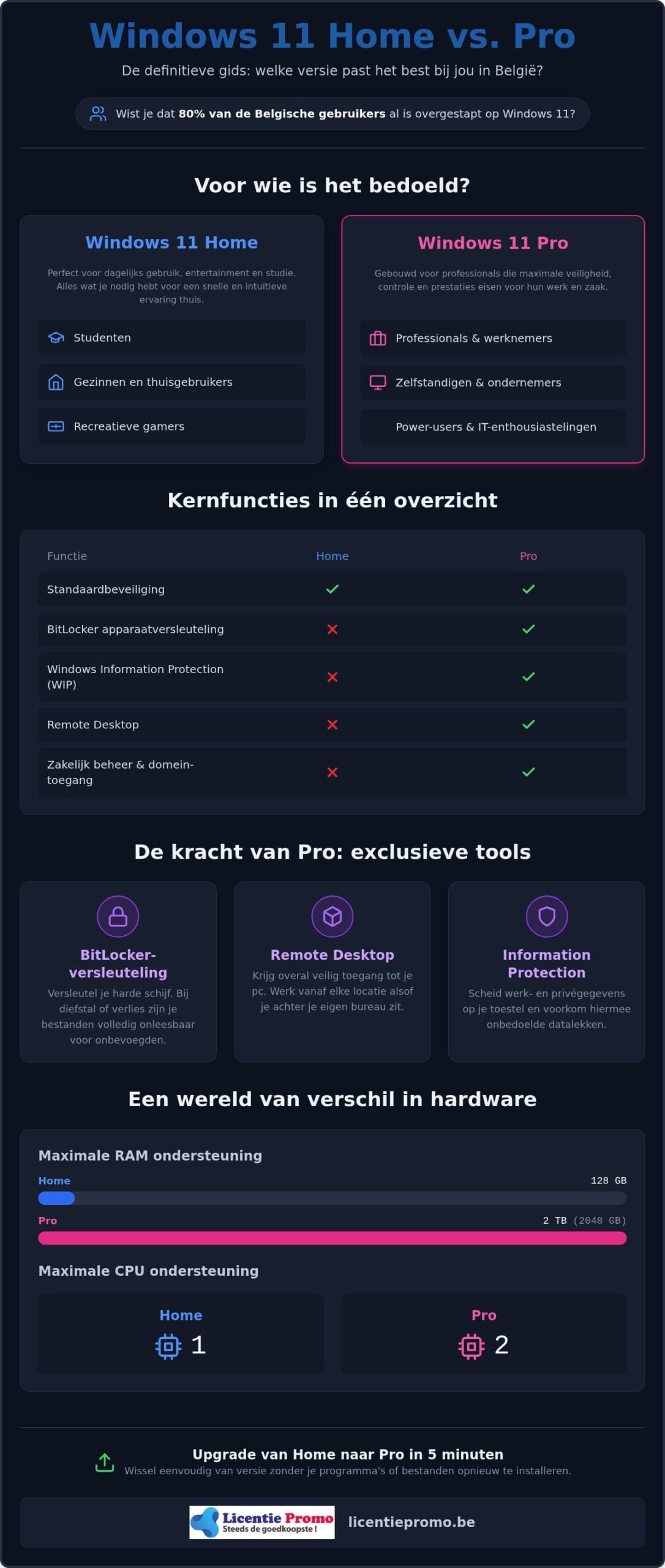
Diese Version ist die perfekte Wahl für Studenten, Familien und Freizeit-Gamer. Du erhältst alle modernen Funktionen, die Windows 11 so beliebt machen. Denke an den überarbeiteten Microsoft Edge Browser, die praktischen Snap Layouts zum Ordnen deiner Fenster und die Widgets für deine täglichen Nachrichten und das Wetter. Die Oberfläche ist intuitiv und vollständig auf Geschwindigkeit und Vergnügen ausgerichtet. Die Hardware-Unterstützung ist für die meisten Menschen mehr als ausreichend. Du bist auf die Verwendung einer einzigen physischen CPU und maximal 128 GB RAM beschränkt. Es sei denn, du baust eine hochmoderne Workstation für wissenschaftliche Forschung – dann hast du an diesen Spezifikationen mehr als genug. Es ist ein stabiles und flüssiges System für alles, was mit Unterhaltung, sozialen Medien und Studium zu tun hat. Du genießt eine sichere Umgebung, ohne von komplexen IT-Einstellungen belästigt zu werden, die du ohnehin nicht nutzt.
Die extra Kraft von Windows 11 Pro
Sind Sie ein Profi, Selbstständiger oder ein echter Power-User? Dann ist die Windows 11 Pro Lizenz die einzig logische Wahl. Diese Version ist für schwere Workloads und maximale Kontrolle über Ihre Daten gebaut. Sie können bis zu zwei physische CPUs und satte 2 TB RAM ansteuern. Das ist essenziell für Profis, die mit schwerer Videobearbeitung, 3D-Rendering oder komplexen virtuellen Maschinen arbeiten.
Der wahre Wert liegt jedoch in den exklusiven Tools, die deine Privatsphäre und Daten schützen. Mit BitLocker verschlüsselst du deine gesamte Festplatte mit einem einfachen Klick. Das ist entscheidend, wenn du in Belgien oft mit deinem Laptop unterwegs bist; bei Diebstahl bleiben deine Dateien für Außenstehende unlesbar. Remote Desktop ermöglicht es dir, dich von einem anderen Standort aus sicher auf deinen PC im Büro oder zu Hause einzuloggen. Du bedienst deinen leistungsstarken Desktop einfach von deinem Tablet oder einem leichteren Laptop aus. Es sind diese Extras, die den Unterschied zwischen einem gewöhnlichen Computer und einem professionellen Arbeitsgerät ausmachen. Du entscheidest dich für Sicherheit, Geschwindigkeit und die Freiheit, überall sicher zu arbeiten.
Die wichtigsten Funktionen im Vergleich: Sicherheit und Verwaltung
Sicherheit ist keine Option mehr; sie ist eine absolute Notwendigkeit. Im Jahr 2026 ist digitaler Diebstahl ein reales Risiko für jeden Computernutzer. Die Debatte über windows 11 home vs pro belgien geht daher weit über ein paar zusätzliche Menüoptionen hinaus. Es geht um den grundlegenden Schutz deiner Identität und deiner wertvollen Daten. Wo die Home-Version bei der Standard-Sicherheit aufhört, beginnt die Pro-Version erst richtig mit der schweren Arbeit. Du bekommst Werkzeuge in die Hand, die früher nur großen IT-Abteilungen zur Verfügung standen.
Nehmen wir zum Beispiel die BitLocker-Geräteverschlüsselung. Verlierst du deinen Laptop im Zug zwischen Antwerpen und Brüssel? Ohne BitLocker sind alle deine Fotos, Passwörter und Dokumente für jeden zugänglich. Mit der Pro-Version sind deine Daten für jeden ohne deinen einzigartigen Schlüssel völlig unlesbar. Für eine ausführliche Liste aller technischen Extras kannst du den offiziellen Vergleich von Microsoft konsultieren. Im täglichen Gebrauch geht es jedoch einfach um absolute Seelenruhe.
Sicherheit, die dein Unternehmen schützt
Belgische Unternehmer haben es mit strengen Datenschutzbestimmungen zu tun. Windows Information Protection (WIP) ist dabei Ihr bester Freund. Diese Funktion sorgt für eine strikte Trennung zwischen Ihren privaten Fotos und Ihren geschäftlichen Kundendaten. Sie verhindert, dass Sie versehentlich vertrauliche Unternehmensinformationen über soziale Medien oder persönliche E-Mails teilen. So erfüllen Sie die GDPR-Normen leichter, ohne dass Ihr Arbeitsablauf verlangsamt wird. Die Integration mit dem TPM-2.0-Chip sorgt außerdem für eine hardwarebasierte Sicherheit, die nahezu unmöglich zu knacken ist. Sie bauen einen digitalen Tresor um Ihre Arbeit herum. Wenn Sie diese Sicherheit auf Ihre Online-Infrastruktur ausweiten möchten, können Sie auf die Hosting-Dienste von snel.com zählen.
Verwalten Sie mehrere Computer oder arbeiten Sie im Team? Dann ist Windows 11 Pro unverzichtbar. Mit Azure Active Directory melden Sie sich nahtlos mit einem einzigen Konto bei Unternehmensnetzwerken an. Kein Ärger mehr mit Dutzenden verschiedenen Passwörtern für jede App. Darüber hinaus bietet Pro den praktischen Kiosk-Modus. Damit beschränken Sie einen Computer auf nur eine bestimmte App. Dies ist ideal für einen Kassensystem-PC in Ihrem Geschäft oder eine Informationssäule für Kunden.
Auch bei Systemupdates hast du dank Windows Update for Business die volle Kontrolle. Du bestimmst, wann dein PC neu startet, nicht die Software. So verhinderst du, dass dein System mitten in einer wichtigen Präsentation mit Updates beginnt. Arbeitest du oft mit komplexen Softwaretests? Mit Hyper-V kannst du virtuelle Maschinen auf deinem eigenen System ausführen, sicher abgeschirmt von deinem Hauptbetriebssystem. Für alle, die diese Leistung direkt nutzen möchten, ist eine Windows 11 Pro-Lizenz der schnellste Weg zu einer professionellen Umgebung.
Vergiss auch nicht den Remotedesktop. Mit dieser Funktion kannst du dich aus der Ferne bei deinem leistungsstarken Desktop-PC anmelden, während du selbst mit einem leichten Laptop bei einem Kunden sitzt. Du hast überall Zugriff auf deine gesamte Arbeitsumgebung, als ob du selbst davor sitzen würdest. Es ist diese Flexibilität, die die Pro-Version zum Standard für jeden ernsthaften Benutzer in Belgien macht. Du arbeitest schneller, sicherer und effizienter.
Windows 11 Home vs. Pro: Welche Version brauchen Sie wirklich in Belgien?
Die Wahl des Betriebssystems wird in Belgien oft schnell beim Kauf eines neuen Laptops getroffen. Dennoch lohnt es sich, kurz bei dem Vergleich windows 11 home vs pro belgien innezuhalten. Mit einem Marktanteil von 80% für Windows 11 in unserem Land bist du sowieso auf der richtigen Plattform. Aber die falsche Version zu wählen, kann sich später rächen. Ein Berater in Gent hat schließlich völlig andere Bedürfnisse als ein Student in Löwen. Die falsche Wahl führt oft zu versteckten Kosten wie Zeitverlust durch fehlende Funktionen oder, schlimmer noch, Sicherheitsrisiken für deine Daten.
Wenn Home für den täglichen Gebrauch ausreicht
Für die meisten Verbraucher ist Windows 11 Home die logische Wahl. Nutzt du deinen PC hauptsächlich zum Surfen, Netflixen oder für soziale Medien? Dann ist die Home-Edition mehr als ausreichend. Das System ist leicht, schnell und enthält alle modernen Funktionen wie Snap Layouts und die überarbeiteten Widgets. Auch für Gamer gibt es gute Nachrichten. Die Pro-Version bringt dir in deinen Lieblingsspielen keine zusätzlichen FPS. Alle Gaming-Technologien wie Auto HDR und DirectStorage sind standardmäßig in beiden Versionen enthalten. Als Freizeitnutzer sparst du also lieber etwas Geld für zusätzliche Hardware oder Spiele. Es ist die budgetfreundliche Alternative, die genau das tut, was sie für deine tägliche Entspannung tun soll.
Warum Selbstständige in Belgien häufiger Pro wählen
Viele Nutzer in Belgien denken, dass sie einen komplett neuen Computer kaufen müssen, um die Pro-Vorteile zu genießen. Nichts ist weniger wahr. Der größte Vorteil im Vergleich zwischen Windows 11 Home vs. Pro in Belgien ist die Einfachheit des Wechsels. Sie müssen Ihre Festplatte nicht löschen. Sie verlieren keine einzige Datei. Es ist einfach eine Frage des Umdrehens des richtigen „Schlüssels“ in Ihrem aktuellen System. Innerhalb weniger Minuten verwandeln Sie Ihren Standard-Laptop in ein leistungsstarkes Geschäfts-Workstation. Sie sparen dabei Stunden an Installationszeit und Konfiguration.
Keine Neuinstallation erforderlich
Die Zeit des stundenlangen Software-Installierens ist vorbei. Windows 11 ist modular aufgebaut. Das bedeutet, dass alle Pro-Funktionen technisch gesehen bereits auf Ihrem PC vorhanden sind; sie sind nur gesperrt. Über die Upgrade-Methode in Ihren Einstellungen lädt Windows nur die notwendigen kleinen Pakete herunter, um diese Funktionen freizuschalten. Ihr System startet einmal neu und Sie sind fertig. Haben Sie einen Laptop bei einer großen Kette in Belgien gekauft? Dann haben Sie wahrscheinlich eine OEM-Lizenz von Home. Keine Sorge. Auch diese Versionen können Sie problemlos mit einem legitimen Produktcode upgraden. Sie überschreiben die alten Einschränkungen einfach mit den neuen, leistungsfähigeren Möglichkeiten der Pro-Edition.
Eine neue Lizenz aktivieren
Der Vorgang ist denkbar einfach. Gehe zu deinen Einstellungen, wähle ‘System’ und klicke auf ‘Aktivierung’. Hier findest du die Option, deine Windows-Edition durch Eingabe eines neuen Produktschlüssels zu aktualisieren. Gib deinen neuen Windows 11 Pro-Lizenzschlüssel ein und das System erledigt den Rest. Du siehst sofort, wie sich der Status in ‘Aktiv’ ändert. Überprüfe nach dem Neustart, ob Funktionen wie BitLocker und Remotedesktop verfügbar sind. Du wirst feststellen, dass alles sofort funktioniert, ohne dass du Programme oder Einstellungen neu konfigurieren musst. Es ist der schnellste Weg zu einer professionellen Arbeitsumgebung.
Manchmal stößt man auf eine Fehlermeldung wie Code 0x803f7001. Das bedeutet meistens, dass die Server von Microsoft gerade ausgelastet sind oder dass deine Internetverbindung gestockt hat. Versuche es einfach erneut oder führe den integrierten Problembehandler für die Aktivierung aus. Stelle immer sicher, dass du einen Originalcode verwendest. Billige, illegale Schlüssel von dubiosen Websites werden von Microsoft oft nach einigen Wochen blockiert. Bei LicentiePromo erhältst du eine Aktivierungsgarantie. Das gibt dir die Sicherheit, dass dein Upgrade dauerhaft ist und dein System für die Zukunft sicher bleibt. Entscheide dich für Sicherheit und Geschwindigkeit. Schalte noch heute das volle Potenzial deines Computers mit einer legalen Lizenz frei.
Sparen Sie bei Ihrer Windows 11-Lizenz bei LicentiePromo
Warum solltest du Hunderte von Euro extra in dem offiziellen Microsoft Store ausgeben? Für eine Windows 11 Pro Lizenz zahlst du dort derzeit den vollen Preis von €259. Das ist ein beträchtlicher Betrag für Software, die du auch auf eine intelligentere Weise erhalten kannst. Der Vergleich zwischen Windows 11 Home vs Pro Belgien wird plötzlich ganz einfach, wenn du siehst, dass du bei LicentiePromo nur einen Bruchteil dieses Betrags zahlst. Du erhältst exakt dasselbe Produkt, dieselben Funktionen und dieselbe Sicherheit, aber zu einem Preis, der sich fair anfühlt. Wir machen professionelle Software für jeden belgischen Benutzer zugänglich.
Die Zeit, in der du für eine DVD-Box in ein physisches Geschäft gehen musstest, ist endgültig vorbei. Die digitale Distribution hat den Markt vollständig verändert. Sie ermöglicht es uns, die Kosten niedrig zu halten und diese Ersparnis direkt an dich weiterzugeben. Du zahlst nicht für teure Ladenflächen oder logistische Prozesse. Du zahlst ausschließlich für die Aktivierung deiner Software. Das ist effizient, nachhaltig und vor allem sehr vorteilhaft für deinen Geldbeutel.
Warum unsere Lizenzen so günstig sind
Unsere scharfen Preise sind das Ergebnis eines cleveren und effizienten Einkaufsprozesses. Wir kaufen ungenutzte Volumenlizenzen von großen Unternehmen auf, die ihren Bestand nicht vollständig ausgeschöpft haben. Dies ist ein völlig legaler Prozess. Der Europäische Gerichtshof hat entschieden, dass der Weiterverkauf von Softwarelizenzen innerhalb der Europäischen Union zulässig ist. Sie kaufen also ein legitimes Produkt mit ruhigem Gewissen. Darüber hinaus entgehen Sie dem Trend teurer Abonnements. Bei uns tätigen Sie einen einmaligen Kauf. Keine monatlichen Rechnungen und keine unerwarteten Preiserhöhungen. Die Lizenz gehört Ihnen, für immer. Sie behalten die volle Kontrolle über Ihr eigenes Softwarebudget.
Direkte Lieferung und Aktivierungsgarantie
Zeit ist Geld, besonders für Selbstständige oder vielbeschäftigte Studenten. Deshalb arbeiten wir mit einer blitzschnellen digitalen Lieferung. Wenn Sie heute bestellen, ist Ihr neuer Produktcode innerhalb von 5 Minuten in Ihrem Postfach. Sie müssen nicht auf einen Kurier oder ein physisches Paket warten. Sie starten das Upgrade direkt von Ihrem eigenen Schreibtischstuhl aus. Wir verstehen, dass Sie absolute Sicherheit über Ihren Kauf wünschen. Deshalb bieten wir eine eiserne Aktivierungsgarantie auf alle unsere Produkte. Funktioniert der Code nicht? Dann lösen wir das Problem direkt für Sie. Unser belgischer Kundenservice spricht Ihre Sprache und kennt die Bedürfnisse des lokalen Marktes. Sie werden nicht zu einem anonymen internationalen Callcenter weiterverbunden, sondern erhalten direkt einen kompetenten Partner am Telefon.
Wählen Sie den intelligenten Weg zu einem professionellen PC. Sie sparen Geld, das Sie besser in Ihr eigenes Geschäft oder bessere Hardware investieren können. Mit unserer Windows 11 Pro-Lizenz holen Sie alles aus Ihrem Computer heraus. Sie erhalten die volle Kontrolle über Ihre Sicherheit und Ihre Verwaltungsoptionen ohne die finanzielle Last eines offiziellen Ladenpreises. Es ist die logischste Wahl für jeden preisbewussten belgischen Nutzer, der keine Kompromisse bei Qualität, Rechtmäßigkeit und Sicherheit eingehen möchte.
Wählen Sie noch heute die Sicherheit von Windows 11 Pro
Sie haben jetzt ein klares Bild der Unterschiede. Windows 11 Home ist eine ausgezeichnete Basis für den täglichen Gebrauch; die Pro-Version ist das unverzichtbare Werkzeug für jeden ernsthaften Benutzer. Dank BitLocker und Remote Desktop heben Sie Ihre Sicherheit und Flexibilität auf ein höheres Niveau. Bei der Abwägung windows 11 home vs pro belgien ist die Wahl einfach für alle, die ihre Daten und Zeit ernst nehmen.
Sparen Sie erheblich bei Ihren Softwarekosten, ohne bei Legalität oder Qualität Abstriche zu machen. Sie müssen keine Hunderte von Euro’s für eine professionelle Arbeitsumgebung ausgeben. Bei LicentiePromo erhalten Sie eine 100% legale Lizenz mit vollständiger Aktivierungsgarantie. Bestellen Sie direkt und legen Sie innerhalb weniger Minuten los.
Kaufen Sie jetzt Ihre Windows 11 Pro Lizenz zum günstigsten Preis bei LicentiePromo. Sie erhalten den Produktcode innerhalb von 5 Minuten per E-Mail. Für Selbstständige stellen wir direkt eine korrekte belgische Rechnung aus. Gönnen Sie sich die Leistung und Sicherheit eines professionellen Betriebssystems!
Häufig gestellte Fragen zu Windows 11 in Belgien
Kann ich von Windows 11 Home auf Pro upgraden, ohne meine Dateien zu verlieren?
Ja, du kannst auf die Pro-Version upgraden, ohne Datenverlust. Das System entsperrt einfach die zusätzlichen Funktionen, die bereits auf deiner Festplatte vorhanden sind. Deine Dateien, Fotos und installierten Programme bleiben nach dem Wechsel genau dort, wo sie waren. Es ist ein digitaler Prozess, der nur wenige Minuten deiner Zeit in Anspruch nimmt. Du musst also kein vollständiges Backup erstellen oder Windows neu installieren. Nach einem kurzen Neustart ist dein PC sofort bereit für den professionellen Einsatz.
Ist eine Windows 11 Pro Lizenz von LicentiePromo legal?
Die Lizenzen, die Sie bei LicentiePromo kaufen, sind 100% legal und rechtmäßig. Wir nutzen europäische Gesetzgebung, die den Weiterverkauf ungenutzter Unternehmenslizenzen ausdrücklich erlaubt. Dies ist ein offizielles Recht innerhalb der Europäischen Union, von dem Sie als Verbraucher profitieren. Sie kaufen einen legitimen Produktcode, der einfach über die offiziellen Server von Microsoft aktiviert wird. Sie erhalten von uns die Sicherheit, dass Ihre Lizenz dauerhaft gültig bleibt und vollständig allen gesetzlichen Anforderungen entspricht.
Was sind die Systemanforderungen für Windows 11 Pro im Jahr 2026?
Die Systemanforderungen für die Pro-Version im Jahr 2026 sind identisch mit denen der Home-Edition. Du benötigst einen kompatiblen 64-Bit-Prozessor mit mindestens zwei Kernen und einer Geschwindigkeit von 1 GHz. Darüber hinaus sind 4 GB RAM und 64 GB Speicherplatz das absolute Minimum. Entscheidend für die Sicherheitsfunktionen ist das Vorhandensein eines TPM-2.0-Chips und die Unterstützung von Secure Boot auf deinem Motherboard. Die neueste Version 25H2 stellt diese strengen Anforderungen, um deine Daten optimal vor modernen Bedrohungen zu schützen.
Brauche ich für Gaming wirklich Windows 11 Pro oder reicht Home?
Für reines Gaming reicht Windows 11 Home für die meisten Spieler aus. Die Pro-Version bietet keine zusätzliche Leistung oder höhere Bildraten in deinen Lieblingsspielen. Alle wichtigen Technologien wie Auto HDR und DirectStorage sind standardmäßig in beiden Editionen integriert. Im Vergleich zwischen Windows 11 Home vs Pro in Belgien entscheiden sich Gamer oft für die Home-Version, um Budget für bessere Hardware zu behalten. Die zusätzlichen Verwaltungstools der Pro-Version machen dein Spielerlebnis technisch gesehen nicht schneller oder flüssiger.
Kann ich einen Windows 11 Pro Key auf mehreren Computern verwenden?
Eine Standard- Windows 11 Pro -Lizenz ist strikt für die Nutzung auf einem Computer gleichzeitig vorgesehen. Du kannst denselben Aktivierungscode nicht gleichzeitig auf mehreren PCs aktivieren. Wenn du einen neuen Computer kaufst, kannst du die Lizenz in einigen Fällen übertragen, aber der Code verfällt dann auf deinem alten Gerät. Für jedes Gerät in deinem Haushalt oder in deinem Unternehmen benötigst du also einen eindeutigen Schlüssel. Dies garantiert einen stabilen Betrieb und stellt sicher, dass du immer Anspruch auf die neuesten Updates hast.
Was passiert, wenn mein Aktivierungscode nicht funktioniert?
Sollte Ihr Aktivierungscode nicht direkt akzeptiert werden, tritt unsere Aktivierungsgarantie sofort in Kraft. Manchmal liegt ein Tippfehler oder eine vorübergehende Störung der Microsoft-Aktivierungsserver vor. Nehmen Sie in diesem Fall direkt Kontakt mit unserem belgischen Kundenservice auf, um Unterstützung zu erhalten. Wir überprüfen den Status Ihres Codes und stellen Ihnen bei Bedarf sofort einen neuen funktionierenden Schlüssel zur Verfügung. Sie stehen nie allein da; wir sorgen dafür, dass Ihre Software innerhalb weniger Minuten einwandfrei und legal läuft.
Muss ich für Windows 11 Pro ein monatliches Abonnement bezahlen?
Nein, bei LicentiePromo zahlen Sie kein monatliches Abonnement für Ihr Betriebssystem. Es handelt sich um einen einmaligen Kauf einer lebenslangen Lizenz für Ihren Computer. Sie müssen sich also keine Sorgen über wiederkehrende Kosten oder automatische Abbuchungen von Ihrem Bankkonto machen. Einmal aktiviert, bleibt die Software unbegrenzt Ihr Eigentum. Dies ist ein großer finanzieller Vorteil gegenüber modernen SaaS-Modellen, bei denen Sie weiterhin für die Nutzung Ihrer Programme zahlen. Sie kaufen Ruhe und Sicherheit für die Zukunft.
Ist BitLocker auch in der Home-Version von Windows 11 verfügbar?
Die BitLocker-Geräteverschlüsselung ist in der Home-Version von Windows 11 leider nicht verfügbar. Dies ist einer der Hauptgründe, warum der Vergleich windows 11 home vs pro belgië bei Laptop-Nutzern oft zur Pro-Edition tendiert. Die Home-Version verfügt zwar über eine sehr eingeschränkte Form der Verschlüsselung, bietet aber viel weniger Kontrolle und Wiederherstellungsoptionen. Für vollständigen Datenträgerschutz und die professionelle Verwaltung Ihrer Sicherheitsschlüssel benötigen Sie wirklich die Pro-Version. Sie schützt Sie vor Datenverlust bei Diebstahl Ihres Geräts.